Microsoft Security | Microsoft Entra | Microsoft Entra ID
A cloud-based identity and access management service for securing user authentication and resource access

This browser is no longer supported.
Upgrade to Microsoft Edge to take advantage of the latest features, security updates, and technical support.

Hello
I would like to make a question regarding old devices in which user set up in the past MFA. The name of the device is still displayed along with the current device. Even if reset MFA and the user forced to register again MFA in the new device, the old name is still displayed Now it can be deleted from My Sign-Ins (microsoft.com) from user side. I am wondering how can I (as admin) delete the old devices which are not in use, preferably through Powershell.
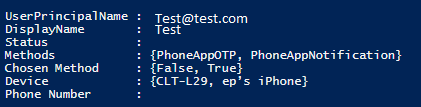
For example in the above screenshot, CLT-L29 is the current device and ep's iPhone is the old one, no in use anymore. How can I delete it?
Regards,
Dimitris
A cloud-based identity and access management service for securing user authentication and resource access
A Microsoft app for iOS and Android devices that enables authentication with two-factor verification, phone sign-in, and code generation
Did anyone faced same situation and managed to resolve it? I am interested in learning from admin's side, not user.