Developer technologies | Windows Presentation Foundation
A part of the .NET Framework that provides a unified programming model for building line-of-business desktop applications on Windows.
This browser is no longer supported.
Upgrade to Microsoft Edge to take advantage of the latest features, security updates, and technical support.
' cx='32' cy='32' r='32' /%3E%3Ctext x='50%25' y='55%25' dominant-baseline='middle' text-anchor='middle' fill='%23FFF' %3EEH%3C/text%3E%3C/svg%3E)
Here's the print function:
void printReport() {
    var dialog = new PrintDialog();
    if (dialog.ShowDialog() != true) return;
    BusyWindow.Activate("Printing ...");
    var size = new Size(dialog.PrintableAreaWidth, dialog.PrintableAreaHeight);
    var document = new FixedDocument();
    var pages = new List<LedgerPage>();
    var page = getPage(document, null);
    pages.Add(page);
    for (int i = 0; i < reportables.Count; i++) {
        if (!page.AddEntry(reportables[i])) {
            page.IsComplete = true;
            page.LastEntry = reportables[i - 1];
            page = getPage(document, page);
            page.AddEntry(reportables[i]);
            pages.Add(page);
        }
    }
    page.IsComplete = true;
    foreach (var p in pages) {
        p.NumberOfPage = document.Pages.Count;
    }
    document.DocumentPaginator.PageSize = size;
    dialog.PrintDocument(document.DocumentPaginator, "");
    BusyWindow.Terminate();
}
required things are initialized here and there's no event handler associated with any of these objects other than BusyWindow in this block. According to my understanding when the program gets out of this block, GC will clean up all of these at some point. In the BusyWindow, I've a handler for Loaded event and a static field for the Window and in its OnClosed function, I unsubscribe from the Loaded and make the static field null. Here it is:
class BusyWindow : Window
{
    Path arc;
    PointAnimationUsingPath pointAnim;
    BooleanAnimationUsingKeyFrames isLargeAnim;
    TextBlock text;
    public string InfoText { get; set; }
    public static bool IsOpened { get; set; }
    static BusyWindow window;
    BusyWindow(double width, double height) {
        Width = width;
        Height = height;
        WindowStyle = WindowStyle.None;
        ResizeMode = ResizeMode.NoResize;
        AllowsTransparency = true;
        ShowInTaskbar = false;
        Background = new SolidColorBrush(Color.FromArgb(100, 0, 0, 100));
        initializeContent();
        initializeAnimations();
        Loaded += onLoaded;
    }
    void onLoaded(object sender, RoutedEventArgs e) {
        text.Text = InfoText;
        var segment = (ArcSegment)((PathGeometry)arc.Data).Figures[0].Segments[0];
        segment.BeginAnimation(ArcSegment.PointProperty, pointAnim);
        segment.BeginAnimation(ArcSegment.IsLargeArcProperty, isLargeAnim);
    }
    public static void Activate(string message) {
        double left = App.Current.MainWindow.Left;
        double top = App.Current.MainWindow.Top;
        double width = App.Current.MainWindow.Width;
        double height = App.Current.MainWindow.Height;
        var state = App.Current.MainWindow.WindowState;
        var thread = new Thread(() => {
            window = new BusyWindow(width, height) {
                Left = left,
                Top = top,
                WindowState = state,
                InfoText = message
            };
            window.Show();
            Dispatcher.Run();
        });
        thread.SetApartmentState(ApartmentState.STA);
        thread.Start();
        IsOpened = true;
    }
    public static void Terminate() {
        while (window == null) { }
        window.Dispatcher.Invoke(window.Close);
    }
    void initializeAnimations() {
        pointAnim = new PointAnimationUsingPath() {
            PathGeometry = PathGeometry.CreateFromGeometry(arc.Data),
            Duration = TimeSpan.FromSeconds(2),
            AccelerationRatio = 0.5,
            DecelerationRatio = 0.5,
            RepeatBehavior = RepeatBehavior.Forever
        };
        isLargeAnim = new BooleanAnimationUsingKeyFrames() {
            KeyFrames = {
                new DiscreteBooleanKeyFrame(false, TimeSpan.FromSeconds(0)),
                new DiscreteBooleanKeyFrame(true, TimeSpan.FromSeconds(1)),
                new DiscreteBooleanKeyFrame(false, TimeSpan.FromSeconds(2))
            },
            RepeatBehavior = RepeatBehavior.Forever
        };
    }
    void initializeContent() {
        var ellipse = new Path() {
            Fill = Brushes.WhiteSmoke,
            Data = new EllipseGeometry() {
                Center = new Point(Width / 2, Height / 2),
                RadiusX = 150,
                RadiusY = 150
            }
        };
        arc = new Path() {
            Stroke = Brushes.Coral,
            StrokeThickness = 5,
            Data = new PathGeometry() {
                Figures = {
                    new PathFigure() {
                        StartPoint = new Point(Width / 2 + 149, Height / 2),
                        Segments = {
                            new ArcSegment() {
                                IsLargeArc = true,
                                Point = new Point(Width / 2 + 149, Height / 2 - 0.1),
                                Size = new Size(148,148),
                                SweepDirection = SweepDirection.Clockwise
                            }
                        }
                    }
                }
            }
        };
        text = new TextBlock() {
            HorizontalAlignment = HorizontalAlignment.Center,
            VerticalAlignment = VerticalAlignment.Center,
            FontSize = 36,
            Foreground = Brushes.Coral
        };
        Content = new Grid() { Children = { ellipse, text, arc } };
    }
    protected override void OnClosed(EventArgs e) {
        Loaded -= onLoaded;
        window.Dispatcher.InvokeShutdown();
        IsOpened = false;
        window = null;
    }
}
When I keep printing memory consumption keeps increasing by 2/3MB at least:
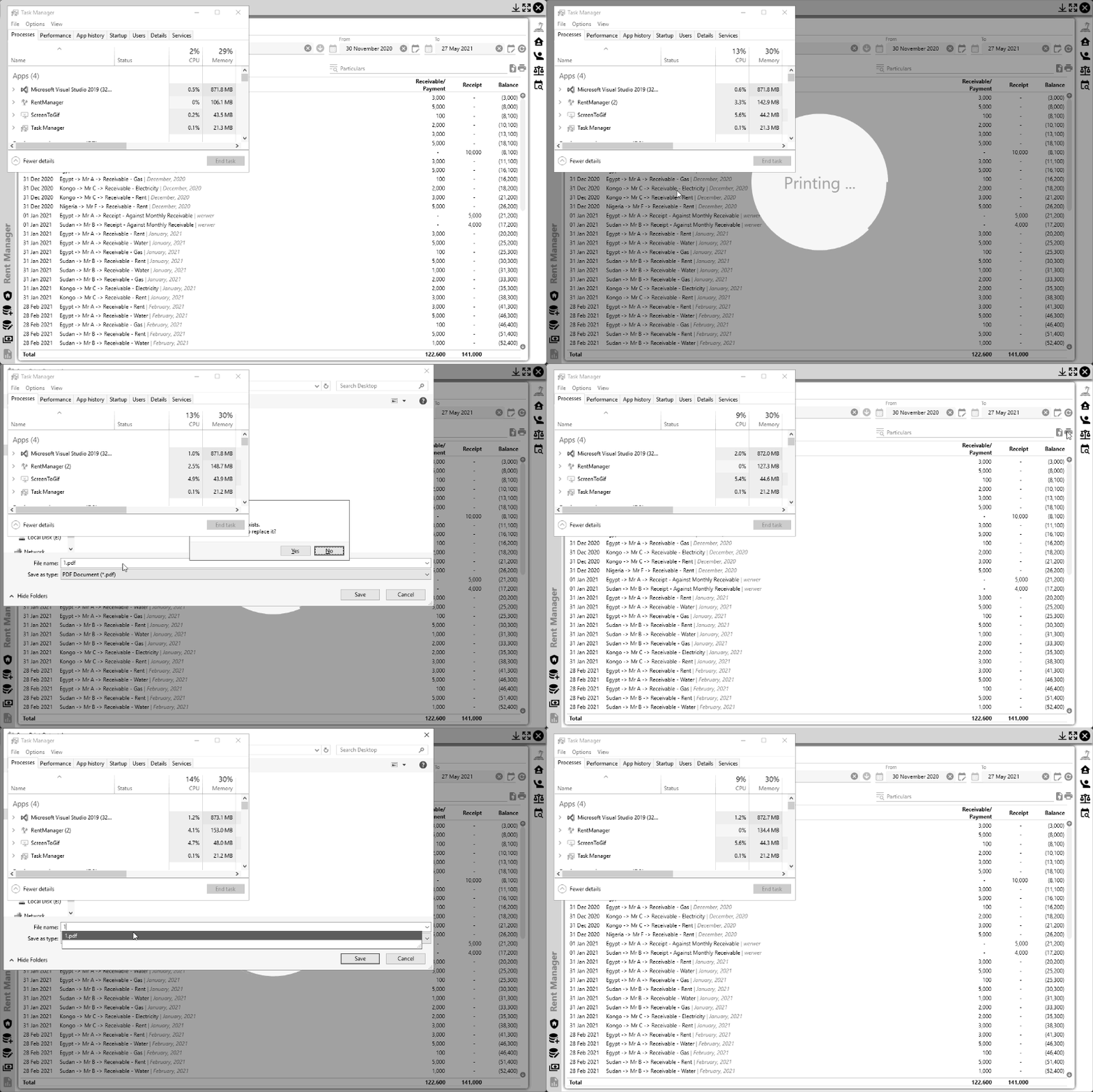
What else do I have to do to avoid this issue?
Missed some (-=)unsubscription in some chart related components, not related to printing, added those and updated the project in github.
EDIT
----
Looks like the BusyWindow doesn't have any issue BUT there could be since this is the first time I'm using multiple UI thread. I also have call to Activate and Terminate of BusyWindow when I click the refresh button, I clicked on that 50+ times and memory usage got back to where it was before clicking. After that, I commented out the Activate and Terminate in printReport method and printed a document containing 35 pages several times. Each time I printed that document memory usage increased by 10-30MB and it doesn't release those memory.
A part of the .NET Framework that provides a unified programming model for building line-of-business desktop applications on Windows.
Answer accepted by question author

I checked your picture and tested your project on github. After repeatedly clicking printing, the memory did not continue to grow. I think this is an expected behavior.
Garbage collection happens automatically when a request for memory cannot be satisfied using available free memory. It may not happened when the window close. You use static BusyWindow window which is static member, it is stored on the heap and exist for the lifetime of the application, they do not need to be garbage collected and are therefore stored in a loader heap.
You can open Diagnostic Tools in visual studio to see memory changes while GC is executing.
If the response is helpful, please click "Accept Answer" and upvote it.
Note: Please follow the steps in our documentation to enable e-mail notifications if you want to receive the related email notification for this thread.
@DaisyTian-MSFT, did you export as PDF? It happens when you export as PDF or print real page. The static BusyWindow window is just a 4/8 byte pointer on the heap and it doesn't point to/hold any memory on other area of heap as it always becomes null on close, am I right?
@Emon Haque
Yes, I exported as pdf. static BusyWindow window should be exist for the lifetime of the application, and it still exists when you close the window, unless you close the application.