Microsoft Teams | Microsoft Teams for business | Teams on mobile devices
Accessing and using Microsoft Teams on smartphones and tablets across platforms

This browser is no longer supported.
Upgrade to Microsoft Edge to take advantage of the latest features, security updates, and technical support.
' cx='32' cy='32' r='32' /%3E%3Ctext x='50%25' y='55%25' dominant-baseline='middle' text-anchor='middle' fill='%23FFF' %3EA%3C/text%3E%3C/svg%3E)
Hello everyone, we have very strange problem on the Samsung cell phones. We all have same Android version and same Teams version. But still different views .
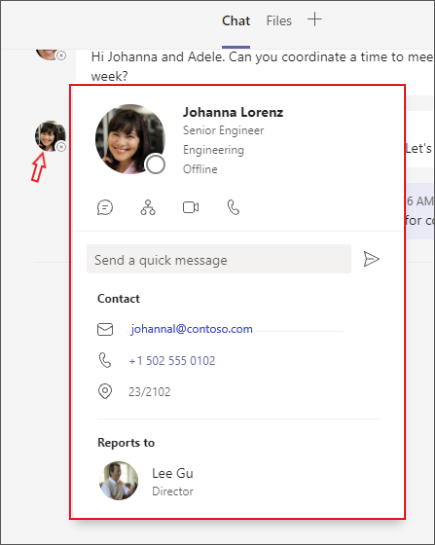
unfortunately i can't upload any pictures but i mean this business card view. For new ones it is like on the desktop New teams with detailed status
https://support.content.office.net/de-de/media/1e4ae66e-4913-4177-b13f-082d1bdb461e.png
The problem is with those where on the profile card the status is visible, calling via the number does not work, it tries to call via the phone app. Settings are also correct authorizations, we have found that there is a problem with profile.
So all users who see the status in the profile card have the problem, no matter which cell phone they log in with.
Accessing and using Microsoft Teams on smartphones and tablets across platforms
Locked Question. This question was migrated from the Microsoft Support Community. You can vote on whether it's helpful, but you can't add comments or replies or follow the question.
Thank you for your answer.
But we have very special case, phones all have same version and same teams version and looks like this ->
left side is actually the normal mobile view, but for many users the view is now similar to the web version of teams.
Hello Kaya Adem,
Hope this finds you well.
May I please know the teams version you are using?
->Also, are you making a teams to teams call or you are making a call from teams to a PSTN/mobile number. I've also attached a sample details card from my teams android view. Is this the same on your end for some of the users?
Also, you can share the screenshot from the users in the reply. you can paste directly in the reply body or use the picture icon.
Looking forward to your response.
Best Regards,
Ashraf.
Hello Kaya Adem,
Good day. Thank for posting in the community.
We've received your query, and you can expect to receive response from one of our community moderators accordingly.
At this point, we appreciate your patience and cooperation. Thank you.
Sincerely,
Community moderator