
Hi,
The supported system for this KB should be Server 2012 instead of 2012 R2.
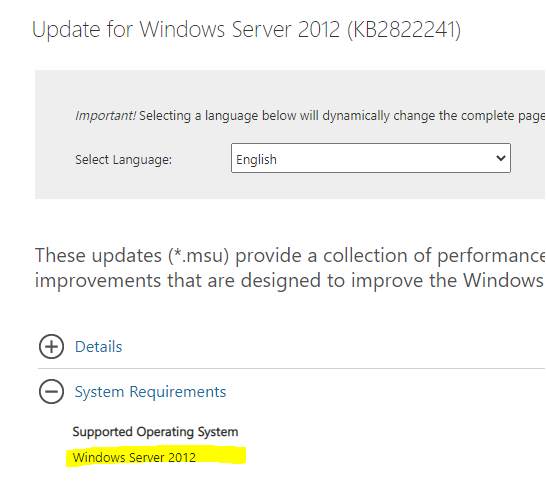
Link:
https://www.microsoft.com/en-us/download/details.aspx?id=38240
Thanks,
Jenny
This browser is no longer supported.
Upgrade to Microsoft Edge to take advantage of the latest features, security updates, and technical support.
' cx='32' cy='32' r='32' /%3E%3Ctext x='50%25' y='55%25' dominant-baseline='middle' text-anchor='middle' fill='%23FFF' %3EA%3C/text%3E%3C/svg%3E)
I want to update my Windows Server r2 2012. So I got the patch on KB2822241 nad run it. But the system said that it is not applied. Why?
Answer accepted by question author
' cx='32' cy='32' r='32' /%3E%3Ctext x='50%25' y='55%25' dominant-baseline='middle' text-anchor='middle' fill='%23FFF' %3EJY%3C/text%3E%3C/svg%3E)
Hi,
The supported system for this KB should be Server 2012 instead of 2012 R2.
Link:
https://www.microsoft.com/en-us/download/details.aspx?id=38240
Thanks,
Jenny
Hi,
Is there any update? Have you got a chance to check if the information provided was helpful or not?
Please feel free to let us know if more assistance needed.
Thanks,
Jenny
' cx='32' cy='32' r='32' /%3E%3Ctext x='50%25' y='55%25' dominant-baseline='middle' text-anchor='middle' fill='%23FFF' %3EA%3C/text%3E%3C/svg%3E)
Looks pretty old and likely has been superseded. You can check the file versions the KB provides
https://support.microsoft.com/en-us/help/2822241/windows-8-and-windows-server-2012-update-rollup-april-2013
versus what's on your system. If you find higher versions the not applicable would be expected.
Windows Server r2 2012
also note 2012 and 2012 R2 updates are not interchangeable.
https://support.microsoft.com/en-us/help/4009470/windows-8-1-windows-server-2012-r2-update-history
--please don't forget to Accept as answer if the reply is helpful--

Hi,
Not applicable could mean one of the following:
For more information, see:
The update is not applicable to your computer
https://learn.microsoft.com/en-us/windows/deployment/update/windows-update-troubleshooting#the-update-is-not-applicable-to-your-computer
----------
The update KB2822241 you are referring to is specifically for Windows Server 2012, not R2, this may be the cause why it is not applicable to your Windows Server 2012 R2.
Best regards,
Leon