Hello Brandon,
Thank you for posting your query to community forum.
According to the description you have a PowerPoint presentation with multiple entrance animations on one slide. When you uncheck an option to advance to a slide on mouse click, this stops the animations on this slide. So, you want to add a button to a slide that would open a next slide. If my understanding doesn’t match your situation, please post back and point that.
Unfortunately, disabling transition on mouse click does stop the animations on mouse click too. To navigate through the slides and animations you may use the arrow keys or click on the navigation buttons in Slide Show view:

You may also add the buttons to your slide and assign the action triggers for them if you want to work around this limitation:
- Select a slide with the animations and add any object to it (in my example is a rectangle shape, but you can use any other object as text box, picture etc.)
- Click Animation, select your question and add an animation.
- In Trigger menu choose the object that you added as a button
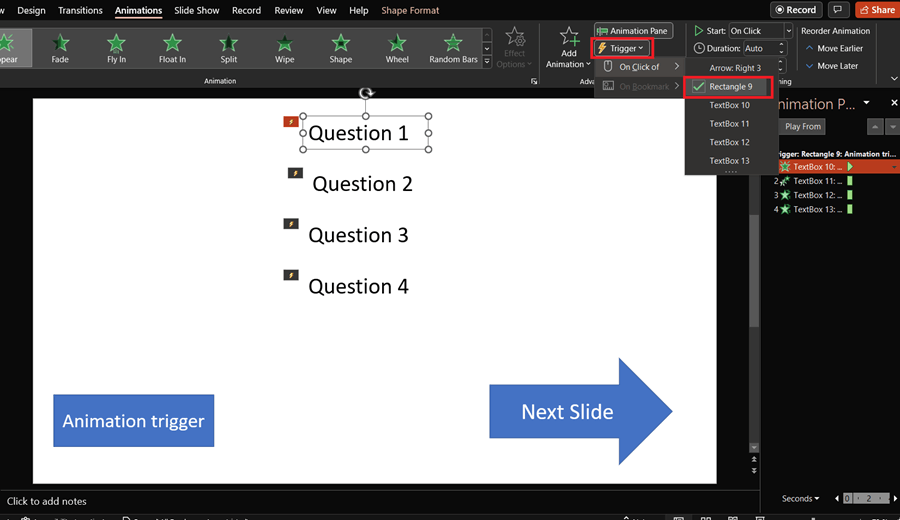
This action will make the animations to start when you click on a trigger object on your slide.
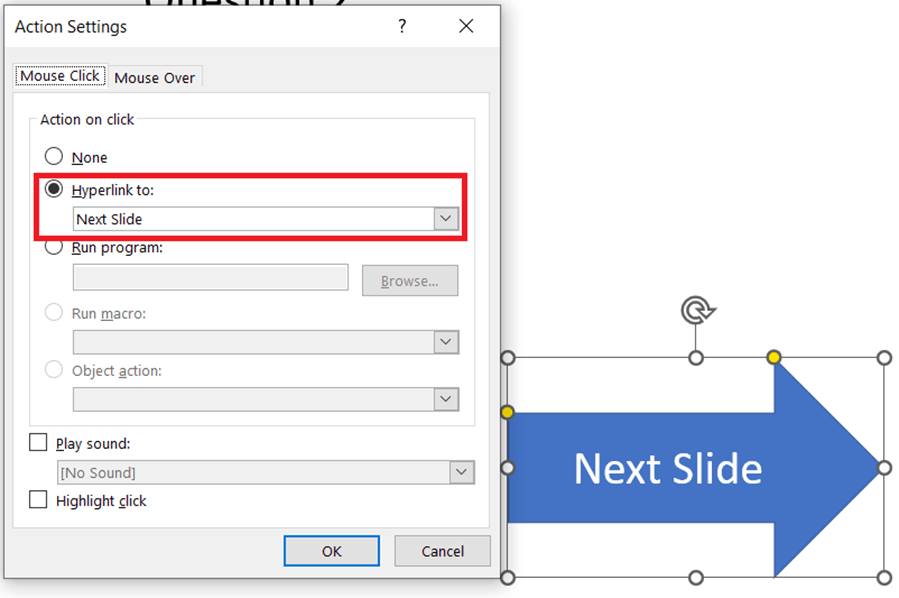
You may also add your custom button to open a next slide.
Add another object, select it and click Insert > Action > in Mouse Click tab select Hyperlink to > Next Slide
I hope this information was useful for you. Feel free to post back to us if you need further assistance.
Best Regards,
Igor
' cx='32' cy='32' r='32' /%3E%3Ctext x='50%25' y='55%25' dominant-baseline='middle' text-anchor='middle' fill='%23FFF' %3EA%3C/text%3E%3C/svg%3E)
