Dear Mike_3154
Good day! Thank you for posting in Microsoft Community. We are happy to help you.
As per your description, please don’t worry we can work together to narrow down and resolve the situation.
- Please first check if your Office applications are up to date.
Right now, the latest version should be 16.70.
Update history for Office for Mac - Office release notes | Microsoft Learn
Sometimes, the older version of Office might cause this kind of problem.
- To confirm if the behavior is caused by some security settings on your Mac, if you have turned on the read only restriction on Mac, please try to turn off them and check the outcome.
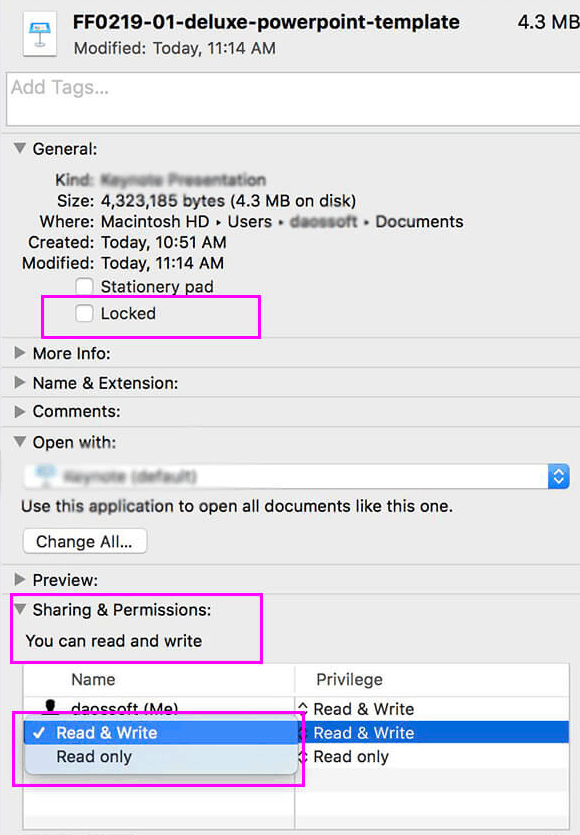
ClickFinder >open the PowerPoint file>Get Info>Uncheck thelocked option under Generalsettings.
Them, go to Sharing & Permission to change every Privilege to Read & Write.
Besides, since you're using PowerPoint files on a shared network drive, which is a third-party software, please contact the third-party support to see if there have some settings for this shared drive can make files become read-only and ask them to help you to turn off these settings.
If the scenario above is not consistent with yours, you can also post back and point that, any updates please feel free to post back.
Your understanding and patience will be highly appreciated. I hope that you are keeping safe and well!
Sincerely,
Stacey | Microsoft Community Moderator
' cx='32' cy='32' r='32' /%3E%3Ctext x='50%25' y='55%25' dominant-baseline='middle' text-anchor='middle' fill='%23FFF' %3EA%3C/text%3E%3C/svg%3E)
