Summary Task Duration Issue?

Anonymous
2023-06-10T02:19:46+00:00

In my construction program i include tasks which have long lead times. For example, i will have "Order concrete" as a task which is a predecessor to "Concrete Pour on site". I will have "Order Concrete" starting 14 days prior to "Concrete Pour on site". I simply have these tasks in the program to act as prompts for my site managers to follow. The issue i'm facing is that my Summary tasks are including the 14 days prior to the concrete pour as part of the overall duration. Is there a way to exclude any tasks from the summary duration so that only tasks which affect site progress are shown in the duration?

Microsoft 365 and Office | Project | For business | Windows

Locked Question. This question was migrated from the Microsoft Support Community. You can vote on whether it's helpful, but you can't add comments or replies or follow the question.

0 comments No comments

2 answers

Sort by: Most helpful
  1. Anonymous
    2023-06-11T02:10:03+00:00

    BASSAM YOUSSEF,

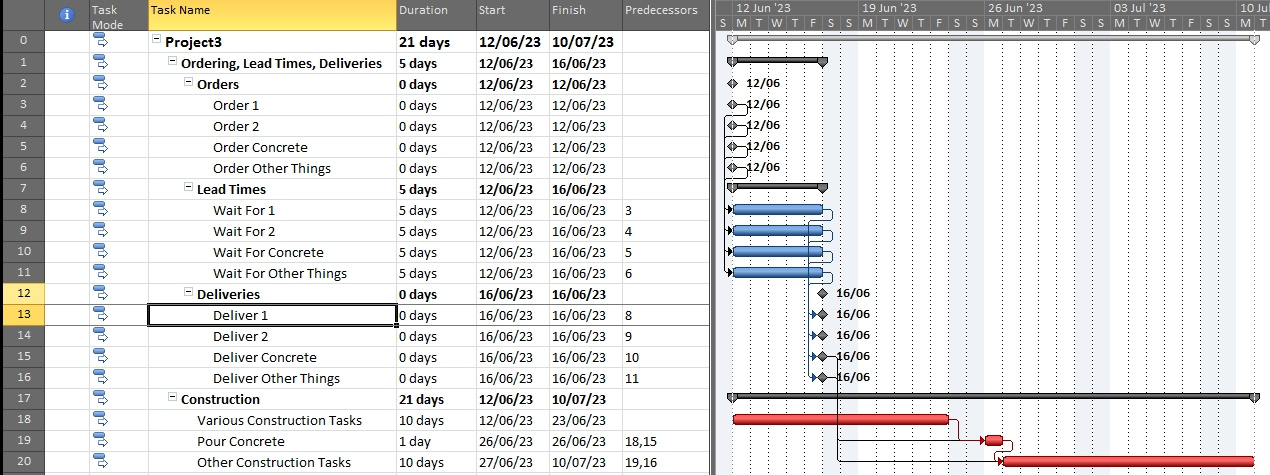
    you don't provide a screenshot or much else to go on, but I think I know what you are getting at.

    You don't say how you set the order to be 14 days before the concrete pour (date Constraint, negative lag?).

    I would separate the ordering etc from the construction. It's just a re-arrangement of the the WBS.

    Since nothing (no predecessor) prevents the order being placed on day 1, it should be scheduled asap.

    This means that the order task has non zero free float (slack) and non zero total float (slack).

    Of course the asap date for the order (and the wait and the delivery) is way earlier than the concrete pour.

    That's why it is not on the critical path.

    As each day passes, and the order has not been placed yet, it gets re-scheduled and one day of float is "consumed".

    You can choose any date for the order between it's early start and latest start.

    Preferably, don't leave it until the last minute when all the float is gone, or it will become critical.

    Hope this helps. Here is a picture:
    Was this answer helpful?

    1 person found this answer helpful.
    0 comments No comments
  2. John Project 49,715 Reputation points Volunteer Moderator
    2023-06-10T15:22:30+00:00

    BASSAM YOUSSEF,

    Short answer, "no". Understand that in Project duration is simply the passage of time, it is NOT indicative of work being accomplished. Also understand that a summary line is NOT a task, it is simply a summary of performance (activity) tasks that are grouped under it. For reference, the duration of a summary line is the working time between start of the earliest task under the summary to the finish of the latest task under the summary.

    However, when you imply the 14 day lead time for the concrete does not affect site progress, what happens if there is a shortage of concrete causing a delay? Does that not affect site progress? It all depends on how you define "progress".

    If you are using percent complete as a measure of plan progress then that is a mistake. Percent complete is duration based and the only things accurately measured by the passage of time are things like concrete curing, paint drying, wounds healing, etc. A much more accurate measure of progress is how much work is being accomplished as compare to how much work is required to accomplish a task (i.e. percent work complete). Or it may be more appropriate to use the Physical % Complete field as noted in this reference: https://techcommunity.microsoft.com/t5/project/tracking-unit-progress-on-ms-project/m-p/3838542

    John

    Was this answer helpful?

    0 comments No comments