Microsoft 365 and Office | Word | For business | Windows
A family of Microsoft word processing software products for creating web, email, and print documents.

This browser is no longer supported.
Upgrade to Microsoft Edge to take advantage of the latest features, security updates, and technical support.
' cx='32' cy='32' r='32' /%3E%3Ctext x='50%25' y='55%25' dominant-baseline='middle' text-anchor='middle' fill='%23FFF' %3EO%3C/text%3E%3C/svg%3E)
Hi,
I need to enable "Navigation Pane" to show the topic headings on the left side bar as shown in below screenshot:
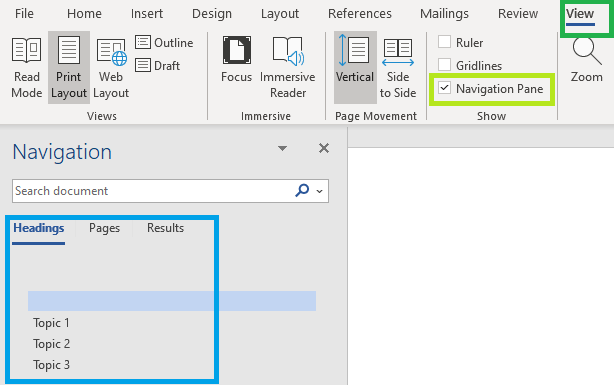
If document is open on a different PC where "Navigation Pane" is not enabled in VIEW Menu, the side bar headings are not visible. Is there anyway to force /require to open this file with "Navigation Pane" always enabled?
A family of Microsoft word processing software products for creating web, email, and print documents.
Answer accepted by question author
Thanks for reply.
Table of contents is available on the Top of the document and not available on the left navigation pane.
If a user has to enable Macros, I think this is not what I am looking for.

Hi @
If you want to use Group Policy to control this feature, it seems you cannot get the result. I suggest you refer to this thread and refer to the reply of William Zhou CHN:
https://social.technet.microsoft.com/Forums/en-US/bb6268ac-546b-4118-87fa-21f6fd2cecbc/word-navigation-pane-open-by-default?forum=officesetupdeployprevious
Hope the information is helpful.
If the response is helpful, please click "Accept Answer" and upvote it.
Note: Please follow the steps in our documentation to enable e-mail notifications if you want to receive the related email notification for this thread.