Share via

Installation failure when installing Microsoft Project from the Company Portal

Anonymous
2025-07-14T08:22:11+00:00

I deployed Microsoft Project as a M365 app in the intune admin centre. However, my users are having issues installing microsoft project. The error message they received varies (e.g. (0x0000426E),  (0x87D1041C)). For (0x0000426E), even after they closed all office applications, microsoft project still wasn't able to be installed. In one case, a user office applications got uninstalled while trying to install the microsoft project. Please advise how we can fix this.

Microsoft 365 and Office | Project | For business | Windows

Locked Question. This question was migrated from the Microsoft Support Community. You can vote on whether it's helpful, but you can't add comments or replies or follow the question.

0 comments No comments

2 answers

Sort by: Most helpful
  1. Anonymous
    2025-07-16T14:02:58+00:00

    Hi Arif Hamizan, 

    Good day! I hope you're doing well. 

    I just wanted to follow up and see how things are progressing with the issue we discussed. Have you had a chance to review the response provided? Are you experiencing any difficulties performing the providing steps? 

    Please don’t hesitate to reach out if you need any further assistance.

    Please kindly be noted that Microsoft 365 and Office is now supported on Microsoft Q&A. Starting July 16, new questions must be posted there. Existing discussions on Microsoft Answers will remain accessible through July 21, after which customers will be redirected to Q&A.

    We value your feedback, please mark it as an Answerif it help resolve your issue/ if it answer your question. This helps others in the community with similar questions find solutions more easily. 

    Image 

    Thank you & Best regards, 

    Tamara-Hu - MSFT | Microsoft Community Support Specialist.

    Was this answer helpful?

    0 comments No comments
  2. Anonymous
    2025-07-14T09:15:38+00:00

    Hello Arif Hamizan, 

    Thank you for reaching out to Microsoft Community. 

    Before providing the most suitable solution, can you give me some information about:

    • What are the operating systems that your users have (Windows, MacOs,...)?
    • Did you install the 32 or 64 bit version of Project?
    • What is the Office version that your company is using?
    • What types of subscriptions does your company have?
    • Is this issue happening to some specific users or everyone?

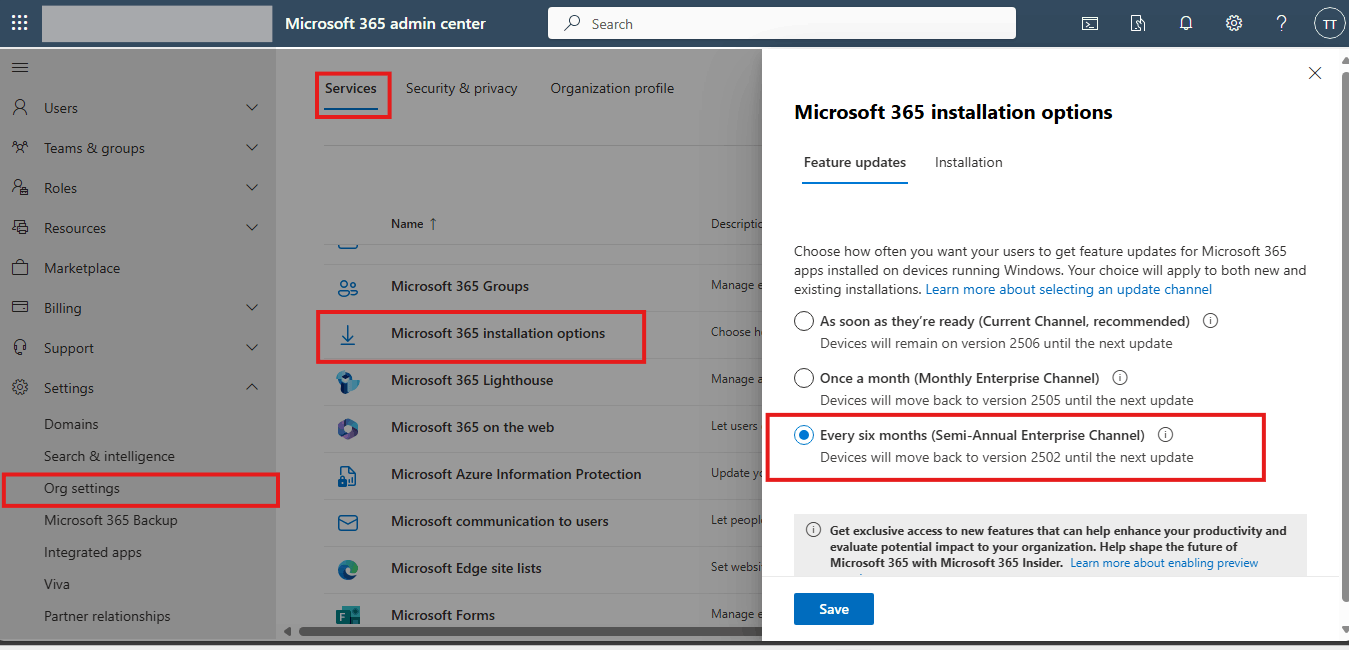
    In the meantime, I recommend you temporarily change to Semi-Annual Enterprise and do the deployment again as a workaround. If you have Admin rights, you can login into Microsoft Admin Center 365 portal, Show all > Settings > Org settings > Services>Microsoft 365 installation options


    Note: This action might take up to 24 hours to apply. 

    Please understand that our initial response does not always resolve the issue immediately. However, with your help and more detailed information, we can work together to find a solution.    

    Don’t hesitate to reply if you need any further assistance. Thank you for your understanding so far! 

    Best regards,  

    Tamara-Hu - MSFT | Microsoft Community Support Specialist.

    Was this answer helpful?

    0 comments No comments