Share via

Remove-scomdisabledclassinstance Power Shell cmdlet not undiscovering IIS objects for selected servers

K, Ravi Shankar 381 Reputation points
2021-09-16T09:42:35.953+00:00

Hi All,

We are tried running the Remove-scomdisabledclassinstance Power Shell cmdlet not to discover IIS objects for which we have applied override.

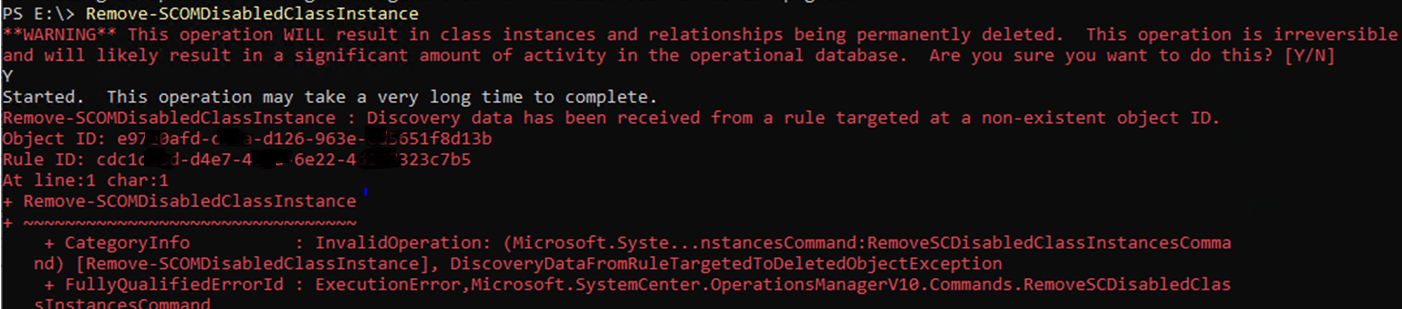
We are receving the error below when we try running the cmdlet.
Can you please help me how to pass this command.

We are running this on one of the SCOM 2019 Mangement server.

132711-disable-cmdlt.png

Regards,
Ravi shankar

System Center Operations Manager

A family of System Center products that provide infrastructure monitoring, help ensure the predictable performance and availability of vital applications, and offer comprehensive monitoring for datacenters and cloud, both private and public.

0 comments No comments

2 answers

Sort by: Most helpful
  1. System Center guy 691 Reputation points
    2021-09-16T12:27:18.25+00:00

    You may refer to Bob Cornelissen blog SCOM Object reference not set to an instance of an object, https://blog.topqore.com/scom-object-reference-not-set/.

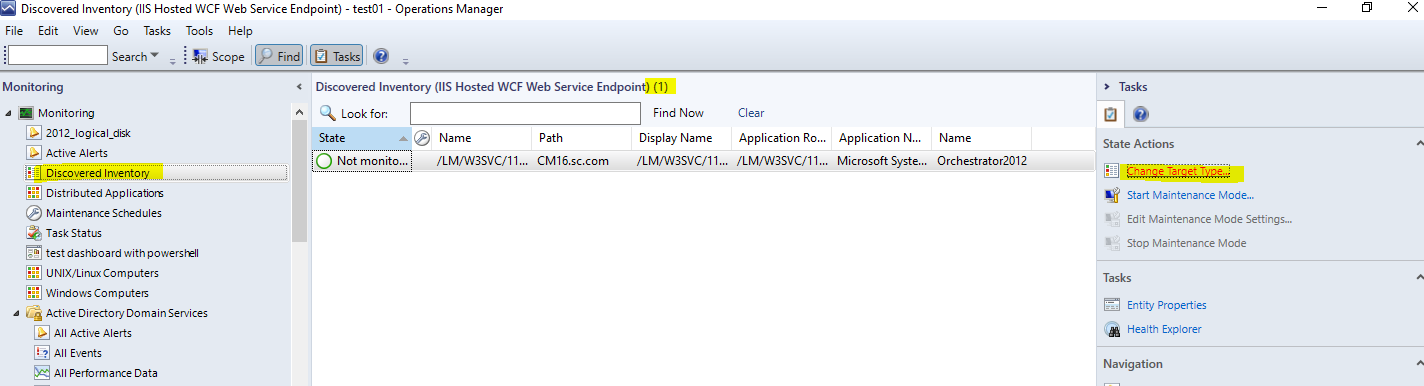
    If you get that error the best you can first do is in SCOM open up a Discovered Inventory view and check how many objects are still there (if it does not throw the same exception as the one I started with!).

    Check the number of entries there.
    Now run the remove-scomdisabledclassinstance command again.
    If it throws the error refresh the screen to check if discovered inventory shows a lower number of discovered instances.
    Keep doing that until it finishes.
    Next I waited for a grooming interval and let it populate the classes again one by one by turning the discoveries back on.

    Roger

    Was this answer helpful?

    1 person found this answer helpful.
    0 comments No comments

  2. AlexZhu-MSFT 6,596 Reputation points Moderator
    2021-09-17T07:12:30.81+00:00

    Hi,

    Roger is right. Could you try the Remove-scomdisabledclassinstance cmdlet multiple times? If it works, please mark Roger's reply as answer.

    If it throws the error refresh the screen to check if discovered inventory shows a lower number of discovered instances.
    Keep doing that until it finishes without errors. It may be 10-20 times in some environment.

    the screenshot for your reference.
    Note: click change target type to the one in your environment and check if the number is reduced after each run.
    133041-scom-discovery-inventory.png

    Alex
    If the response is helpful, please click "Accept Answer" and upvote it.

    Was this answer helpful?

    0 comments No comments

Your answer

Answers can be marked as 'Accepted' by the question author and 'Recommended' by moderators, which helps users know the answer solved the author's problem.