Hello Slate, Richard,
Thank you for sharing your experience, and I really appreciate you taking the time to explain how this change impacts your workflow. I understand how disruptive it can be when a familiar shortcut doesn’t behave the way you expect.
I’d like to clarify a bit more so I can fully understand what you’re seeing. When I test this in my environment using a simple URL (for example, a web link), I observe the following behavior:
- When I use Ctrl + V, the link is pasted with formatting, meaning it appears as a clickable hyperlink with the associated style applied.
- When I use Ctrl + Shift + V, the same link is pasted as plain text only, without retaining any hyperlink formatting.
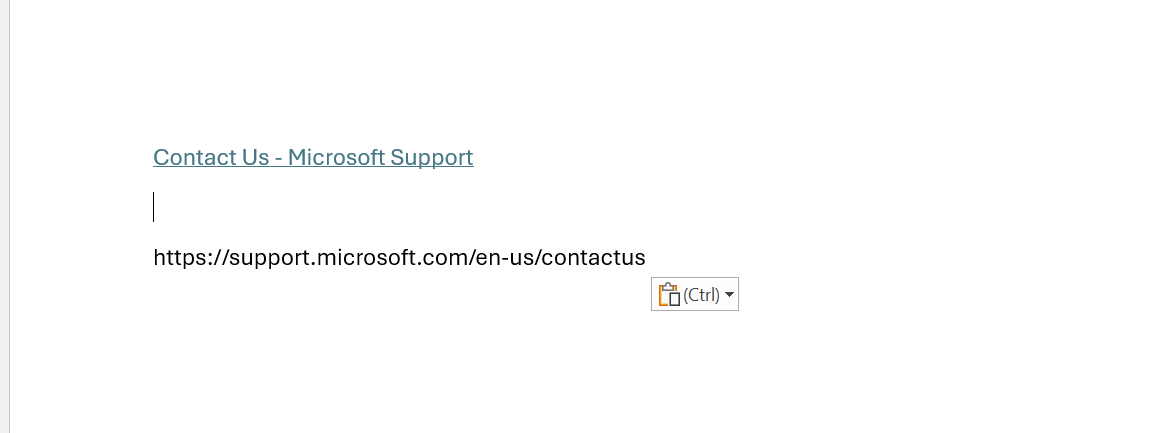
Could you please confirm whether Ctrl + Shift + V does not paste plain text at all in your case, or if you’re seeing a different result than what I described? If possible, a screenshot or short example of the behavior you’re encountering would help a lot in making sure we’re looking at the same scenario.
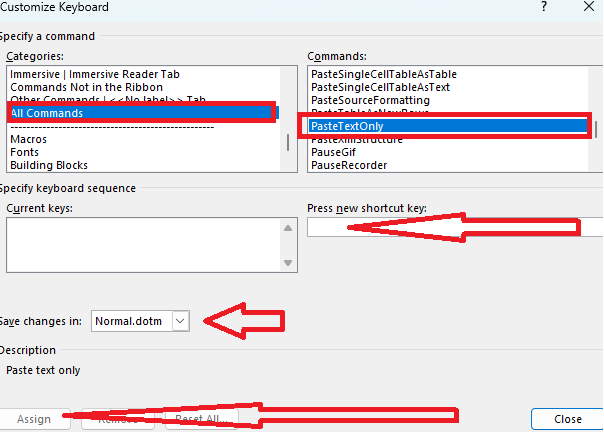
As an additional option, Word does allow you to manually reassign keyboard shortcuts. If you’re willing to try, you can go to:
- File > Options > Customize Ribbon > Customize (Keyboard shortcuts)
- Set Save changes in to "Normal.dotm". Find the PasteTextOnly command and click in the "Press new shortcut key" box and press the key assignment you want.
- From there, you can assign Ctrl + Shift + V directly to the PasteTextOnly command and test again to see whether that restores the behavior you’re expecting.
You might also find the following Microsoft article helpful, as it explains recent updates, tips, and customization options related to paste shortcuts in Word: Paste Text Only shortcut in Word | Microsoft Community Hub
Please understand that our initial response does not always resolve the issue immediately. However, with your help and more detailed information, we can work together to find a solution. I genuinely want to make sure I understand your situation correctly and help in any way I can.
Kind regards,
Note: Please follow the steps in our documentation to enable e-mail notifications if you want to receive the related email notification for this thread.
' cx='32' cy='32' r='32' /%3E%3Ctext x='50%25' y='55%25' dominant-baseline='middle' text-anchor='middle' fill='%23FFF' %3ESR%3C/text%3E%3C/svg%3E)


' cx='32' cy='32' r='32' /%3E%3Ctext x='50%25' y='55%25' dominant-baseline='middle' text-anchor='middle' fill='%23FFF' %3EDN%3C/text%3E%3C/svg%3E)
' cx='32' cy='32' r='32' /%3E%3Ctext x='50%25' y='55%25' dominant-baseline='middle' text-anchor='middle' fill='%23FFF' %3EYH%3C/text%3E%3C/svg%3E)