How do I complete denied printer installation?

Bo Bredenhof 1 Reputation point
2020-08-05T12:01:04.893+00:00

"Windows 10 will not complete my printer installation "due to a "connection with flexible data traffic costs". It is done automaticly and I am not given any options.
I have a mobile Internet Connection to my computer and a cable to HP printer.
Printer and computer works fine. I am not connected to any other network.
Where can I disable this automatic denial to complete the printer installation?

Bo Bredenhof

Windows for business | Windows Client for IT Pros | User experience | Other
0 comments No comments

2 answers

Sort by: Most helpful
  1. Jenny Yan-MSFT 9,376 Reputation points
    2020-08-06T05:47:54.847+00:00

    Hi,

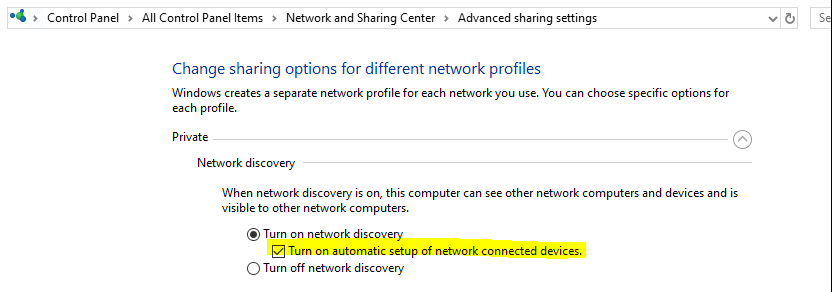
    Was the auto installation related to network printer? If yes, kindly check setting highlighted as below:

    Network and Sharing Center--->Change advanced sharing settings---> Private--->Network discovery
    There is a box that says "Turn on automatic setup of network connected devices."
    Uncheck that box and click "Save changes."
    16022-image.png
    Hope this would be helpful.

    Thanks,
    Jenny

    Was this answer helpful?


  2. Kapil Arya 37,951 Reputation points Volunteer Moderator
    2020-08-05T12:31:15.987+00:00

    Hello,

    Check if you've set your network connection as Metered. See if turning off Metered connection helps.

    https://support.microsoft.com/en-in/help/4028458/windows-metered-connections-in-windows-10

    Regards.

    Was this answer helpful?


Your answer

Answers can be marked as 'Accepted' by the question author and 'Recommended' by moderators, which helps users know the answer solved the author's problem.
