Azure Data Factory
An Azure service for ingesting, preparing, and transforming data at scale.
This browser is no longer supported.
Upgrade to Microsoft Edge to take advantage of the latest features, security updates, and technical support.

Say when I am copying a sql table from one database to another (azure sql).
I have 1000 rows, but one fails with a SQL exception on insert.
Is there a way to handle these errors so 999 rows are inserted and the other one is saved in logs or azure storage.
NOTE: I have seen there "Conditional Splittings" in Data flows, but this happens before inserting into the sink, I would need the same after insert is attempted.
I am trying to avoid creating a stored procedure for every single copy operation as that has other limitations.
An Azure service for ingesting, preparing, and transforming data at scale.
I had an error in the flow that was hiding incompatible rows, once that was solved, incompatible rows started working.
Truncate errors, duplicates and float conversions where tested.
Hi I have tried that, but "incompatible row" definition does not apply to sql type inserts, seems like this check is done before insert time (maybe PK violations, but again, seems like this is proactive work, not reactive)
The scenario I tried was a mismatch in column sizes where sink has smaller sized nvarchar column from 100 to 50 chars and forced the error. This error was not caught.
Reading through the cases, incompatible does not support sql errors.
Documentation: https://learn.microsoft.com/en-us/azure/data-factory/copy-activity-fault-tolerance

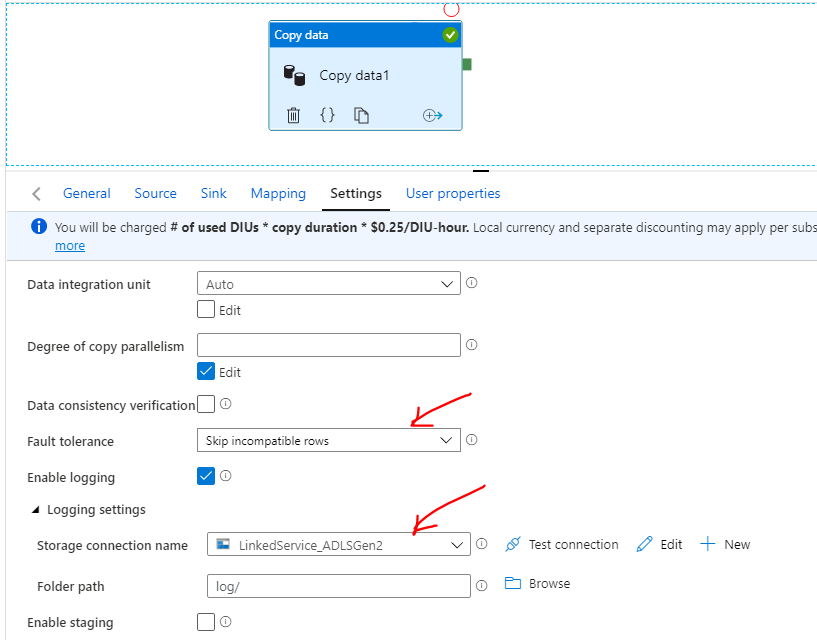
If Fault tolerance setting option is checked, bad rows are ignored and other rows are inserted successfully.
We can use Logging option to log the error message. It creates a file which has a bad record and also details on reason behind failure
===============================================
If the response helped, do "Accept Answer" and upvote it -- Vaibhav