Exchange Online
A cloud-based service included in Microsoft 365, delivering scalable messaging and collaboration features with simplified management and automatic updates.
This browser is no longer supported.
Upgrade to Microsoft Edge to take advantage of the latest features, security updates, and technical support.
' cx='32' cy='32' r='32' /%3E%3Ctext x='50%25' y='55%25' dominant-baseline='middle' text-anchor='middle' fill='%23FFF' %3EGM%3C/text%3E%3C/svg%3E)
Hi Experts
i want to set autoreply for office365 unified group, will the below syntax work for me
Set-MailboxAutoReplyConfiguration -Identity unifiedgroup1@Company portal .com -InternalMessage "Hello,This group is not monitored," -ExternalMessage "Hello This group is not monitored"
A cloud-based service included in Microsoft 365, delivering scalable messaging and collaboration features with simplified management and automatic updates.
The administration and maintenance of Microsoft Exchange Server to ensure secure, reliable, and efficient email and collaboration services across an organization.

You should mark @Jon Alfred Smith answer as accepted. He gave you the solution.
Answer accepted by question author
' cx='32' cy='32' r='32' /%3E%3Ctext x='50%25' y='55%25' dominant-baseline='middle' text-anchor='middle' fill='%23FFF' %3ELZ%3C/text%3E%3C/svg%3E)
As JonAlfredSmith-5004 mentioned, you have to add AutoReplyState parameter and enable it to make sure the OOF is working. I test the command, and OOF works well for internal and external senders. Here are my test results.
The command I used:

When an internal user user01 sends message to that group, user01 can get OOF message:

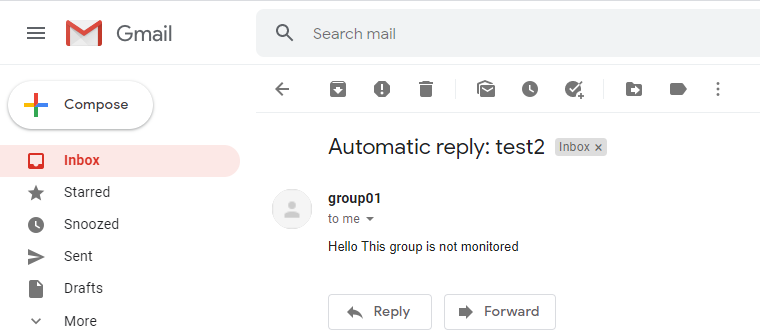
When I send to the group with my Gmail account, I can get the OOF message as well:
Do you use the command in your organization? Does it work as expected?
Please let us know if you would like further assistance.
Is there any update on this thread? If OOF doesn't work, and you have some questions or need further help on this issue, please feel free to post back.

You need to add the AutoReplyState parameter to specify whether the mailbox is enabled for Automatic Replies.
Set-MailboxAutoReplyConfiguration -Identity unifiedgroup1@Company portal .com -AutoReplyState Enabled -InternalMessage "Hello,This group is not monitored," -ExternalMessage "Hello This group is not monitored"
There's perhaps a typo after "not monitored", a comma.