Access denied while running powershell script

sns 9,251 Reputation points
2021-12-12T11:37:33.16+00:00

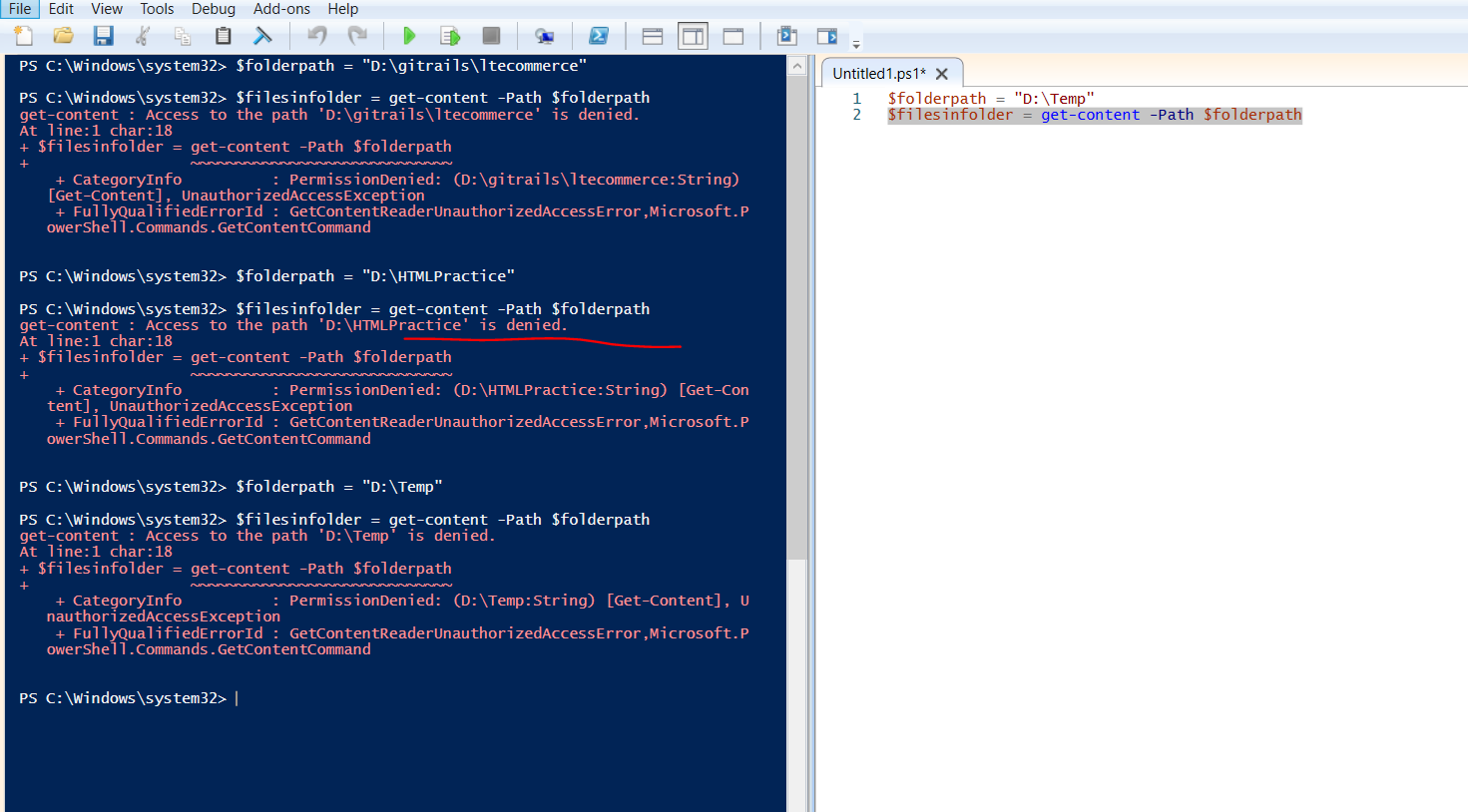
I am running powershell ISE as admin but still I am getting access denied error not sure why? Please help and PFA
156916-runningasadminbutyerror.png

Windows for business | Windows Server | User experience | PowerShell
0 comments No comments
{count} votes

Answer accepted by question author
  1. Rich Matheisen 48,026 Reputation points
    2021-12-12T16:04:25.863+00:00

    Ummmm . . . why are you trying to use Get-Content on a directory????

    The help text for Get-Content is pretty explicit about this.

    -Path
    Specifies the path to an item where Get-Content gets the content. Wildcard characters are permitted. The paths must be paths to items, not to containers. For example, you must specify a path to one or more files, not a path to a directory.


    0 comments No comments

2 additional answers

Sort by: Most helpful
  1. MotoX80 37,151 Reputation points
    2021-12-12T16:16:52.54+00:00

    You are using the wrong cmdlet. Try this.

    $FilesInFolder = Get-ChildItem -Path $FolderPath -File     # Get all files in the folder 
    
    0 comments No comments

  2. Limitless Technology 40,076 Reputation points
    2021-12-16T15:56:52.507+00:00

    Hi @sns

    Judging from your screenshot, you are using the incorrect cmdlet. Get-Content -Path is only valid to retrieve files, but not containers.For this action you sould use Get-ChildItem -Path cmdlet

    https://learn.microsoft.com/en-us/powershell/module/microsoft.powershell.management/get-childitem?view=powershell-7.2

    The Get-ChildItem cmdlet gets the items in one or more specified locations. If the item is a container, it gets the items inside the container, known as child items. You can use the Recurse parameter to get items in all child containers and use the Depth parameter to limit the number of levels to recurse.

    Hope this helps with your query,

    --If the reply is helpful, please Upvote and Accept as answer--

    0 comments No comments

Your answer

Answers can be marked as 'Accepted' by the question author and 'Recommended' by moderators, which helps users know the answer solved the author's problem.