Developer technologies | Windows Presentation Foundation
A part of the .NET Framework that provides a unified programming model for building line-of-business desktop applications on Windows.
This browser is no longer supported.
Upgrade to Microsoft Edge to take advantage of the latest features, security updates, and technical support.
' cx='32' cy='32' r='32' /%3E%3Ctext x='50%25' y='55%25' dominant-baseline='middle' text-anchor='middle' fill='%23FFF' %3EI%3C/text%3E%3C/svg%3E)
My MainWindow has a TabControl with several TabItem. Each TabItem has several buttons. I want to open a different UserControl in grid UserControlRowwith each button click. How to do this in MVVM?
<Grid >
	<Grid.RowDefinitions >
		<RowDefinition x:Name="TabControlRow" Height="90"/>
		<RowDefinition x:Name="UserControlRow" Height="*"/>
	</Grid.RowDefinitions>
</Grid>
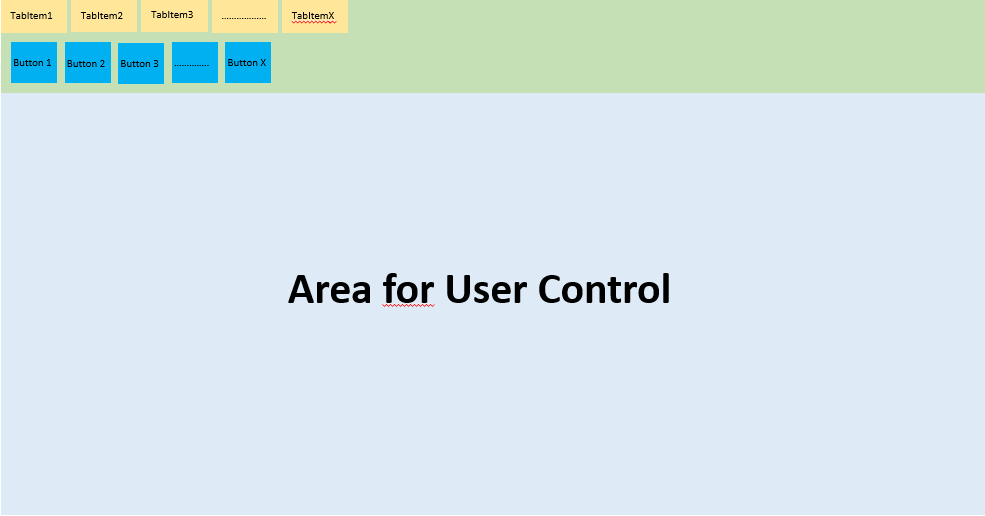
I have started the following in my ViewModel but I don't know if it is the best/correct solution. And how to open the user control, I do not know.
public class MainWindowViewModel
    {
        public RelayCommand Cmd { get => new RelayCommand(CmdExec); }
        private void CmdExec(object parameter)
        {
            switch (parameter.ToString())
            {
                case "Button1":
					//Code
                    break;
                case "Button2":
					//Code
                    break;
                case "ButtonX":
					//Code
                    break;
                default:
                    break;
            }
        }
    }
}
A part of the .NET Framework that provides a unified programming model for building line-of-business desktop applications on Windows.
' cx='32' cy='32' r='32' /%3E%3Ctext x='50%25' y='55%25' dominant-baseline='middle' text-anchor='middle' fill='%23FFF' %3EHL%3C/text%3E%3C/svg%3E)
Hi,@Imilio . Is there an update to your question? Did my solution work for you? If yes, you can accept it as the answer. This is helpful for community members with similar issues.
You could refer to the following code to switch UserControl.
MainWindow.xaml:
<Window.DataContext>
        <local:ViewModel/>
    </Window.DataContext>
    <Grid>
        <Grid.ColumnDefinitions>
            <ColumnDefinition Width="*"/>
            <ColumnDefinition Width="*"/>
        </Grid.ColumnDefinitions>

        <Grid.RowDefinitions>
            <RowDefinition Height="20"/>
            <RowDefinition Height="*"/>
        </Grid.RowDefinitions>
        <Button Grid.Row="0" Grid.Column="0" Command="{Binding ChangeFirstViewCommand}">Change View 1</Button>
        <Button Grid.Row="0" Grid.Column="1" Command="{Binding ChangeSecondViewCommand}">Change View 2</Button>
        <ContentControl  Grid.Row="1" Grid.ColumnSpan="2" Content="{Binding ContentView}"></ContentControl>
    </Grid>
MainWindow.xaml.cs:
using System;
using System.ComponentModel;
using System.Windows;
using System.Windows.Input;

namespace ClickButtonToSwitchUserControl
{
  public partial class MainWindow : Window
  {
    public MainWindow()
    {
      InitializeComponent();
    }
  }
  public class ViewModel: INotifyPropertyChanged
  {
    private FrameworkElement contentView;
    public FrameworkElement ContentView
    {
      get { return contentView;}
      set
      {
        contentView=value;
        OnPropertyChanged("ContentView");
      }
    }
    public ViewModel()
    {
      SwitchViewMessage svm=new SwitchViewMessage();
      SwitchView(svm.ViewName);
    }

    public ICommand ChangeFirstViewCommand
    {
      get
      {
        return new RelayCommand(x =>
        {
          SwitchView("FirstView");
        });
      }
    }
    public ICommand ChangeSecondViewCommand
    {
      get
      {
        return new RelayCommand(x =>
        {
          SwitchView("SecondView");
        });
      }
    }
    public void SwitchView(string viewName)
    {
      switch (viewName)
      {
        case "FirstView" :
          ContentView =new FirstView();
          ContentView.DataContext=new FirstViewModel() { Text= "This is the first view" };
          break;
        default:
          ContentView = new SecondView();
          ContentView.DataContext = new SecondViewModel() { Text = "This is the second View" };
          break;
      }
    }
    public event PropertyChangedEventHandler PropertyChanged;

    protected void OnPropertyChanged(string propertyName)
    {
      if (PropertyChanged != null)
      {
        PropertyChanged(this, new PropertyChangedEventArgs(propertyName));
      }
    }
  }
  public class SwitchViewMessage
  {
    public string ViewName { get; set; }
  }
  public class RelayCommand : ICommand
  {
    private readonly Predicate<object> _canExecute;
    private readonly Action<object> _execute;

    public RelayCommand(Action<object> execute)
       : this(execute, null)
    {
      _execute = execute;
    }

    public RelayCommand(Action<object> execute, Predicate<object> canExecute)
    {
      if (execute == null)
      {
        throw new ArgumentNullException("execute");
      }
      _execute = execute;
      _canExecute = canExecute;
    }

    public bool CanExecute(object parameter)
    {
      return _canExecute == null || _canExecute(parameter);
    }

    public void Execute(object parameter)
    {
      _execute(parameter);
    }
    public event EventHandler CanExecuteChanged
    {
      add
      {
        CommandManager.RequerySuggested += value;
        CanExecuteChangedInternal += value;
      }
      remove
      {
        CommandManager.RequerySuggested -= value;
        CanExecuteChangedInternal -= value;
      }
    }
    private event EventHandler CanExecuteChangedInternal;
    public void RaiseCanExecuteChanged()
    {
      CanExecuteChangedInternal.Raise(this);
    }
  }
  public static class EventRaiser
  {
    public static void Raise(this EventHandler handler, object sender)
    {
      if (handler != null)
      {
        handler(sender, EventArgs.Empty);
      }
    }
  }
}
FirstView.xaml:(UserControl1)

<StackPanel>
        <Label Content="View 1" FontSize="30"/>
        <Button
            Content="Goto View 2"
            Command="{Binding GotoView2Command}"
            HorizontalAlignment="Center"
            Margin="10,10,0,0"
            VerticalAlignment="Center"
            Width="75">
        </Button>
    </StackPanel>
View1ViewModel:
 <StackPanel>
        <Label>This is the first view</Label>
        <Label Content="{Binding Text}"  FontSize="30"/>

    </StackPanel>
FirstViewModel:
public class FirstViewModel : INotifyPropertyChanged
  {

    private string _text;
    public string Text
    {
      get { return _text; }
      set
      {
        _text = value;
        OnPropertyChanged("Text");
      }
    }
    public event PropertyChangedEventHandler PropertyChanged;

    protected void OnPropertyChanged(string propertyName)
    {
      if (PropertyChanged != null)
      {
        PropertyChanged(this, new PropertyChangedEventArgs(propertyName));
      }
    }
  }
SecondView.xaml:(UserControl2)
 <StackPanel>
        <Label>This is the second view</Label>
        <Label Content="{Binding Text}" FontSize="30" />

    </StackPanel>
SecondViewModel :
public class SecondViewModel : INotifyPropertyChanged
  {

    private string _text;
    public string Text
    {
      get { return _text; }
      set
      {
        _text = value;
        OnPropertyChanged("Text");
      }
    }

    public event PropertyChangedEventHandler PropertyChanged;

    protected void OnPropertyChanged(string propertyName)
    {
      if (PropertyChanged != null)
      {
        PropertyChanged(this, new PropertyChangedEventArgs(propertyName));
      }
    }
  }
The result:
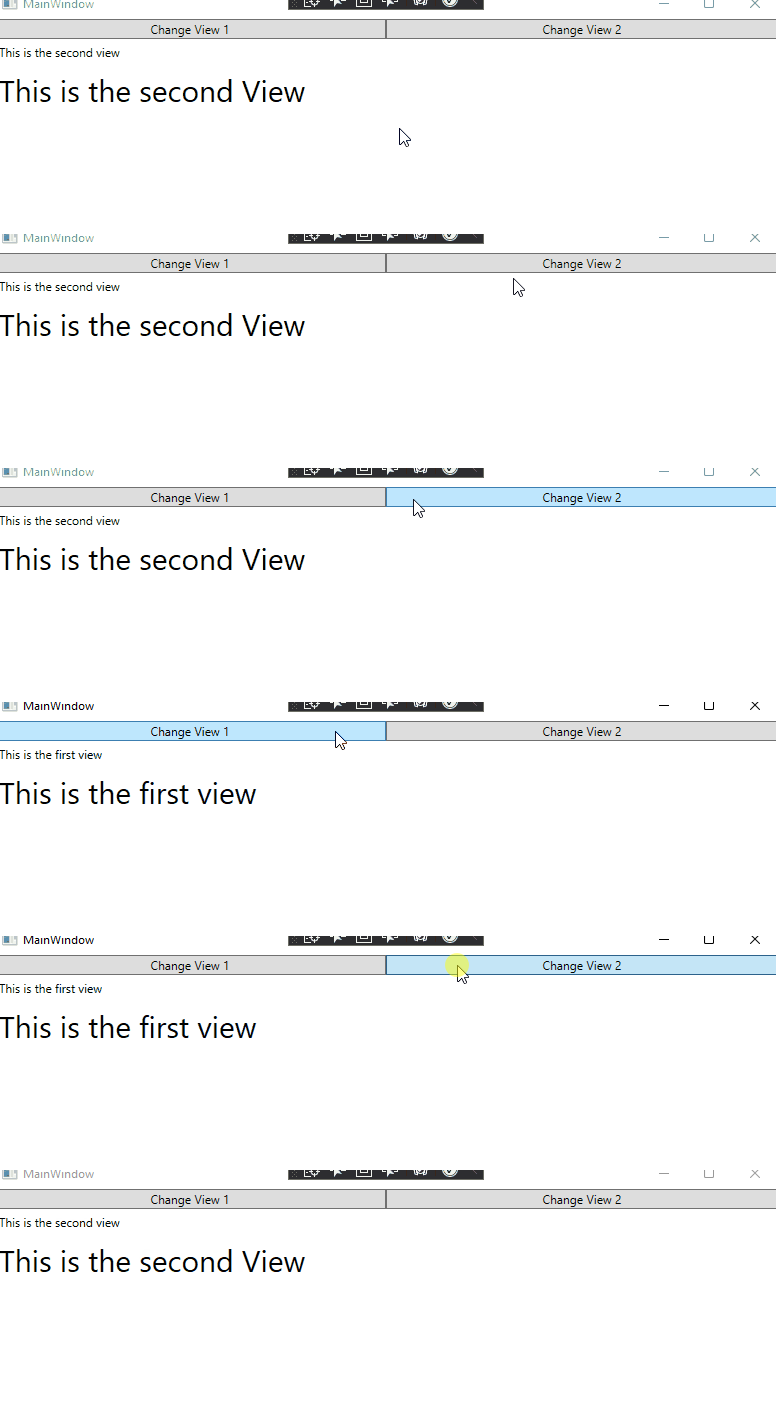
If the response is helpful, please click "Accept Answer" and upvote it.
Note: Please follow the steps in our [documentation][5] to enable e-mail notifications if you want to receive the related email notification for this thread.
[5]: https://learn.microsoft.com/en-us/answers/articles/67444/email-notifications.html

Hi Imilio,
you can use ItemsControl to show UserControl like in following demo:
XAML:
<Window x:Class="WpfApp1.Window010"
        xmlns="http://schemas.microsoft.com/winfx/2006/xaml/presentation"
        xmlns:x="http://schemas.microsoft.com/winfx/2006/xaml"
        xmlns:d="http://schemas.microsoft.com/expression/blend/2008"
        xmlns:mc="http://schemas.openxmlformats.org/markup-compatibility/2006"
        xmlns:local="clr-namespace:WpfApp010"
        mc:Ignorable="d"
        Title="Imilio_220324" Height="450" Width="800">
  <Window.DataContext>
    <local:ViewModel/>
  </Window.DataContext>
  <Window.Resources>
    <Style TargetType="Button">
      <Setter Property="Margin" Value="5"/>
      <Setter Property="Height" Value="25"/>
      <Setter Property="Background" Value="#d0d0ff"/>
    </Style>
  </Window.Resources>
  <Grid>
    <Grid.RowDefinitions >
      <RowDefinition Height="90"/>
      <RowDefinition Height="*"/>
    </Grid.RowDefinitions>
    <TabControl Grid.Row="0">
      <TabItem Header="TabItem1">
        <StackPanel Orientation="Horizontal" Background="LightGreen">
          <Button Content="Button1" Command="{Binding}" CommandParameter="Button1"/>
          <Button Content="Button2" Command="{Binding}" CommandParameter="Button2"/>
          <Button Content="Button3" Command="{Binding}" CommandParameter="Button3"/>
        </StackPanel>
      </TabItem>
    </TabControl>
    <ItemsControl Grid.Row="1" ItemsSource="{Binding UserControls}"/>
  </Grid>
</Window>
ViewModel:
using System;
using System.Collections.ObjectModel;
using System.Windows;
using System.Windows.Controls;
using System.Windows.Input;
using System.Windows.Media;

namespace WpfApp010
{
  public class ViewModel : ICommand
  {
    public ObservableCollection<FrameworkElement> UserControls { get; set; } = new ObservableCollection<FrameworkElement>();

    public event EventHandler? CanExecuteChanged;
    public bool CanExecute(object? parameter) => true;
    public void Execute(object? parameter)
    {
          UserControls.Clear();
      switch (parameter?.ToString())
      {
        case "Button1":
          UserControls.Add(GetUserControlInstance("Button1"));
          break;
        case "Button2":
          UserControls.Add(GetUserControlInstance("Button2"));
          break;
        case "Button3":
          UserControls.Add(GetUserControlInstance("Button3"));
          break;
        default:
          break;
      }
    }
    private UserControl GetUserControlInstance(string name)
    {
      Random rnd = new Random();
      UserControl ctrl = new UserControl();
      Grid grd = new Grid() { Height = 100 };
      ctrl.Content = grd;
      grd.Background = new SolidColorBrush(Color.FromArgb(255,(byte)rnd.Next(100,255), (byte)rnd.Next(100, 255), (byte)rnd.Next(100, 255)));
      grd.Children.Add(new Label() { Content= name });
      return ctrl;
    }
  }
}
Hi @Peter Fleischer (former MVP) , it works quite well, thank you. Just one thing, why is the width of Grid.Row="1" filled and the height not? The height also needs to be filled.
 <Grid.RowDefinitions >
   <RowDefinition Height="90"/>
   <RowDefinition Height="*"/>
 </Grid.RowDefinitions>
Hi Imilio,
for this case take ContentControl:
<ContentControl Grid.Row="1" Content="{Binding UserControlInstance}"/>
public class ViewModel : ICommand, INotifyPropertyChanged
{
  public FrameworkElement UserControlInstance { get; set; }
....
 public void Execute(object? parameter)
    {
      switch (parameter?.ToString())
      {
        case "Button1":
          UserControlInstance = GetUserControlInstance("Button1");
          break;
....
        default:
          break;
      }
      OnPropertyChanged(nameof(UserControlInstance));
    }
    private UserControl GetUserControlInstance(string name)
    {
      Random rnd = new Random();
      UserControl ctrl = new UserControl();
      Grid grd = new Grid();
      ctrl.Content = grd;
      grd.Background = new SolidColorBrush(Color.FromArgb(255, (byte)rnd.Next(100, 255), (byte)rnd.Next(100, 255), (byte)rnd.Next(100, 255)));
      grd.Children.Add(new Label() { Content = name });
      return ctrl;
    }
    public event PropertyChangedEventHandler PropertyChanged;
    private void OnPropertyChanged([CallerMemberName] string propName = "") => PropertyChanged?.Invoke(this, new PropertyChangedEventArgs(propName));
  }