Developer technologies | .NET | Xamarin
A Microsoft framework for building cross-platform mobile apps using .NET and C# with native performance and user interfaces.
This browser is no longer supported.
Upgrade to Microsoft Edge to take advantage of the latest features, security updates, and technical support.
' cx='32' cy='32' r='32' /%3E%3Ctext x='50%25' y='55%25' dominant-baseline='middle' text-anchor='middle' fill='%23FFF' %3EPN%3C/text%3E%3C/svg%3E)
Hi Support,
How can we design Coachmark view in Xamarin Form which will compatible with both iOS and Android.
Looking for solution like below.
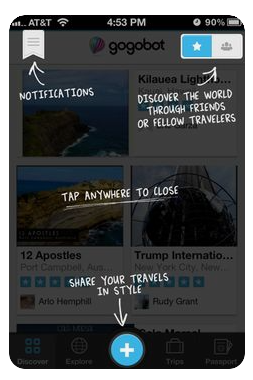
A Microsoft framework for building cross-platform mobile apps using .NET and C# with native performance and user interfaces.
Answer accepted by question author
' cx='32' cy='32' r='32' /%3E%3Ctext x='50%25' y='55%25' dominant-baseline='middle' text-anchor='middle' fill='%23FFF' %3EYL%3C/text%3E%3C/svg%3E)
Hello,
For Implementing the Coach Mark View in Xamarin.forms, you need to use AbsoluteLayout or Grid. They allow elements could overlay in layout.
You can try the following steps:
Step1. Use Gird to design the overlay style UI.
Step2. Add TapGestureRecognizer to the overlay elements. For example, when user clicks the screen, the overlay element change their IsVisible Property to false.
Best Regards,
Alec Liu.
If the answer is the right solution, please click "Accept Answer" and kindly upvote it. If you have extra questions about this answer, please click "Comment".
Note: Please follow the steps in our documentation to enable e-mail notifications if you want to receive the related email notification for this thread.
HI Alec Liu,
My question is on Coachmark view. A UI overlay view which will show on top of the screen on first launch. This overlay ui will be an aid to the user in learning how to use the system.
Thanks
Niladri
It's my mistake, I have already updated my answer.
Hi Alec,
As you mentioned to use a overlayout with Absolute layout/Grid, will work. But the main challenge is relative positioning of views in Mobile & Tablet screens. Also how to add coach marks for Toolbar icons & Hamburger menu. The screenshot which I attached, is showing coach marks for toolbar items as well.
It will be a great help you can share some code sample any Libraries.
Thanks
Niladri
In fact, it's not very hard to implement it. You can refer the following code:
<Grid>
    <StackLayout>
        <!-- all content goes here -->
    </StackLayout>
    <Grid
        VerticalOptions="StartAndExpand"
        HorizontalOptions="EndAndExpand">
        <!-- draw content for overlay here -->
    </Grid>
<Grid/>
challenge is relative positioning of views in Mobile & Tablet screens.
In Grid, the position can vary according to the proportions in different platform, or you can make a full-screen photo as the overlay view, and control it whether appearing by event.
Hi Alec,
Thanks a lot for your support.
As you mentioned in Grid the position will vary on different platforms and device resolutions. Also I faced issues in drawing overlay on top of Hamburger menu and toolbar icons from a content page. Alternatively as you suggested to make a full-screen photo as the overlay view will work.
I thought of keeping 2 set of full-screen photos for mobile and tablet and draw a overlay view on top of it. This will have a better look and feel both Mobile & Tablet users.
Thanks
Niladri
It's my pleasure:)
I have not heard from you for a couple of days. Please let me know if there is anything that I can help here.
I have implemented as you suggested, like drawing overlay on top of a Full screen image. Its working fine.
Thanks a lot.
Could you please accept my answer? It will be helpful for others who meet the same issue.:)