Azure
A cloud computing platform and infrastructure for building, deploying and managing applications and services through a worldwide network of Microsoft-managed datacenters.

This browser is no longer supported.
Upgrade to Microsoft Edge to take advantage of the latest features, security updates, and technical support.
' cx='32' cy='32' r='32' /%3E%3Ctext x='50%25' y='55%25' dominant-baseline='middle' text-anchor='middle' fill='%23FFF' %3ESK%3C/text%3E%3C/svg%3E)
Hi,
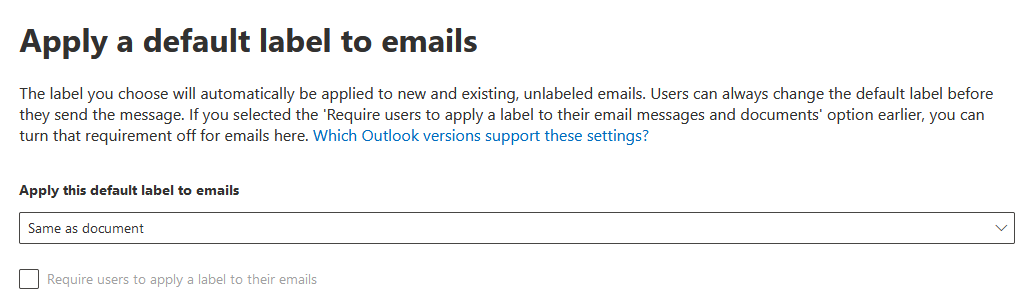
We have a single AIP Policy, and the "Apply default label to emails" is set to "same as document" - but this has never worked.
We are using the latest Office 365 (Word, Outlook, etc).
As a typical example - my attachment has been label as "Highly Confidential", but the email itself, stays at the default "General" label - and does not apply the same label as the attached document.
Any ideas why this basic AIP functionality might not be working?
Thank you
SK
A cloud computing platform and infrastructure for building, deploying and managing applications and services through a worldwide network of Microsoft-managed datacenters.
A cloud-based identity and access management service for securing user authentication and resource access

' cx='32' cy='32' r='32' /%3E%3Ctext x='50%25' y='55%25' dominant-baseline='middle' text-anchor='middle' fill='%23FFF' %3ETK%3C/text%3E%3C/svg%3E)
It seems we found the issue shortly after posting. You need to change the Advanced Settings for the policy so that it is aware of this.
You need to do the following;
Connect to the Compliance Powershell
Import-Module ExchangeOnlineManagement
Connect-IPPSSession -UserPrincipalName %username%
Get the current Label Policy Settings
(Get-LabelPolicy -Identity "Global").settings
Enable the Advanced Settings for AIP in the Policy
Set-LabelPolicy -Identity "Global" -AdvancedSettings @{EnableCustomPermissions="False"}
Set the AttachmentAction Advanced Setting to Automatic
Set-LabelPolicy -Identity "Global" -AdvancedSettings @{AttachmentAction="Automatic"}
Give it 10-15 mins and it will work.
' cx='32' cy='32' r='32' /%3E%3Ctext x='50%25' y='55%25' dominant-baseline='middle' text-anchor='middle' fill='%23FFF' %3EZK%3C/text%3E%3C/svg%3E)
@Shim Kwan Make sure you are on the latest outlook version.
I agree with Shim. This doesnt answer the problem.
I am facing the same issue with a client.
What we did, we created a file with Top Secret label + protection. We then attached that file to a new email and sent the email. The email should also be at Top Secret Level but its not, its at General (default). Why is the email not upgrading its level accordingly?
Is there something additional that needs to be done?
' cx='32' cy='32' r='32' /%3E%3Ctext x='50%25' y='55%25' dominant-baseline='middle' text-anchor='middle' fill='%23FFF' %3EA%3C/text%3E%3C/svg%3E)
Hi @Shim Kwan , labels not updating could sometimes be fixed by just reopening the apps. From this document:
The Azure Information Protection client checks for any changes whenever a supported Office application starts, and downloads the changes as its latest Azure Information Protection policy. Additional triggers that refresh the policy on the client:
Note
When the client downloads the policy, be prepared to wait a few minutes before it's fully operational. The actual time varies, according to factors such as the size and complexity of the policy configuration, and the network connectivity. If the resulting action of your labels does not match your latest changes, allow up to 15 minutes and then try again.
Please let me know if this doesn't work or if you have any questions.
If this answer helped you please mark it as "Verified" so other users can reference it.
Thank you,
James
thank you for that clarification @James Hamil
however this still does not answer my question above about the "same as document" dilemma.