Developer technologies | Universal Windows Platform (UWP)
A Microsoft platform for building and publishing apps for Windows devices.
This browser is no longer supported.
Upgrade to Microsoft Edge to take advantage of the latest features, security updates, and technical support.
' cx='32' cy='32' r='32' /%3E%3Ctext x='50%25' y='55%25' dominant-baseline='middle' text-anchor='middle' fill='%23FFF' %3EW%3C/text%3E%3C/svg%3E)
I am trying to create a UI in XAML having a row/column arrangement of data like in the below image:
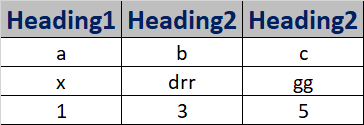
I am aware that there is GridView/ListView support in UWP XAML but could not find some code that creates a lit like the above.
Would it be possible to create such a UI in XAML/UWP?
A Microsoft platform for building and publishing apps for Windows devices.
' cx='32' cy='32' r='32' /%3E%3Ctext x='50%25' y='55%25' dominant-baseline='middle' text-anchor='middle' fill='%23FFF' %3EFW%3C/text%3E%3C/svg%3E)
Hi, can the following method help? Have you solved your issue?
Hi, do you have other questions?
Hi, do you have other questions?
Hi, is there any update? Have you solved your issue?
Hello,
Welcome to our Microsoft Q&A platform!
You can use DataGrid control from Windows Community toolkit, it provides a flexible way to display a collection of data in rows and columns, you can customize columns and header. But before you use it, you need to add Microsoft.Toolkit.Uwp.UI.Controls.DataGrid nuget package. About more details, you can refer to this document.
.xaml:
< Grid>
< controls:DataGrid x:Name="dataGrid1"
Height="600" Margin="12"
AutoGenerateColumns="false"
ItemsSource="{x:Bind MyViewModel.Customers,Mode=OneWay}" />
< /Grid>