Developer technologies | Windows Forms
A set of .NET Framework managed libraries for developing graphical user interfaces.
This browser is no longer supported.
Upgrade to Microsoft Edge to take advantage of the latest features, security updates, and technical support.
' cx='32' cy='32' r='32' /%3E%3Ctext x='50%25' y='55%25' dominant-baseline='middle' text-anchor='middle' fill='%23FFF' %3EBJ%3C/text%3E%3C/svg%3E)
Visual Studio 2019
VB win form project
I can't see how to update a data source after making additional changes to the underlying tables.
I have created a locale DB, then created several tables in the DB.
I then create a data source to the DB and tables that I use to populate several DataGridViews on Winforms.
I then realize, that some of my tables need to be modified, adding columns, etc.
After changing the tables, the data source continues to show previous table schema.
I have "refreshed" them but no joy.
There must be a way to update the data source, without having to recreate it and then redo all of my previous coding?
A set of .NET Framework managed libraries for developing graphical user interfaces.
A family of Microsoft suites of integrated development tools for building applications for Windows, the web, mobile devices and many other platforms. Miscellaneous topics that do not fit into specific categories.
Answer accepted by question author

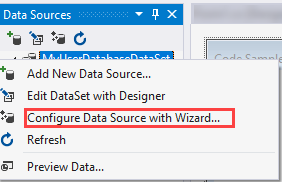
In the Data Source window right click on a table, select Configure Data Source with Wizard, this will pick up on changes.
Thanks, I tried that initially and it didn't work.
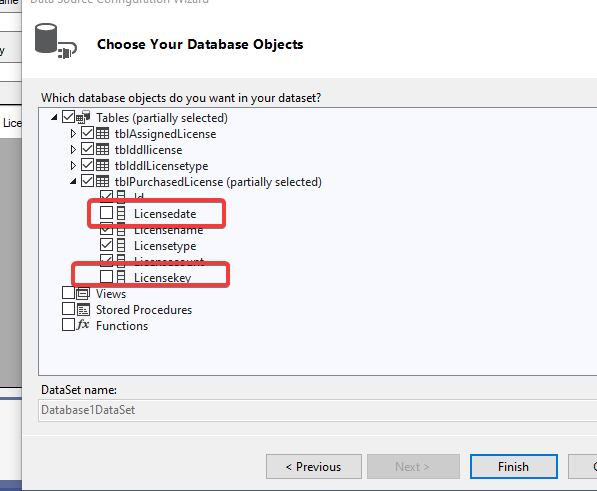
However, I went back in and after selecting "Configure Data Source with Wizard" I opened each individual table and then was able to see the additions and check the boxes for added columns, etc. After selecting the additions they showed up correctly.
Thank you!