Share via

creating powerpoint apps

RKIA.ZIRID 41 Reputation points
2022-05-02T17:25:39.437+00:00

hi! how can I make my application create on powerpoint (office 365) more powerful: with option

Microsoft 365 and Office | PowerPoint | For business | Windows
0 comments No comments

Answer accepted by question author

Ceasar Chen_MSFT 4,486 Reputation points
2022-05-03T02:40:02.863+00:00

Hi, @RKIA.ZIRID
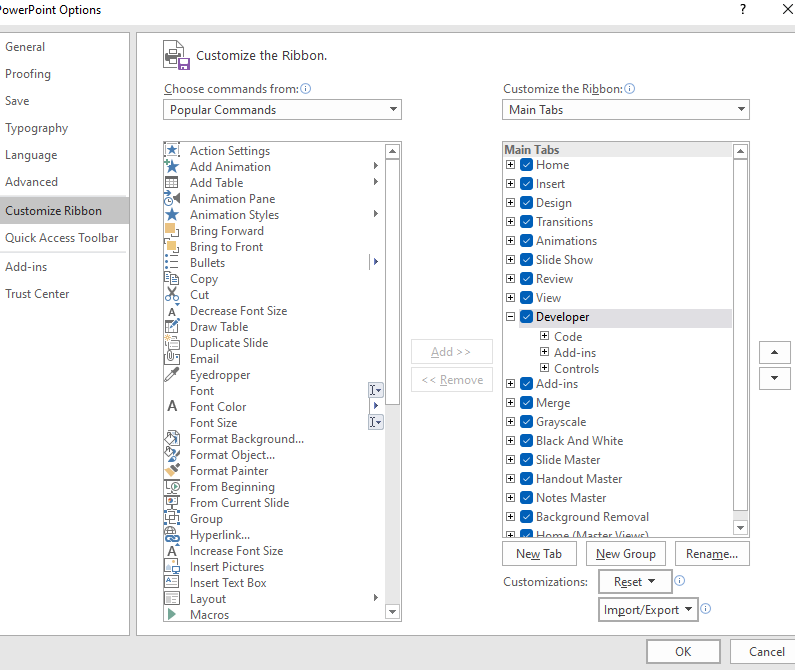
Welcome to the Q&A Forum.Could you please provide more information about your specific needs? If you want to use more or advanced features, you can check the PowerPoint developer options box or go to PowerPoint add-ins developer community.
Check Developer in Options - Customize the Ribbon.
198240-image.png
198378-image.png


If the response is helpful, please click "Accept Answer" and upvote it.
Note: Please follow the steps in our documentation to enable e-mail notifications if you want to receive the related email notification for this thread.

Was this answer helpful?

0 comments No comments

2 additional answers

Sort by: Most helpful
  1. John Korchok 232.6K Reputation points Volunteer Moderator
    2022-05-03T14:21:57.887+00:00

    You have circled the Minimize and Restore windows commands. You can access those commends with VBA. Here is Microsoft's reference page on the WindowState property:
    https://learn.microsoft.com/en-us/office/vba/api/powerpoint.application.windowstate

    Was this answer helpful?

    0 comments No comments

  2. Daniel Kåven 696 Reputation points
    2022-05-02T20:48:56.89+00:00

    I'm not really sure what you are looking for, could you please explain use case and expected outcome?

    There are many ways to create PowerPoint using programming languages and there are ways to make PowerPoint behave like an application. I've built a few for use as Demo environments.

    Was this answer helpful?


Your answer

Answers can be marked as 'Accepted' by the question author and 'Recommended' by moderators, which helps users know the answer solved the author's problem.