Exchange | Exchange Server | Management
The administration and maintenance of Microsoft Exchange Server to ensure secure, reliable, and efficient email and collaboration services across an organization.
This browser is no longer supported.
Upgrade to Microsoft Edge to take advantage of the latest features, security updates, and technical support.
' cx='32' cy='32' r='32' /%3E%3Ctext x='50%25' y='55%25' dominant-baseline='middle' text-anchor='middle' fill='%23FFF' %3EHM%3C/text%3E%3C/svg%3E)
One of our clients emails is consistently being sent to the Quarantine folder, labeled as "High Confidence Phish". How can this be prevented/stopped? Can these emails be allow thru?
The administration and maintenance of Microsoft Exchange Server to ensure secure, reliable, and efficient email and collaboration services across an organization.
' cx='32' cy='32' r='32' /%3E%3Ctext x='50%25' y='55%25' dominant-baseline='middle' text-anchor='middle' fill='%23FFF' %3ELL%3C/text%3E%3C/svg%3E)
Hi @Haughton Morgan ,
I am writing here to confirm with you how thing going now? If the above suggestion helps, please click “Accept as answer” to mark helpful reply as an answer.Your action would be helpful to other users who encounter the same issue and read this thread.
Thanks for your understanding.
----------
If the response is helpful, please click "Accept Answer" and upvote it.
Note: Please follow the steps in our documentation to enable e-mail notifications if you want to receive the related email notification for this thread.
Hi @Haughton Morgan ,
I agree with what Andy said.
For more information you could refer to: The spam confidence level stamp and New-TransportRule
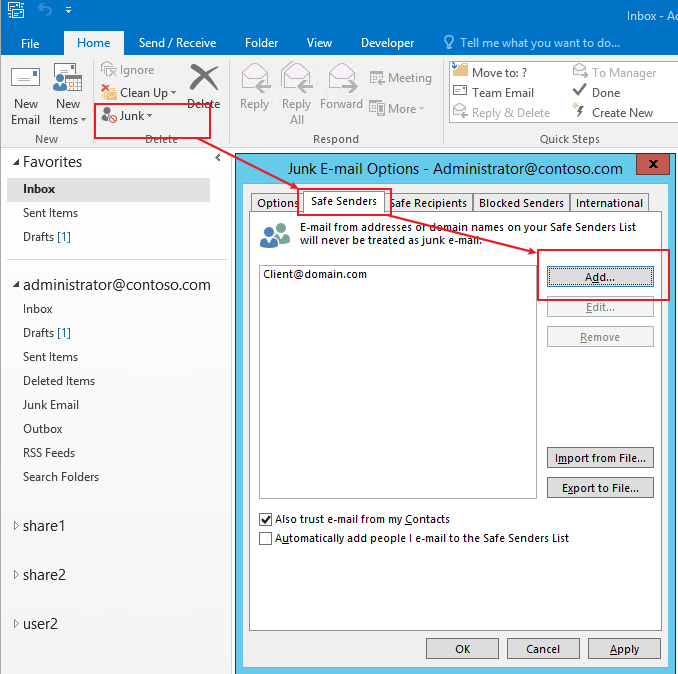
2.You could add the client’s email address to Safe Senders List in Outlook, the email from addresses on your Safe Senders List will never be treated as junk email.
If the response is helpful, please click "Accept Answer" and upvote it.
Note: Please follow the steps in our documentation to enable e-mail notifications if you want to receive the related email notification for this thread.
Hi @Haughton Morgan ,
Do suggestions above help? If the issue has been resolved, please click “Accept as answer” to mark helpful reply as an answer, this will make answer searching in the forum easier and be beneficial to other community members as well.
Thanks for your understanding.
----------
If the response is helpful, please click "Accept Answer" and upvote it.
Note: Please follow the steps in our documentation to enable e-mail notifications if you want to receive the related email notification for this thread.

Absolutely!
Choose one of these options:
The best from the admin perspective is a mail flow rule:
The available safe sender lists are described in the following list in order from most recommended to least recommended:
Mail flow rules
Outlook Safe Senders
IP Allow List (connection filtering)
Allowed sender lists or allowed domain lists (anti-spam policies)
Option 4 is not a good choice. I would use a mail flow rule or ask your users to add the specific sender to their safe sender list.