Microsoft Teams | Microsoft Teams for business | Other
Additional features, settings, or issues not covered by specific Microsoft Teams categories

This browser is no longer supported.
Upgrade to Microsoft Edge to take advantage of the latest features, security updates, and technical support.
' cx='32' cy='32' r='32' /%3E%3Ctext x='50%25' y='55%25' dominant-baseline='middle' text-anchor='middle' fill='%23FFF' %3EI%3C/text%3E%3C/svg%3E)
Hello
Please i need your help on this.
I would like to know if it is possible to hide presence state for external users in Microsoft Teams and if internal user is allowed to make presence state visible for specific external user.
Because after setting -EnablePrivacyMode = true in Teams, presence state is off for every external.
We have the request that the presence status for federated tenants (external) should not be viewed.
Now this should be possible with Set-CsPrivacyConfiguration -EnablePrivacyMode.
Although the article says: Note: This cmdlet has been deprecated in Microsoft Teams and has no impact. According to the community and my tests with a test tenant, it works!
Now the question is how can I allow individual external parties to see the status after all. Supposedly when you add the contact to the contactlist: -EnablePrivacyMode If True, gives users the opportunity to enable the advanced privacy mode.
In advanced privacy mode, only people on your Contacts list will be allowed to view your presence information. If False, your presence information will be available to anyone in your organization. The default value is False.
But that doesn't work (after several days of waiting). We are in Teams Only Mode, possibly the contact list of the Skype client is also meant and that went earlier, as described in the blog from 2017.
Is there a supported way to let external contacts still see the status if the PrivacyMode is set to enabled?
We do not want to be able to see the external status of the internal but for individuals it should be possible according to the KB entry, the question is, is the KB entry article still fully valid for teams?
What other variant is there?
Additional features, settings, or issues not covered by specific Microsoft Teams categories
' cx='32' cy='32' r='32' /%3E%3Ctext x='50%25' y='55%25' dominant-baseline='middle' text-anchor='middle' fill='%23FFF' %3EYS%3C/text%3E%3C/svg%3E)
Hi @IBN ,
I would like to know if it is possible to hide presence state for external users in Microsoft Teams and if internal user is allowed to make presence state visible for specific external user.
I am afraid this is currently not feasible. Actually according to this document, "Privacy (where you define who can see presence) configuration isn't available in Teams." and "Presence sharing with everyone (including Federated services) is always enabled for users in Teams.":

Regarding the cmdlet Set-CsPrivacyConfiguration -EnablePrivacyMode, while it may still work in Teams Only tenant for the time being, as mentioned in this document and also cited in your post, "This cmdlet has been deprecated in Microsoft Teams", which means it's not an officially supported configuration for Teams. So per my understanding, it's expected that your test result is not corresponding to the description in the document which applies to Skype for Business only:
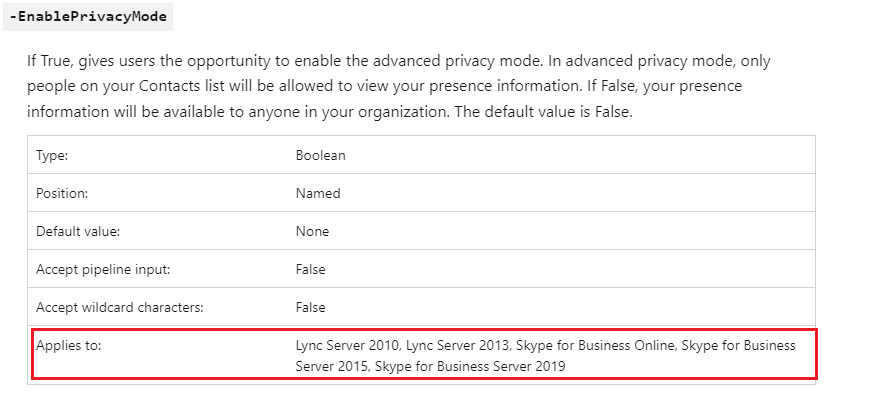
Then I did further research and found several posts in the feedback portal for Teams requesting to have the option to hide user presence from external contacts. I've voted them both and have added a comment about allowing presence state visible for specific external user. You can vote or comment there as well. Hopefully this feature can be realized in the future updates.
If the answer is helpful, please click "Accept Answer" and kindly upvote it. If you have extra questions about this answer, please click "Comment".
Note: Please follow the steps in our documentation to enable e-mail notifications if you want to receive the related email notification for this thread.
Hi @IBN ,
Just following up regarding my previous post. Do you perhaps have any questions regarding the information provided?
' cx='32' cy='32' r='32' /%3E%3Ctext x='50%25' y='55%25' dominant-baseline='middle' text-anchor='middle' fill='%23FFF' %3ER%3C/text%3E%3C/svg%3E)
Yuki, this is a bit confusing... reviewing this document, there is no mention about the command not working in teams or being deprecated. In fact, it states "For information about privacy mode in Microsoft Teams, see User presence in Teams", which takes you to this document (the main doc). Here it actually states "Teams respects your privacy configuration so if you have enabled the privacy mode, your presence will not be visible to external users", and later in the article "In Teams, presence sharing is always enabled for users in the organization unless Privacy mode is enabled. In Privacy mode, presence is not visible to external users". This clearly seems to say that we can enable privacy mode and control whether or not presence information is visible to external users.
Thanks!
//ray