Hello !
I have a laptop with Win11 Pro. It is connected to internet with both WiFi and an ethernet cable.
I am developing a device that is running an Linux-embedded device (SOM board). It is connected to my laptop with USB, using an RNDIS driver to emulate a network card.
The embedded device runs a DHCP server (device = 192.168.41.1, laptop = 192.168.41.3).
Once connected to the embedded device with USB/RNDIS, I can usually log into it using a SSH client from my Win11 laptop.
However, when the laptop is connected to internet with the ethernet cable and WiFi, the SSH connection to the embedded device does not work. And same for all services on the embedded device (SMB share, web server, etc).
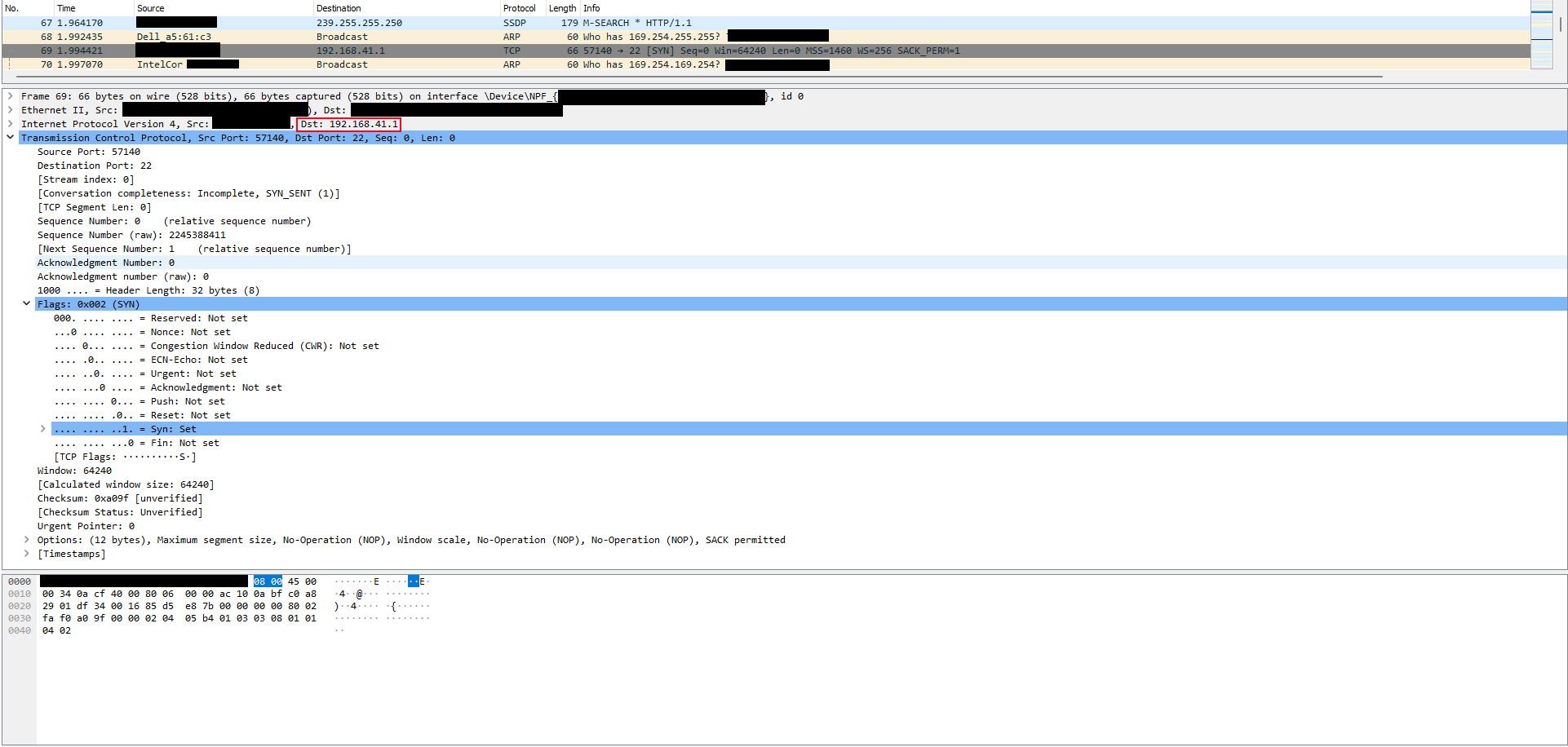
Checking with Wireshark shows that the packets sent by the SSH client to the embedded device are in fact sent to the wrong interface (i.e. sent to the network card with the ethernet cable, instead of through the RNDIS interface). But the routing table (route print) are looking correct: only the RNDIS interface is set for traffic to the subnet of the embedded device (192.168.41.*.)
Network Destination        Netmask          Gateway       Interface  Metric
          0.0.0.0          0.0.0.0      172.16.10.1    172.16.10.191     25 <- ethernet interface
          0.0.0.0          0.0.0.0      172.16.10.1    172.16.10.206     50 <- Wifi interface
        127.0.0.0        255.0.0.0         On-link         127.0.0.1    331
        127.0.0.1  255.255.255.255         On-link         127.0.0.1    331
  127.255.255.255  255.255.255.255         On-link         127.0.0.1    331
      172.16.10.0    255.255.254.0         On-link     172.16.10.206    306
      172.16.10.0    255.255.254.0         On-link     172.16.10.191    281
    172.16.10.191  255.255.255.255         On-link     172.16.10.191    281
    172.16.10.206  255.255.255.255         On-link     172.16.10.206    306
    172.16.11.255  255.255.255.255         On-link     172.16.10.206    306
    172.16.11.255  255.255.255.255         On-link     172.16.10.191    281
     192.168.41.0    255.255.255.0         On-link      192.168.41.3    276 <- Routing to the embedded device
     192.168.41.3  255.255.255.255         On-link      192.168.41.3    276
   192.168.41.255  255.255.255.255         On-link      192.168.41.3    276
        224.0.0.0        240.0.0.0         On-link         127.0.0.1    331
        224.0.0.0        240.0.0.0         On-link     172.16.10.191    281
        224.0.0.0        240.0.0.0         On-link     172.16.10.206    306
        224.0.0.0        240.0.0.0         On-link      192.168.41.3    276
  255.255.255.255  255.255.255.255         On-link         127.0.0.1    331
  255.255.255.255  255.255.255.255         On-link     172.16.10.191    281
  255.255.255.255  255.255.255.255         On-link     172.16.10.206    306
  255.255.255.255  255.255.255.255         On-link      192.168.41.3    276
- If I disconnect the ethernet cable or deactivate the WiFi, the issue disappears and the packets are well routed.
- If I set a "gateway" in the configuration of the DHCP server of the embedded device, it seems to works on my laptop. However on many other Win11 laptops, the opposite issue appears: the Internet access gets broken as soon as the embedded device is plugged by USB/RNDIS, because packets that should go to the ethernet or WiFi interfaces are wrongly sent to the RNDIS device.
This looks like a low-level bug where the index of the interface where to send the packet gets shifted in some conditions.
Is this a known issue ? Are there anything we can do to fix it or avoid it (except solutions mentionned above) ?
This is quite critical as it prevents from using the device normally.
Thank you !
' cx='32' cy='32' r='32' /%3E%3Ctext x='50%25' y='55%25' dominant-baseline='middle' text-anchor='middle' fill='%23FFF' %3EAH%3C/text%3E%3C/svg%3E)