Azure VPN Gateway
An Azure service that enables the connection of on-premises networks to Azure through site-to-site virtual private networks.
This browser is no longer supported.
Upgrade to Microsoft Edge to take advantage of the latest features, security updates, and technical support.
' cx='32' cy='32' r='32' /%3E%3Ctext x='50%25' y='55%25' dominant-baseline='middle' text-anchor='middle' fill='%23FFF' %3EAE%3C/text%3E%3C/svg%3E)
Hello,
I want to create a Site-to-site VPN between my network and an Azure Vnet,
I created a VPN Gateway in the Vnet, and the local network gateway also,
I've a problem while adding a new connection, the virtual network gateway didn't been selected even when i click on it.
Also why the other options are grayed out???
Ps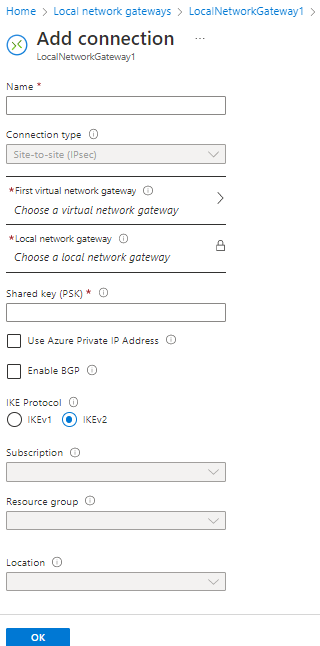
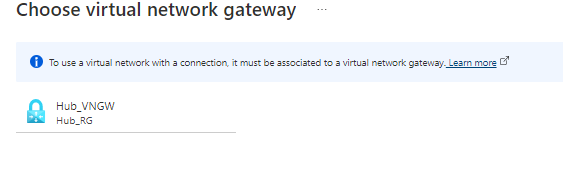 : I'm using a student subscription.
An Azure service that enables the connection of on-premises networks to Azure through site-to-site virtual private networks.
An Azure networking service that is used to provision private networks and optionally to connect to on-premises datacenters.
Answer accepted by question author
' cx='32' cy='32' r='32' /%3E%3Ctext x='50%25' y='55%25' dominant-baseline='middle' text-anchor='middle' fill='%23FFF' %3ECM%3C/text%3E%3C/svg%3E)
Hello @Abderrahim EL BRAK ,
Welcome to the Microsoft Q&A forum.
Based on a similar issue here. This is a known issue.
Can you try creating the connection using PowerShell? I was able to add the connection using PowerShell commands below.
  $gateway1 = Get-AzVirtualNetworkGateway -Name <GWName> -ResourceGroupName <RG>
  $local = Get-AzLocalNetworkGateway -Name <LNGName> -ResourceGroupName <RG>
  New-AzVirtualNetworkGatewayConnection -Name VNet1toSite1 -ResourceGroupName <RG> `
  -Location <Location> -VirtualNetworkGateway1 $gateway1 -LocalNetworkGateway2 $local `
  -ConnectionType IPsec -ConnectionProtocol IKEv2 -RoutingWeight 10 -SharedKey 'abc123'
If you do not have a PowerShell environment set-up locally. You can try Cloud Shell to run these commands. Please let me know if you observe any errors. Thank you!