Microsoft Security | Intune | Configuration Manager | Other
Other Configuration Manager-related features and issues

This browser is no longer supported.
Upgrade to Microsoft Edge to take advantage of the latest features, security updates, and technical support.
' cx='32' cy='32' r='32' /%3E%3Ctext x='50%25' y='55%25' dominant-baseline='middle' text-anchor='middle' fill='%23FFF' %3EKK%3C/text%3E%3C/svg%3E)
i am planning to utilise peer caching in my environment and need help with best practices/configurations required in sccm (like ports, settings)/etc.
If anyone can point to any documentation for the design document and for clear understanding, will be very helpful.
Other Configuration Manager-related features and issues

Hi @Karun Khanna ,
1)Free bandwidth of the peer cache source is used. We could not have to worry about this configuration.
We could delete the content in the file of ccmcache on the side of the client.
2)Yes, it will.
Yes, we could disable the check box enough to make sure clients do not use peer cache.
3)Yes, just remove the client setting.
4)It seems that there might be no related article about them.
A peer cache source rejects requests for content when it meets any of the following conditions at the time a peer requests content:
Low battery mode Processor load exceeds 80% Disk I/O has an AvgDiskQueueLength that exceeds 10
There are no more available connections to the computer.
If the response is helpful, please click "Accept Answer" and upvote it.
Note: Please follow the steps in our documentation to enable e-mail notifications if you want to receive the related email notification for this thread.

Thank you for participating in the community.
In the company I work for, I use the peer cache option due to the latency of links between sites.
Important point:
Attention to the packages / application that is also used in the Task Sequence.
I went through a problem: The field technicians, to optimize the disk space, they deleted the files from the cache (c:\windows\ccmcache*. *), Without cleaning the WMI class.
During the OSD deployment on new equipment or roll-out, the installation time was compromised.
Behavior observed by the logs:
The desktop validates the equipment of the same network and then tests which one has the package you are requesting.
An example of the log follows: c:\Windows\CCM\Logs\ContentTransferManager.log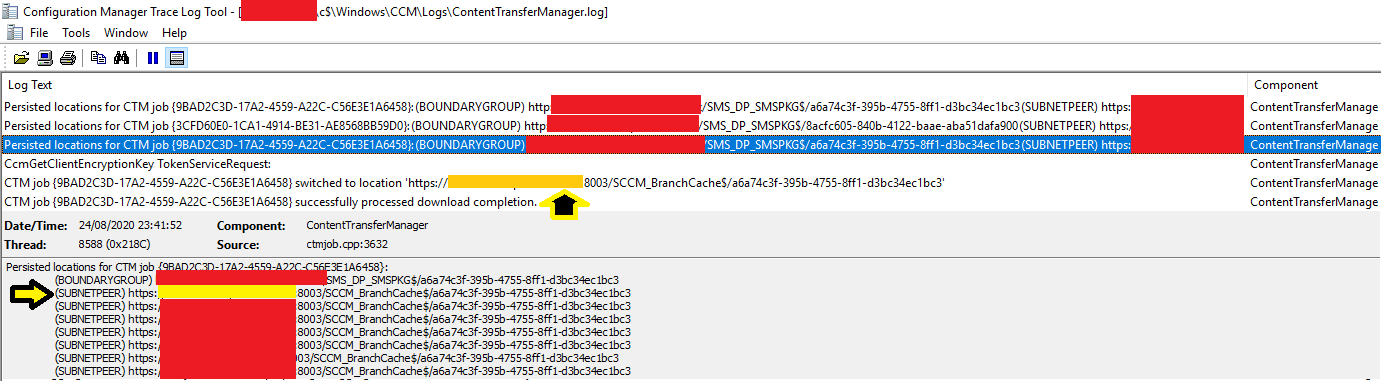
Thanks a lot guys, couple of more questions which i am really confused:
Hi KarunKhanna-4030,
Maybe we could refer to this article about peer and branch cache co-existence.
https://2pintsoftware.com/configmgr-peer-cache-branchcache/
Note: the above links are not from MS, and just for your reference.
Few questions on Peer cache:
1) How should the content be managed in Peer cache sources ( any considerations to deploy the packages in terms of bandwidth)
How the deletion of content should be managed in peer cache sources?
2) Will VPN client boundary group utilize the peer caching , will just disabling the check box enough to make sure clients dont use peer cache.
3) Roll back plan for peer caching (just remove the client settings?)
4) Minimum HD/CPU/etc requirement for peer cache source?

Hi,
Here is a guide from Johan which pretty much covers it all: setup-peer-cache-in-configmgr-current-branch
I always recommend that you read through the offical docs as well as things update frequently client-peer-cache
I hope that helps!
Regards,
Jörgen