Azure Virtual Desktop
A Microsoft desktop and app virtualization service that runs on Azure. Previously known as Windows Virtual Desktop.
This browser is no longer supported.
Upgrade to Microsoft Edge to take advantage of the latest features, security updates, and technical support.
' cx='32' cy='32' r='32' /%3E%3Ctext x='50%25' y='55%25' dominant-baseline='middle' text-anchor='middle' fill='%23FFF' %3EJW%3C/text%3E%3C/svg%3E)
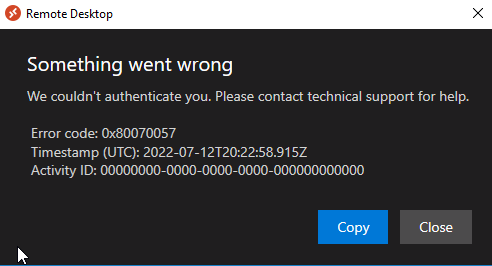
When I run the Windows Desktop Client on many of the desktops in my environment, I get the attached error when I click the subscribe button. The web client works fine from these computers. This is using the newest client. I get the same thing if I put in the feedurl. This error immediately pops up, it never even asks me to login. The Windows Desktop Client works from other computers.
A Microsoft desktop and app virtualization service that runs on Azure. Previously known as Windows Virtual Desktop.

Thanks for reaching out on Microsoft Q&A Platform.
Can you confirm if you have configured ADFS SSO for your devices?
Apologies for delayed response on this.
I guess this could be failing due to DNS resolution not working or a proxy server.
Can you please check once.
This issue was on Citrix Server 2016 Session Hosts. The solution ended up being to run this powershell script at login:
if (-not (Get-AppxPackage Microsoft.AAD.BrokerPlugin)) { Add-AppxPackage -Register "$env:windir\SystemApps\Microsoft.AAD.BrokerPlugin_cw5n1h2txyewy\Appxmanifest.xml" -DisableDevelopmentMode -ForceApplicationShutdown } Get-AppxPackage Microsoft.AAD.BrokerPlugin
This only resolved the issue for published desktops, not for published apps.
Firstly, apologies for the delay in responding here and any inconvenience this issue may have caused.
This issue needs deeper investigation. Support team will be able to check and help on this. I would recommend you to open a azure support case.
' cx='32' cy='32' r='32' /%3E%3Ctext x='50%25' y='55%25' dominant-baseline='middle' text-anchor='middle' fill='%23FFF' %3ESS%3C/text%3E%3C/svg%3E)
This solution worked for me.. Microsoft BrokerAgent application is required to authenticate.. In my case, it was corrupt.
Thanks for sharing the resolution for benefit of community.
