Note
Access to this page requires authorization. You can try signing in or changing directories.
Access to this page requires authorization. You can try changing directories.
Confidential Virtual Machines (CVMs) offer strong security and confidentiality for tenants. CVMs offer VM based Hardware Trusted Execution Environment (TEE) that leverage SEV-SNP security features to deny the hypervisor and other host management code access to VM memory and state, providing defense in depth protections against operator access. These features enable node pools with CVMs to target the migration of highly sensitive container workloads to AKS without any code refactoring while benefiting from the features of AKS. For example, you may require CVMs if you have the following:
- Workloads that handle security-critical data and sensitive customer data.
- Services that are required to meet various compliance requirements, especially for government contracts. Without a scalable solution for securing data, this could potentially lead to the loss of accreditation and contracts.
In this article, you learn how to create AKS node pools using Confidential VM sizes.
Important
Starting on December 10, 2026, Azure Kubernetes Service (AKS) no longer supports Azure Linux with OS Guard for AKS (preview). At that point, AKS no longer produces new Azure Linux with OS Guard node images or provides security patches, and you can no longer create new node pools with Azure Linux with OS Guard. On March 10, 2027, AKS removes all existing Azure Linux with OS Guard node images, which causes scaling and remediation (reimage and redeploy) operations to fail. To avoid disruption, migrate to Azure Container Linux (ACL). For more information about this retirement, see the Retirement GitHub issue and the Azure Updates retirement announcement. To stay informed about announcements and updates, follow the AKS release notes.
AKS supported confidential VM sizes
Azure offers a choice of Trusted Execution Environment (TEE) options from both AMD and Intel. These TEEs allow you to create Confidential VM environments with excellent price-to-performance ratios, all without requiring any code changes. Intel TDX-based Confidential VMs aren't currently supported on AKS.
For more information, see CVM VM sizes.
Security features
CVMs offer the following security enhancements as compared to other virtual machine (VM) sizes:
- Robust hardware-based isolation between virtual machines, hypervisor, and host management code.
- Customizable attestation policies to ensure the host's compliance before deployment.
- VM encryption keys that the platform or the customer (optionally) owns and manages.
- Secure key release with cryptographic binding between the platform's successful attestation and the VM's encryption keys.
- Dedicated virtual Trusted Platform Module (TPM) instance for attestation and protection of keys and secrets in the virtual machine.
- Secure boot capability similar to Trusted launch for Azure VMs
How does it work?
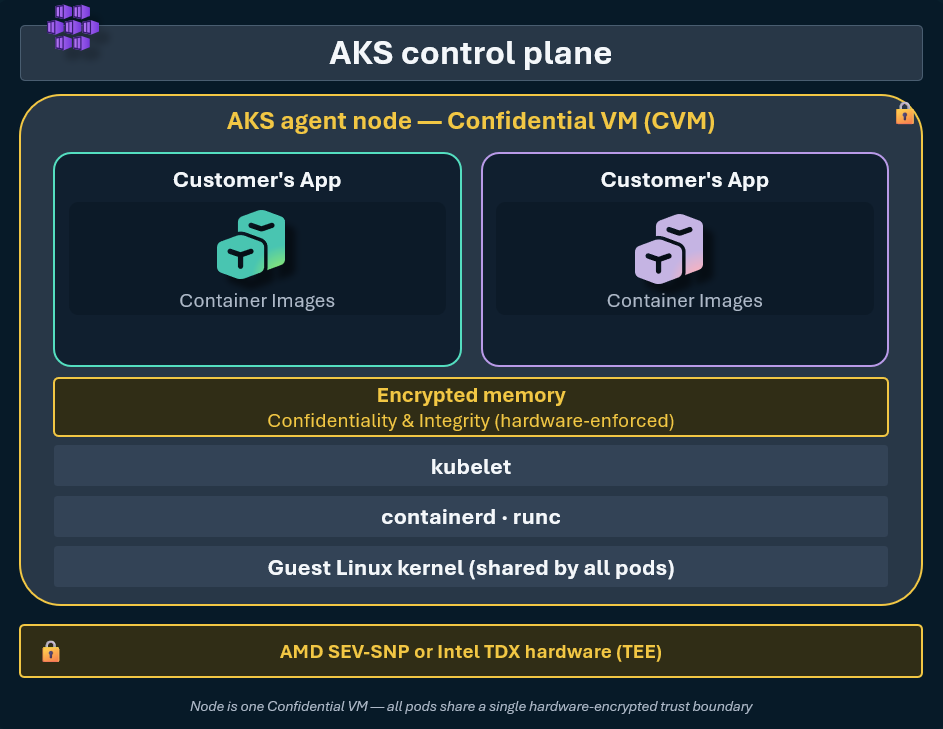
If you're running a workload that requires enhanced confidentiality and integrity, you can benefit from memory encryption and enhanced security without code changes in your application. All pods on your CVM node are part of the same trust boundary. The nodes in a node pool created with CVMs use a customized node image specially configured for CVMs.
Supported OS versions
You can create CVM node pools on Linux OS types (Ubuntu and Azure Linux). However, not all OS versions support CVM node pools.
This table includes the supported OS versions:
| OS type | OS SKU | CVM support | CVM default |
|---|---|---|---|
| Linux | Ubuntu |
Supported | Ubuntu 20.04 is default for Kubernetes version 1.24-1.34. Ubuntu 24.04 is the default for Kubernetes version 1.35-1.38. |
| Linux | Ubuntu2204 |
Not supported | AKS doesn't support CVM for Ubuntu 22.04. |
| Linux | Ubuntu2404 |
Supported | CVM is supported on Ubuntu2404 in Kubernetes 1.32-1.38. |
| Linux | AzureLinux |
Supported on Azure Linux 3.0 | Azure Linux 3 is default when enabling CVM for Kubernetes version 1.28-1.36. |
| Linux | flatcar |
Not supported | Flatcar Container Linux for AKS doesn't support CVM. |
| Linux | AzureLinuxOSGuard |
Not supported | Azure Linux with OS Guard for AKS doesn't support CVM. |
| Linux | AzureContainerLinux | Not supported | Azure Container Linux (ACL) doesn't support CVM. |
| Windows | All Windows OS SKUs | Not supported | N/A |
When you use Ubuntu or AzureLinux as the osSKU, if the default OS version doesn't support CVMs, AKS defaults to the most recent CVM-supported version of the OS.
Limitations
The following limitations apply when adding a node pool with CVM to AKS:
- You can't use FIPS, ARM64, Trusted Launch, Pod sandboxing, Confidential containers, or node auto-provisioning (NAP) with CVM node pools.
- You can't use CVMs with Windows node pools.
Prerequisites
Before you begin, make sure you have the following:
- An existing AKS cluster.
- CVM sizes must be available for your subscription in the region where the cluster is created. You must have sufficient quota to create a node pool with a CVM size.
Add a node pool with a CVM to your AKS cluster
Add a node pool with a CVM to your AKS cluster using the az aks nodepool add command and set the node-vm-size to a supported VM size.
az aks nodepool add \
    --resource-group myResourceGroup \
    --cluster-name myAKSCluster \
    --name cvmnodepool \
    --node-count 3 \
    --node-vm-size Standard_DC4as_v5
If you don't specify the osSKU or osType, AKS defaults to --os-type Linux and --os-sku Ubuntu.
To create a CVM node pool that uses Azure Linux, set --os-sku AzureLinux.
az aks nodepool add \
    --resource-group myResourceGroup \
    --cluster-name myAKSCluster \
    --name cvmnodepool \
    --node-count 3 \
    --node-vm-size Standard_DC4as_v5 \
    --os-sku AzureLinux
Verify the node pool uses CVMs
Verify a node pool uses CVMs by running the
az aks nodepool showcommand and checking that thevmSizeisStandard_DC4as_v5.az aks nodepool show \ --resource-group myResourceGroup \ --cluster-name myAKSCluster \ --name cvmnodepool \ --query 'vmSize'The following example output shows the node pool uses CVMs:
"Standard_DC4as_v5"Verify a node pool uses a CVM image by running the
az aks nodepool showcommand.az aks nodepool show \ --resource-group myResourceGroup \ --cluster-name myAKSCluster \ --name cvmnodepool \ --query 'nodeImageVersion'The following example output shows the node pool uses an Ubuntu 20.04 CVM image. The OS generation and image version depend on the Kubernetes version and OS SKU of the node pool.
"AKSUbuntu-2404gen2CVMcontainerd-202608.06.1"
Remove a node pool with CVMs from an AKS cluster
Remove a node pool with CVMs from an AKS cluster using the az aks nodepool delete command.
az aks nodepool delete \
    --resource-group myResourceGroup \
    --cluster-name myAKSCluster \
    --name cvmnodepool
Related content
In this article, you learned how to add a node pool with CVMs to an AKS cluster.
- For more information about CVMs, see Confidential VM node pools support on AKS.
- To migrate an existing node pool to a CVM vm size, you can resize your node pool.
- If you're interested in enabling Trusted Launch on your node pools, see Trusted Launch on AKS.