Note
Access to this page requires authorization. You can try signing in or changing directories.
Access to this page requires authorization. You can try changing directories.
Azure Virtual Machine Scale Sets
Azure Logic Apps
Azure SQL Managed Instance
Azure Virtual Network
Azure ExpressRoute
Solution ideas
This article describes a solution idea. Your cloud architect can use this guidance to help visualize the major components for a typical implementation of this architecture. Use this article as a starting point to design a well-architected solution that aligns with your workload's specific requirements.
This architecture describes how to implement an Information Management System (IMS) mainframe application workload on Azure by using Raincode IMSql. It's more complex to migrate an IMS Database (DB) application to a cloud-native solution than to migrate a relational database application. This article describes how to rehost a mainframe IMS workload that has critical IMS features and capabilities to Azure. You don't need to translate or modify your existing application.
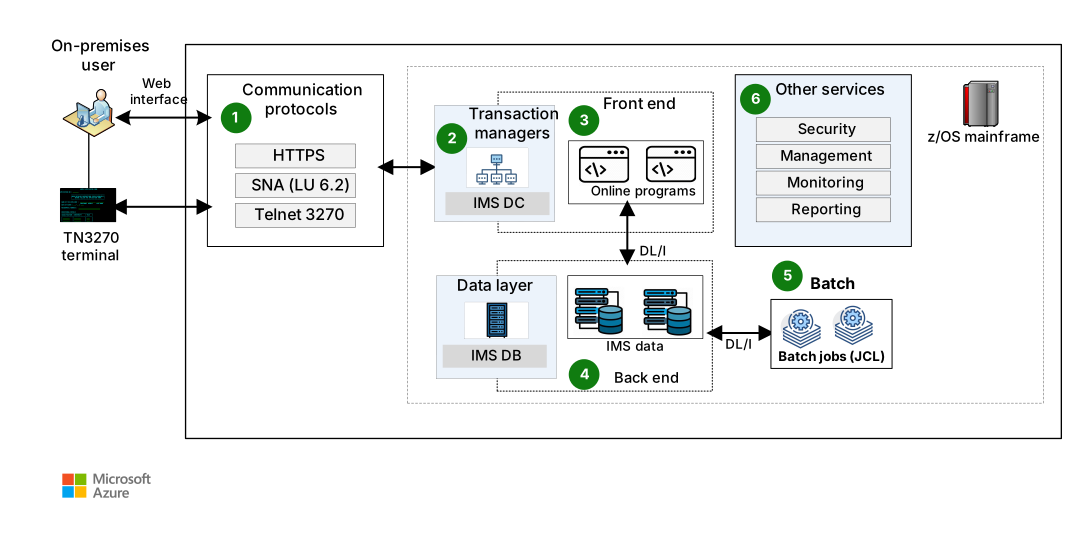
Premigration IMS DB and IMS Data Communications workload architecture
Data flow
The following data flow corresponds to the previous diagram:
Users connect to the mainframe over TCP/IP by using standard mainframe protocols like TN3270 and HTTPS.
Transaction managers interact with users and invoke the application to satisfy user requests.
Users interact with IMS screens or webpages in the application layer front end.
Application code uses the hierarchical IMS DB back-end data layer's storage capabilities.
Batch jobs perform offline big data operations.
Along with transaction processing, other services provide authentication, security, management, monitoring, and reporting. These services interact with other system services.
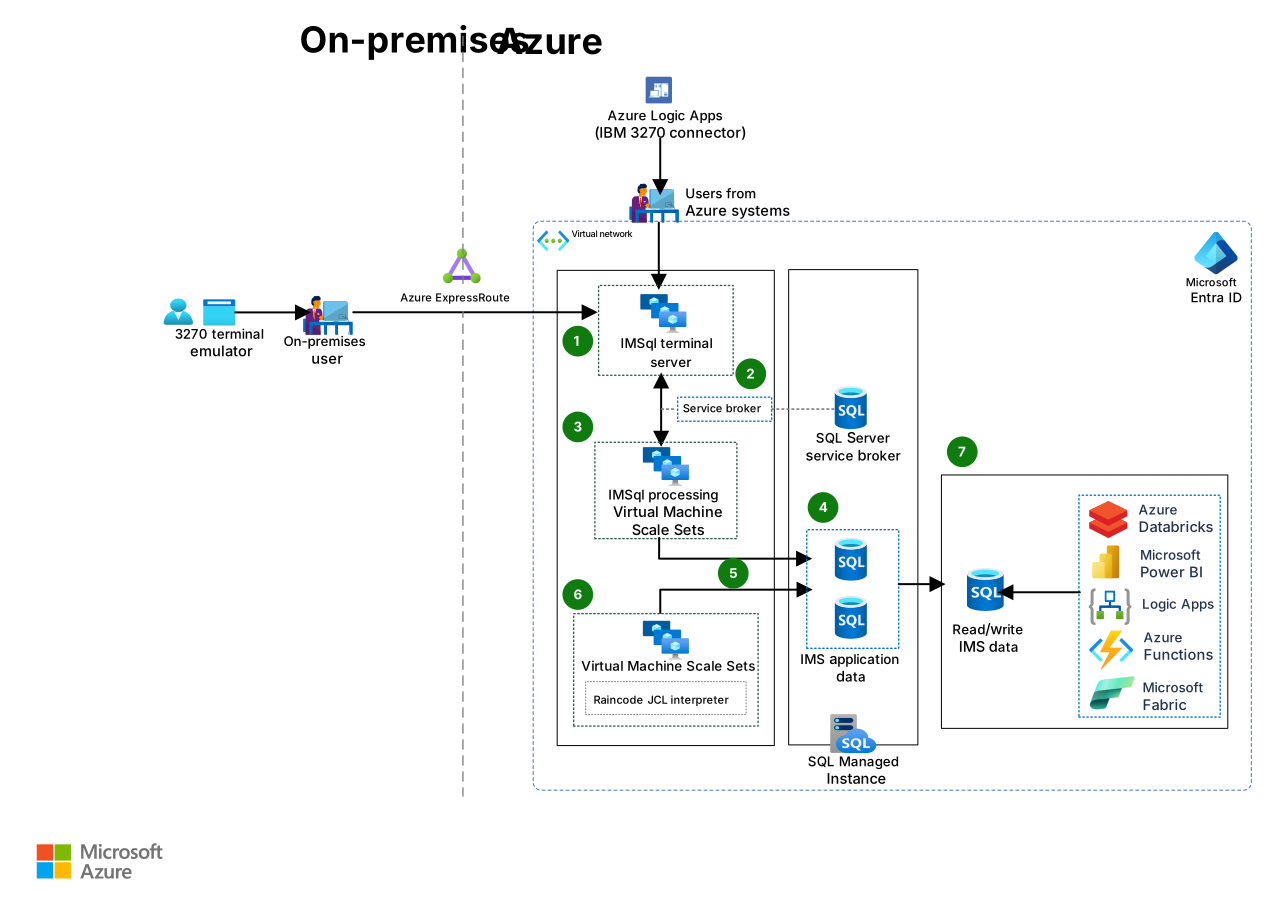
IMSql architecture on Azure
Download a Visio file of this architecture.
Workflow
The following workflow corresponds to the previous diagram:
IMSql terminal server
Traditionally, on-premises users access the mainframe z/OS interface by using an IBM in-house terminal or by using terminal emulation software. An application that has a geographically dispersed network with thousands of users connects to the mainframe by using a terminal. If you rehost an IMS Data Communications (DC) application on a distributed cloud-based system, you need to centrally host the application and the resource and publish them for the remote client devices. To host and publish the application and the resource on Azure, use IMSql terminal servers.
SQL Server service broker
In the mainframe, IMS DC transmits and processes messages in a control region to orchestrate the communication layer between user terminals and application programs. After the rehost, the SQL Server service broker orchestrates this asynchronous communication layer. This service broker supports communication through its message delivery framework and scales out messages to separate processing servers, current users, and their transaction processing.
IMSql processing server
The processing server runs Raincode-recompiled code for IMS programs in .NET Framework or .NET. The server contains the underlying infrastructure so that recompiled programs run effectively and with correct functional equivalence. The IMSql processing server can generate dynamic queries and call stored procedures in SQL Server that are created during Data Language/One (DL/I) call recompilation.
SQL Server as a hierarchical data store
Data is stored hierarchically in IMS. IMSql uses the same model on SQL Server. This model uses high performance relational databases to logically implement hierarchical segments from IMS. The model supports independent scaling with segments. Segment data is stored in raw EBCDIC format so that it doesn't require conversion for the application. By using SQL platform as a service (PaaS), IMSql can take advantage of the underlying high availability and disaster recovery capabilities that Azure provides.
DL/I call API
The IMSql API translates COBOL IMS DL/I calls to equivalent SQL queries. The API fetches data and returns it to the application program in the expected format. IMSql tracks the program position on the table record to perform create, read, update, and delete operations like the hierarchical database. To respond to performance-intensive DL/I calls, IMSql can create stored procedures in SQL Server during compilation.
Raincode JCL
Raincode job control language (JCL) is a z/OS JCL-compatible interpreter. Raincode JCL smooths the transition from the intricate business logic embedded in JCL to Azure and .NET platforms. Raincode JCL runs code compiled by Raincode COBOL, PL/I, and ASM370 compilers. Raincode JCL runs steps written in most languages. Implement user-written code to configure and adapt it for bespoke batch scheduling.
IMSql data view
IMSql defines relational SQL views based on copybooks or record layouts so Azure services and new applications can access IMS segments by using plain SQL statements. IMSql views are writable, so modern applications can both read and write to IMS via SQL Server.
Data migration via IMSql
Database object migration
IMSql extracts and transfers the original IMS database description (DBD) from the mainframe. IMSql uses DBD information to produce SQL scripts to generate a target database and tables in Azure SQL.
Each segment in an IMS DBD is translated as a table in Azure.
Tables include a key field, search fields, and IMS segment data represented in EBCDIC.
Azure SQL tables retain the IMS segment tree structure and the primary and foreign key relationships.
Initial data load
Data from the IMS DB is extracted via a mainframe job and download utilities like DFSRRC00 and DFSURGL0.
You can transfer extracted binary files to Azure by using Azure Data Factory connectors, like FTP and Secure FTP (SFTP), and a Java-based solution that runs on Unix Subsystem Services.
IMSql has a built-in load utility for completing the initial data loads. This tool uses the SQL Server bulk copy program (bcp) utility. The tool ensures that bcp runs and checks that the referential integrity between the tables matches the expected hierarchical structure.
This migration addresses a one-time data load from the IMS DB, but it doesn't address coexistence and associated data synchronization.
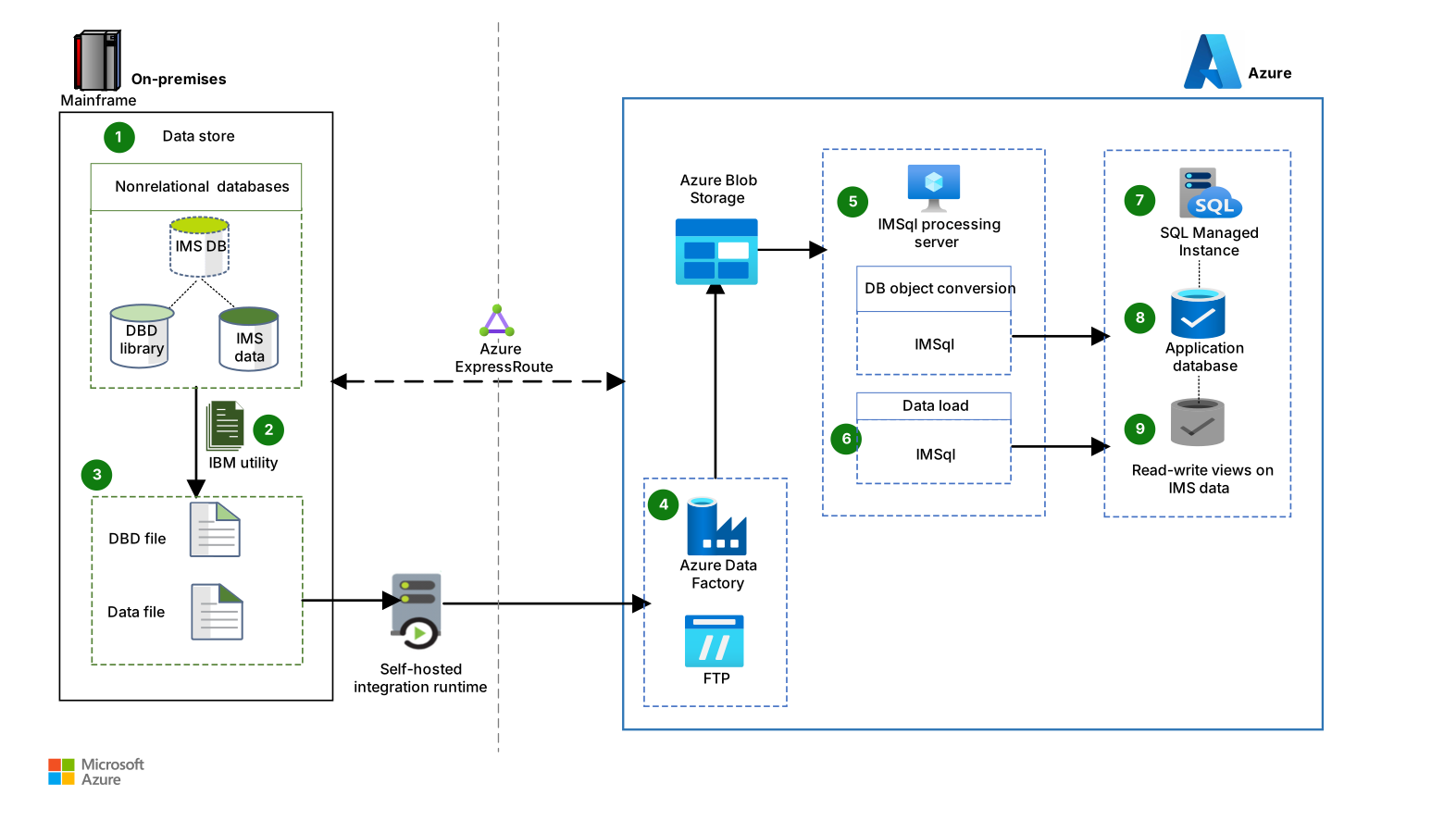
Data flow
The following data flow corresponds to the previous diagram:
IMS DB contains the DBD and the segment data.
IBM utilities extract and unload IMS DB information.
The DBD file and corresponding binary data files are generated separately.
The following steps describe the data ingestion process:
The Azure Data Factory FTP connector copies mainframe IMS datasets to Azure data storage.
Mainframe IMS data files are copied to Azure Blob Storage via SFTP.
Mainframe JCL runs a custom Java solution that moves data between the mainframe system and the SFTP Blob Storage.
IMSql creates the target database and tables, and maintains referential integrity, by using the DBD file.
IMSql loads the created data objects to the corresponding tables in sequential order.
Azure SQL Managed Instance hosts migrated IMS data.
The application database contains the raw segment data that's used for online IMS processing and batch processing.
The IMS read and write views contain segment data that expands based on the copybook layout.
Migrate IMS DB data by using Raincode zBridge
Raincode zBridge facilitates access to mainframe nonrelational data on Azure, including data from IMS DB segments. You can access this data in Azure SQL databases for distributed applications and for reporting and analytical purposes.
Import IMS segment data files into zBridge by using a matching COBOL copybook or PL/I include. The data appears as SQL rows that convert mainframe numeric types to SQL types and that convert strings to ASCII if needed. zBridge also supports complex data structures.
Components
Azure Logic Apps is a cloud platform for powerful integration solutions. Mainframe users familiar with 3270 terminals and on-premises connectivity can use the Logic Apps IBM 3270 connector to access and run IBM mainframe apps. In this architecture, Logic Apps supports mainframe interaction with migrated Azure applications by using either the public internet or an Azure ExpressRoute private connection that uses Microsoft Entra ID for authentication.
Azure Virtual Machine Scale Sets is a compute service that provides automated and load balanced virtual machine (VM) scaling that simplifies application management and increases availability. In this architecture, Virtual Machine Scale Sets provides enough VMs for the IMSql workload's mission-critical online and batch processing needs.
Azure Virtual Network supports secure communication between Azure resources, like Azure VMs, and with the internet and on-premises networks. Virtual Network is like a traditional network that you operate in your own datacenter, but it provides the scale, availability, and isolation of Azure infrastructure. In this architecture, Virtual Network provides a secure network foundation for effective communication between IMSql components.
ExpressRoute is a connectivity service that extends your on-premises networks into the Microsoft Cloud over a private connection facilitated by a connectivity provider. You can use ExpressRoute to establish connections to Microsoft Cloud services like Azure and Microsoft 365. In this architecture, ExpressRoute provides secure, high-bandwidth connectivity between on-premises mainframe environments and the migrated IMS applications that run on Azure.
Microsoft Entra ID is a cloud-based enterprise identity and access management service. In this architecture, Microsoft Entra ID protects against cybersecurity attacks and provides single sign-on and multifactor authentication to help users sign in and access resources.
SQL Managed Instance provides a fully managed SQL Server instance in Azure. In this architecture, SQL Managed Instance provides the relational database platform for converted hierarchical IMS DB data structures with high availability and Azure service integration.
Alternatives
You can use SQL Server in an Azure VM instead of SQL Managed Instance. We recommend SQL Managed Instance because of its high availability, integration with Azure services, and management of security patches and maintenance.
You can use an Azure single-VM architecture instead of Virtual Machine Scale Sets. Consider single VMs for workloads that have constant load and performance demands and don't require scaling. This architecture uses Virtual Machine Scale Sets to handle typical IMS workloads.
Scenario details
Mainframe online transaction processing (OLTP) systems can process millions of transactions for many users. IBM IMS is a classic mainframe transaction manager for OLTP. IBM IMS comprises IMS DC, the transaction manager, and IMS DB, the underlying hierarchical database management system (DBMS).
IMSql provides IMS-based workload hosting on Azure and on-premises, SQL Server-based, distributed implementations. IMSql provides a holistic solution for IMS workloads, including the app, data, and middleware components. IMSql can ingest hierarchical IMS DB data structures to a relational data model in SQL Server, SQL Server on Azure Virtual Machines, and SQL Managed Instance. It has built-in APIs for IMS application program DL/I calls, and it extends the data layer beyond hierarchical workloads to cloud-native apps for relational data.
This solution:
Modernizes infrastructure and reduces the high costs, limitations, and inflexibility of monolithic mainframe IMS workloads.
Implements cloud-native solutions and DevOps to reduce technical debt.
Sends IMS DB data to cloud-based applications that don't use mainframes, including AI and analytics applications.
Potential use cases
This solution might be useful for:
Banking, finance, insurance, government, and retail industries that use Mainframe IMS. Many of these organizations run their primary OLTP and batch applications on IMS DB and IMS DC.
IBM zSeries mainframe customers who need to migrate business-critical applications. These customers often want to maintain continuity with other on-premises applications and to avoid the effects of a complete redevelopment.
Contributors
Microsoft maintains this article. The following contributors wrote this article.
Principal authors:
- Nithish Aruldoss | Engineering Architect
- Amethyst Solomon | Senior Engineering Architect
To see nonpublic LinkedIn profiles, sign in to LinkedIn.
Next steps
- Copy files from the mainframe to Azure Data Factory by using the FTP connector
- Transfer mainframe files to Blob Storage by using SFTP
- What is Virtual Network?
- What is ExpressRoute?
- Microsoft Fabric documentation