Note
Access to this page requires authorization. You can try signing in or changing directories.
Access to this page requires authorization. You can try changing directories.
Agents and Tools with Foundry Local has three components. Agentic Retrieval finds and grounds content from your documents and other knowledge sources. Agent Service runs agents. An agent is an AI assistant that follows your instructions, calls tools, and answers users with content from your own data. The Local chat UI gives users a browser experience for chatting with agents. This article describes Agent Service.
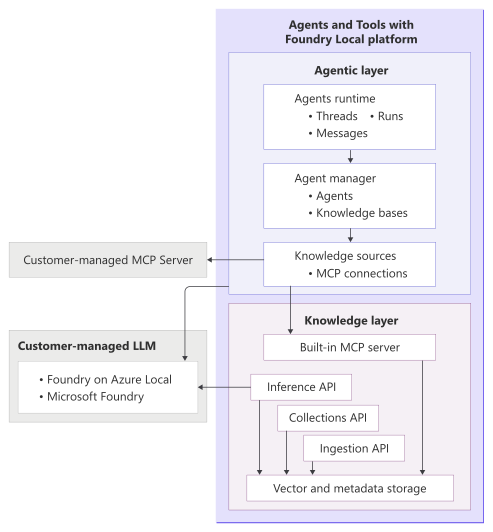
Agent Service uses the same API shapes as Microsoft Foundry Agent Service: an Agents API to define agents, and an OpenAI-compatible Responses API to run them. If you already know these APIs, most of your knowledge and client code carries over.
Important
Agent creation and management with Foundry Local is available in preview. Preview releases provide early access to features that are in active deployment. Features, approaches, and processes can change or have limited capabilities before general availability (GA). To learn about the legal terms that apply to Azure features that are in beta, preview, or otherwise not yet released into general availability, see the Supplemental Terms of Use for Microsoft Azure Previews.
What Agent Service provides
Use Agent Service when you need more than a single search. It gives you:
- Agents that you define. You create agents, write their instructions, choose their model, and pick their tools.
- Versioning. Every change to an agent creates a new, unchangeable version. You choose which version answers users, and you can roll back.
- Tools. Agents can call Model Context Protocol (MCP) servers, Microsoft Foundry toolboxes, and your Agentic Retrieval knowledge bases.
- Conversations. The service stores multiturn conversations for each user, so the agent remembers earlier turns.
- Streaming answers with citations. Answers can stream to the client as they're generated, and include links to the sources the agent used.
Main parts of Agent Service
Agent Service works with four services on your cluster. Agents management and agents execution are part of Agent Service. The Knowledge Sources and knowledge base execution services give agents access to Agentic Retrieval. You call their public routes through the cluster's HTTPS address (https://<cluster-domain>).
| Service | What it does | Main paths |
|---|---|---|
| Agents management | Stores agents, agent versions, connections, and knowledge bases. Developers use it to set up agents. | /agents, /connections, /knowledgebases |
| Agents execution | Runs agents. It reads the agent version, calls the model and tools, and stores the result. Applications and the local chat UI use it. | /openai/v1/responses, /openai/v1/conversations |
| Knowledge Sources | Creates and manages indexed, remote MCP, and SQL knowledge-source resources. | /knowledgesources |
| Knowledge base execution | Searches the knowledge sources in a knowledge base and returns grounded content to the agent. Agents use it through an MCP tool. You don't call it directly. | No public route |
Key concepts
Read these terms in order. Each one builds on the previous terms.
Model connection. A model connection tells the platform how to reach one deployed language model: its endpoint, model name, and sign-in method. A developer creates it with the Connections API. Agents and knowledge bases refer to it by name. For example,
my-model/gpt-oss-20bmeans "the modelgpt-oss-20bthat the connectionmy-modelpoints to".Agent. An agent is a named AI assistant, such as
hr-helper. A developer creates it. The agent itself only holds a name, an on/off state (enabled or disabled), and a pointer to the version that answers users.Agent version. An agent version holds the real settings of an agent: the model, the instructions, and the tools. A developer creates a new version each time they change the agent. The first version is number
1, and each new version gets the next number. You can't change a version after you create it.Tool. A tool is something an agent can call while it answers, such as a search over your documents. You list the tools in the agent version. The agent decides when to call them.
MCP connection. An MCP connection stores the address and sign-in method of one MCP server. A developer creates it with the Connections API, or inline when creating an agent version. MCP tools in an agent version point to an MCP connection by name.
Knowledge source. A knowledge source registers one place that holds knowledge, such as an indexed collection, an external MCP server, or an approved read-only SQL database slice. SQL knowledge sources are in preview. A developer creates a source with the Knowledge Sources API. For more information, see Configure a knowledge source.
Knowledge base. A knowledge base groups one or more knowledge sources and adds retrieval instructions. A developer creates it with the Knowledge Bases API. When you create a knowledge base, the platform also creates a matching MCP connection named
kb-<knowledge-base-name>. To let an agent use the knowledge base, you add that connection to the agent version as a tool. For more information, see Manage knowledge bases.Conversation. A conversation stores the turns between one user and agents over time. The calling user owns it. Other users can't see it.
Response. A response is one run of an agent. Your application sends the user's input, and the agent reads it, calls tools if needed, and returns output. A response can be part of a conversation, or it can stand alone.
How the parts work together
The following steps show a typical setup, from an empty cluster to a user getting an answer.
- A developer creates a model connection for the language model.
- A developer creates knowledge sources and a knowledge base that groups them. The platform creates the MCP connection
kb-<name>for the knowledge base. - A developer creates an agent version. It names the model connection, gives instructions, and adds tools, for example the knowledge base and an external MCP server.
- A user opens the local chat UI, or your application calls the Responses API, and sends a question to the agent.
- The agents execution service runs the selected agent version. It calls the model. When the model asks for a tool, the service calls the tool and gives the result back to the model.
- The service returns the answer, with citations, and stores it in the user's conversation.
Agents only use the tools listed in their version. They don't see other knowledge bases, connections, or collections on the cluster.
Roles and access
For a full description of identities, credentials, and approved endpoints, see Security and access for Agent Service.
Azure role-based access control (Azure RBAC) is the primary access model. An administrator assigns Azure roles to users, groups, or application identities at the extension resource scope. Inherited assignments at subscription, resource-group, or cluster scope also apply. For setup steps, see Assign Azure roles.
Important
App roles remain a fallback for most management and classic APIs, but not for Responses or Conversations. The local chat UI uses these APIs, so an app role alone no longer lets you chat with agents.
| Azure role | Who gets it | What they can do |
|---|---|---|
| Reader | People who read resource settings | Read settings and list enabled agent summaries. |
| Cognitive Services Contributor | Developers and administrators | Create, change, and delete agents, agent versions, connections, knowledge sources, and knowledge bases. |
| Cognitive Services OpenAI User | People and apps that run agents | Use Responses and Conversations, including the local chat UI. Also assign Reader to list agents. |
In disconnected deployments, use Reader for read-only access and Contributor for changes and chat. The extension's managed identity also needs Reader at the extension scope to check role assignments.
The EdgeRAGDeveloper app role remains a management fallback and is required to read full definitions from GET /agents and GET /agents/{name}. Without it, callers get enabled-agent summaries. EdgeRAGEndUser remains a fallback for agent summaries, connection metadata, and classic queries. Azure-role-authorized callers can access every collection; app-role fallback retains collection filters.
Conversations and responses belong to the caller who created them. The service uses the object ID (oid) in the access token. Stored responses also use the tenant ID (tid). A different owner or response tenant returns 404 Not Found.
The extension also has its own managed identity. If agents call a Foundry Local model with this identity, the identity needs Azure role assignments. You don't assign these roles to people. For steps, see Configure Foundry Local inference authentication.
Optional indexed sources and Agent Service
The current chart always deploys the core Agent Service workloads. The indexedSourcesEnabled setting controls whether the local indexed-source stack is also deployed.
indexedSourcesEnabled |
Core Agent Service | Local indexed-source stack | Typical use |
|---|---|---|---|
true (default) |
Yes | Yes | Agents grounded in locally indexed content and other configured tools. |
false |
Yes | No | Agent execution without the local ingestion, collection, and Indexed Sources MCP workloads. |
Language model options
The Agents and Tools with Foundry Local extension doesn't include a language model. You provide one and register it as a model connection. The model must offer an OpenAI-compatible API. The recommended model is GPT-OSS-20B. For hardware needs, see Requirements. To create a model connection, see Create and manage agents.
| Model connection kind | Use it for |
|---|---|
FoundryOnArc |
A model served by Foundry Local on Azure Local on the same Azure Arc-connected cluster. Recommended for on-premises deployments. |
FoundryCloud |
A model deployed in Microsoft Foundry. Needs network access from the cluster to Azure. |
OpenAICompatible |
Any other endpoint that offers an OpenAI-compatible API. Requires an API key. |
Agent APIs from earlier previews
Earlier previews used threads, messages, and runs, and created one agent for you automatically. Microsoft retired these APIs. Calls to /threads, /knowledge-bases, and POST /agents with the old request body now return 410 Gone. The earlier Knowledge Sources API used generated IDs. The current Knowledge Sources API at /knowledgesources uses source names and a different request body. Use the Agents API, current Knowledge Sources and Knowledge Bases APIs, Conversations API, and Responses API that this article describes.
| Earlier preview concept | Use instead |
|---|---|
| Thread | Conversation |
| Message | Conversation item |
| Run | Response |
| Default knowledge base paired with an automatic agent | Knowledge bases that you create and add to your own agents as tools |
Route mapping
The following table shows the current route for each route from earlier previews. Knowledge sources and knowledge bases now use a name in the route, not a generated ID.
| Earlier route | Current route | Notes |
|---|---|---|
POST /agents with the old request body |
POST /agents/{agent_name}/versions |
Creates the agent and its first version. |
POST /threads |
POST /openai/v1/conversations |
|
GET /threads |
GET /openai/v1/conversations |
|
GET /threads/{thread_id} |
GET /openai/v1/conversations/{conversation_id} |
|
POST /threads/{thread_id} |
POST /openai/v1/conversations/{conversation_id} |
Replaces the conversation metadata. |
DELETE /threads/{thread_id} |
DELETE /openai/v1/conversations/{conversation_id} |
|
POST /threads/{thread_id}/messages |
POST /openai/v1/conversations/{conversation_id}/items |
|
GET /threads/{thread_id}/messages |
GET /openai/v1/conversations/{conversation_id}/items |
|
GET /threads/{thread_id}/messages/{message_id} |
GET /openai/v1/conversations/{conversation_id}/items/{item_id} |
|
DELETE /threads/{thread_id}/messages/{message_id} |
DELETE /openai/v1/conversations/{conversation_id}/items/{item_id} |
|
POST /threads/{thread_id}/runs |
POST /openai/v1/responses |
Set agent_reference and conversation in the body. Set stream to true to get Server-Sent Events. |
GET /threads/{thread_id}/runs/{run_id} |
GET /openai/v1/responses/{response_id} |
|
POST /threads/{thread_id}/runs/{run_id}/cancel |
POST /openai/v1/responses/{response_id}/cancel |
|
GET /threads/{thread_id}/runs/{run_id}/steps |
GET /openai/v1/responses/{response_id} |
Tool calls appear as mcp_call items in output. |
GET /knowledge-bases |
GET /knowledgebases |
|
GET /knowledge-bases/{kb_id} |
GET /knowledgebases('{name}') |
|
PUT or PATCH /knowledge-bases/{kb_id} |
PUT /knowledgebases('{name}') |
The current API has no PATCH. Send the full knowledge base. |
POST /edgeai/knowledgesources |
POST /knowledgesources |
Use the current request body. |
GET /edgeai/knowledgesources |
GET /knowledgesources |
|
GET, PATCH, or DELETE /edgeai/knowledgesources/{ks_id} |
GET, PATCH, or DELETE /knowledgesources/{name} |
Use the source name, not the generated ID. |
POST /edgeai/knowledgesources/batch-delete |
POST /knowledgesources/batch-delete |
For request and response details, see the Agents API reference, Responses API reference, Knowledge Bases API reference, and Knowledge Sources API reference.