Note
Access to this page requires authorization. You can try signing in or changing directories.
Access to this page requires authorization. You can try changing directories.
Applies to:  Azure SQL Database
SQL database in Fabric
This article explains the connection policies available to Azure SQL Database. It covers different connection policies and how they affect clients connecting from within Azure and clients connecting from outside of Azure.
Supported connection policies
Azure SQL Database supports three connection policies:
For a side-by-side comparison of policies, see Which connection policy to choose.
Important
SQL database in Microsoft Fabric doesn't support changing the connection policy to a setting other than Default.
Proxy connection policy
The Proxy policy means that the client’s TCP session is established via the Azure SQL Database gateway and all subsequent packets flow via the gateway. The following diagram illustrates this traffic flow.
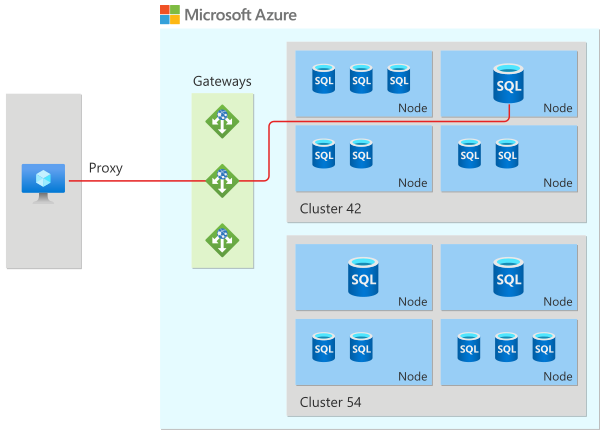
In Proxy mode, all connections go through the Azure SQL Database gateways. This mechanism ensures full backward compatibility with nonstandard TDS drivers that incorrectly report the support for redirection. However, it significantly increases latency, reduces throughput, and causes disconnects due to gateway failovers. To use the Proxy mode for connections, clients need to:
- For public endpoint access: allow outbound communication from the client to Azure SQL Database gateway IP addresses on port 1433. Use the Gateway IP addresses list later in this article for your region's IP addresses to allow.
- For private endpoint access: if you’re using Private Link, allow outbound communication from the client to the private endpoint’s IP address on port 1433.
Redirect connection policy
Redirect policy means that the client's TCP session connects directly with the host running the database. The following diagram shows this traffic flow.

In Redirect mode, clients first contact the gateway briefly to obtain the address of the node node hosting the database, then disconnect and connect directly to the node. Compared to Proxy, this mechanism reduces latency, improves throughput, and increases the overall resiliency of database connections. To use Redirect mode for connections, clients need to:
- For public endpoint access: allow outbound communication from the client to all Azure SQL IP addresses in the region on ports 1433 and 11000 through 11999 (ports 1434 and 14000 through 14999 for DAC). Use the
Sql.<region>service tags in Azure to make this easier to manage. See Azure IP Ranges and Service Tags - Public Cloud. - For private endpoint access: If you use Private Link, allow client-to-private-endpoint traffic on ports 1433 through 65535. DAC is available on port 1434. For more information, see Use Redirect connection policy with private endpoints.
Default connection policy
For public and service endpoints, the Default connection policy automatically chooses between Redirect and Proxy. Connections originating from Azure use Redirect when the client supports TDS 7.4 or later. Connections originating outside Azure, and connections from clients that don't support Redirect, use Proxy.
For public and service endpoints, clients in Azure using the Default policy must have outbound connectivity to Azure SQL Database on the ports required for Redirect.
Existing private endpoints using Default use Proxy on port 1433. To use Redirect, meet the private endpoint prerequisites and explicitly select the Redirect connection policy.
Which connection policy should you choose?
For production workloads, use explicit Redirect. Redirect provides direct connectivity to the database host, so it avoids the extra latency, throughput limitations, and gateway dependency that Proxy adds. When you use Redirect, configure client outbound connectivity explicitly to meet the network requirements described in the following table.
Note
Only use Proxy when client or network constraints prevent the use of Redirect. Proxy negatively affects connection performance and reliability. For Azure SQL Database, avoid the use of Default in production environments, as its variable application of Proxy and Redirect complicates connectivity setups and makes connectivity problems harder to trace. This recommendation doesn't apply to SQL database in Fabric, where Default is the only supported policy.
| Redirect (recommended) | Proxy | |
|---|---|---|
| Connection path | Direct. The gateway redirects the connection to the database host and is then removed from the data path. | Indirect. All traffic continues through the gateway for the lifetime of the connection. |
| Latency | Lower. After the initial connection through the gateway, traffic flows directly between the client and database host. | Higher. The gateway remains in the data path, which can particularly affect chatty applications making many small, sequential database calls. |
| Throughput | Higher. Traffic flows directly between the client and database host. | Lower. All database traffic flows through the gateway, which can affect bulk transfers and large result sets. |
| Performance consistency | Better. The gateway is removed from the data path after redirection. | Adds a dependency on shared regional gateway resources. |
| Resilience | Better isolation from gateway events. Established redirected connections don't depend on the gateway remaining available. | Established connections depend on the gateway and can be affected by gateway failover or maintenance. |
| Network requirements, public and service endpoints | Requires access to the Sql.<region> service tag on port 1433 and ports 11000–11999. |
Requires access to the regional gateway IP addresses for the region on port 1433. |
| Network requirements, private endpoint | Requires access to the private endpoint IP address on ports 1433–65535. | Requires access to the private endpoint IP address on port 1433. |
| Driver requirements | Compatible with all supported TDS drivers. TDS 7.4 or later is required to negotiate redirection; older drivers fall back to Proxy. | Any supported TDS driver. |
| When to choose | Preferred for production workloads. Design network topology and firewall rules to support Redirect. Use the latest TDS drivers for best security and performance: SQL Connectivity and Drivers. | Use only when client or network constraints prevent Redirect from being used. |
For new deployments, design your network to support Redirect. Use Proxy only when specific client or network constraints make Redirect impractical.
Changing connection policy
To change the connection policy after configuring your network flows for the required traffic flows, see Change the connection policy.
Gateway IP addresses
This section lists the IP address ranges assigned to the regional gateways of SQL Database.
When the Proxy connection policy is in effect, database clients must reach all IP addresses in all ranges for the region of the logical server. With the Redirect connection policy, clients must reach a wider set of IP addresses. To accomplish this, use the Sql.<region> service tags in Azure. For more information, see Azure IP Ranges and Service Tags - Public Cloud.
Clients connecting to private endpoints don't need connectivity to any of these ranges because a private endpoint has direct connectivity to the gateways.
| Region name | Gateway IP address ranges |
|---|---|
| East Asia | 13.75.32.192/29, 13.75.33.192/29, 20.195.72.32/27, 20.205.77.176/29, 20.205.77.200/29, 20.205.83.224/29 |
| Southeast Asia | 13.67.16.192/29, 20.195.65.32/27, 23.98.80.192/29, 40.78.232.192/29 |
| Australia Central | 20.36.105.32/29, 20.53.48.96/27 |
| Australia Central 2 | 20.36.113.32/29, 20.53.56.32/27 |
| Australia East | 13.70.112.32/29, 20.53.46.128/27, 40.79.160.32/29, 40.79.168.32/29 |
| Australia Southeast | 4.199.88.48/29, 13.77.49.32/29, 48.215.144.48/29, 104.46.179.160/27 |
| Austria East | 68.210.154.160/29, 68.210.175.32/27, 68.210.192.48/29, 68.210.208.48/29 |
| Belgium Central | 9.160.56.96/27, 9.160.82.136/29, 9.160.88.48/29, 9.160.112.48/29 |
| Brazil South | 191.233.200.32/29, 191.234.142.160/27, 191.234.144.32/29, 191.234.152.32/27, 191.234.153.32/27, 191.234.157.136/29 |
| Brazil Southeast | 191.233.15.160/27, 191.233.48.32/29 |
| Canada Central | 13.71.168.32/29, 20.38.144.32/29, 20.48.196.32/27, 52.246.152.32/29 |
| Canada East | 40.69.105.32/29, 52.139.106.192/27 |
| Chile Central | 68.211.15.128/27, 68.211.154.160/29, 68.211.168.24/29, 68.211.184.24/29 |
| Denmark East | 9.205.48.96/27, 9.205.72.48/29, 9.205.96.48/29, 9.205.112.48/29 |
| North Europe | 13.69.233.136/29, 13.74.105.192/29, 52.138.229.72/29, 52.146.133.128/27 |
| West Europe | 13.69.112.168/29, 20.61.99.192/27, 52.236.184.32/29, 104.40.169.32/29 |
| France Central | 20.43.47.192/27, 40.79.128.32/29, 40.79.136.32/29, 40.79.144.32/29 |
| France South | 40.79.176.40/29, 40.79.177.32/29, 52.136.185.0/27 |
| Germany West Central | 51.116.149.32/27, 51.116.152.32/29, 51.116.240.32/29, 51.116.248.32/29 |
| Germany North | 51.116.54.96/27, 51.116.57.32/29 |
| Central India | 20.192.43.160/27, 20.192.96.32/29, 40.80.48.32/29, 104.211.86.32/29 |
| India South Central | 172.198.99.32/27 |
| South India | 40.78.192.32/29, 40.78.193.32/29, 52.172.113.96/27 |
| West India | 52.136.53.160/27, 104.211.144.32/29, 104.211.145.32/29 |
| Indonesia Central | 70.153.167.64/27, 70.153.177.64/29, 70.153.200.24/29, 70.153.216.24/29 |
| Israel Central | 20.217.53.0/27, 20.217.59.248/29, 20.217.75.192/29, 20.217.91.192/29 |
| Israel Northwest | 51.4.136.96/27, 51.4.136.96/27, 51.4.162.136/29, 51.4.162.136/29 |
| Italy North | 4.232.101.160/27, 4.232.107.184/29, 4.232.123.192/29, 4.232.195.192/29 |
| Japan East | 13.78.104.32/29, 20.191.165.160/27, 40.79.184.32/29, 40.79.192.32/29 |
| Japan West | 4.190.144.24/29, 20.18.179.192/29, 20.189.225.160/27, 40.74.96.32/29 |
| Jio India Central | 20.192.48.32/27, 20.192.233.32/29 |
| Jio India West | 20.192.167.224/27, 20.193.200.32/29 |
| Korea Central | 20.44.24.32/29, 20.194.64.32/29, 20.194.73.64/27, 52.231.16.32/29 |
| Korea South | 52.147.112.160/27, 52.231.151.88/29, 52.231.151.96/27 |
| Malaysia South | 20.17.59.128/27, 20.17.67.248/29 |
| Malaysia West | 20.17.127.96/27, 20.17.131.40/29, 20.17.168.24/29, 20.17.184.24/29 |
| Mexico Central | 158.23.11.184/29, 158.23.112.160/27, 158.23.123.192/29, 158.23.195.192/29 |
| New Zealand North | 172.204.167.64/27, 172.204.177.0/29, 172.204.192.24/29, 172.204.208.24/29 |
| Norway East | 51.120.96.32/29, 51.120.104.32/29, 51.120.208.32/29, 51.120.232.192/27 |
| Norway West | 51.13.136.224/27, 51.120.217.32/29 |
| Poland Central | 20.215.13.0/27, 20.215.19.192/29, 20.215.27.192/29, 20.215.155.248/29 |
| Qatar Central | 20.21.43.248/29, 20.21.53.32/27, 20.21.67.192/29, 20.21.75.192/29 |
| South Africa North | 102.133.120.32/29, 102.133.152.32/29, 102.133.221.224/27, 102.133.248.32/29 |
| South Africa West | 102.37.80.96/27, 102.133.25.32/29 |
| Spain Central | 68.221.40.160/27, 68.221.99.184/29, 68.221.147.192/29, 68.221.154.88/29 |
| Sweden Central | 51.12.46.32/27, 51.12.96.32/29, 51.12.224.32/29, 51.12.232.32/29 |
| Sweden South | 51.12.198.32/27, 51.12.200.32/29, 51.12.201.32/29 |
| Switzerland North | 20.208.19.192/29, 51.103.203.192/29, 51.107.56.32/29, 51.107.242.32/27 |
| Switzerland West | 51.107.153.32/29, 51.107.250.64/27 |
| Taiwan North | 51.53.101.32/27, 51.53.107.248/29, 70.157.88.48/29, 167.105.104.48/29 |
| Taiwan Northwest | 51.53.182.32/27, 51.53.187.248/29 |
| UAE Central | 20.37.71.64/27, 20.37.72.96/29, 20.37.73.96/29, 74.243.18.24/29 |
| UAE North | 20.38.143.64/27, 20.38.152.24/29, 40.120.72.32/29, 65.52.248.32/29 |
| UK South | 51.105.64.32/29, 51.105.72.32/29, 51.140.144.32/29, 51.143.209.224/27 |
| UK West | 20.58.66.128/27, 51.140.208.96/29, 51.140.209.32/29 |
| Central US | 13.89.168.192/29, 20.40.228.128/27, 52.182.136.192/29, 104.208.21.192/29 |
| North Central US | 20.49.119.32/27, 20.125.171.192/29, 20.125.203.192/29, 52.162.105.192/29, 52.162.105.200/29 |
| South Central US | 20.45.121.32/29, 20.49.88.32/29, 20.49.89.32/29, 20.65.132.160/27, 40.124.64.136/29, 48.221.168.48/29 |
| South Central US 2 | 48.216.10.160/29, 48.216.34.32/27 |
| West Central US | 13.71.193.32/29, 20.69.0.32/27, 57.151.152.24/29, 172.215.203.64/29 |
| East US | 20.42.65.64/29, 20.42.73.0/29, 20.62.132.160/27, 52.168.116.64/29 |
| East US 2 | 20.62.58.128/27, 40.70.144.192/29, 52.167.104.192/29, 104.208.150.192/29, 172.210.216.24/29 |
| East US 3 | 134.138.83.32/27, 134.138.83.32/27, 134.138.96.48/29, 134.138.96.48/29 |
| Central US EUAP | 20.46.11.32/27, 40.78.200.128/29, 40.78.201.128/29 |
| East US 2 EUAP | 20.51.17.160/27, 40.74.144.32/29, 40.74.145.32/29, 40.75.32.40/29, 40.75.33.32/29, 52.138.88.32/29, 52.138.89.32/29, 68.220.82.88/29 |
| Northeast US 5 | 172.194.84.96/27 |
| Southeast US | 57.151.223.64/27, 68.154.137.64/29 |
| Southeast US 3 | 74.7.56.224/27, 74.7.82.136/29 |
| West US | 13.86.217.224/29, 20.66.3.64/27, 20.168.163.192/29 |
| West US 2 | 13.66.136.192/29, 20.51.9.128/27, 40.78.240.192/29, 40.78.248.192/29 |
| West US 3 | 4.236.112.48/29, 20.150.168.32/29, 20.150.176.32/29, 20.150.184.32/29, 20.150.241.128/27 |
For Gateway IP address ranges for regions in China, see Gateway IP addresses on Microsoft Azure operated by 21Vianet docs.