Note
Access to this page requires authorization. You can try signing in or changing directories.
Access to this page requires authorization. You can try changing directories.
This article explains Spring Cloud Azure authentication methods and helps you choose the right credential type to secure access to Azure resources.
Authentication and authorization with Microsoft Entra ID
By using Microsoft Entra ID, you can use Azure role-based access control (Azure RBAC) to grant permissions to a security principal, which can be a user or an application service principal. When a security principal (a user or an application) tries to access an Azure resource, such as an Event Hubs resource, the request must be authorized. By using Microsoft Entra ID, access to a resource is a two-step process:
- First, authenticate the security principal's identity and return an OAuth 2.0 token.
- Next, pass the token as part of a request to the Azure service to authorize access to the specified resource.
Credential types
Spring Cloud Azure enables you to configure different credential types for authentication, including DefaultAzureCredential, WorkloadIdentityCredential, ManagedIdentityCredential, ClientSecretCredential, AzureCliCredential, and more.
DefaultAzureCredential
DefaultAzureCredential is appropriate for most scenarios where the application is intended to run in the Azure Cloud, because it combines the following credentials:
- Credentials commonly used to authenticate when deployed.
- Credentials used to authenticate in a development environment.
Note
DefaultAzureCredential simplifies getting started with the Azure SDK by handling common scenarios with reasonable default behaviors. If you want more control or the default settings don't support your scenario, use other credential types.
DefaultAzureCredential attempts to authenticate via the following mechanisms in order:
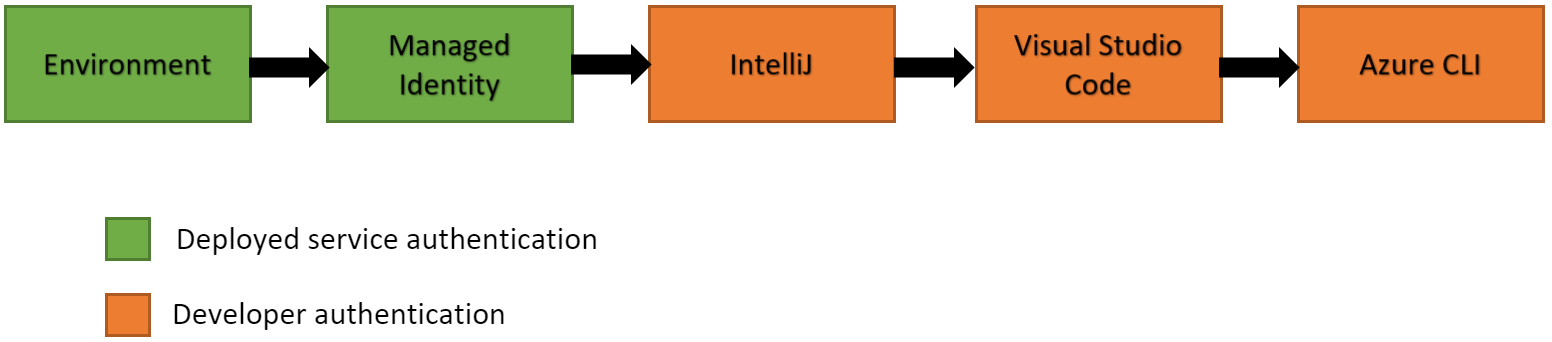
- Environment -
DefaultAzureCredentialtries to read account information specified through environment variables and use it to authenticate. - Managed Identity - If the application is deployed to an Azure host with Managed Identity enabled,
DefaultAzureCredentialtries to authenticate by using that account. - Workload Identity - If the application is deployed to a virtual machine (VM),
DefaultAzureCredentialtries to authenticate by using that account. - Shared Token Cache - If you authenticated through Visual Studio,
DefaultAzureCredentialtries to authenticate by using that account. - IntelliJ - If you authenticated through Azure Toolkit for IntelliJ,
DefaultAzureCredentialtries to authenticate by using that account. - Azure CLI - If you authenticated an account through the Azure CLI
az logincommand,DefaultAzureCredentialtries to authenticate by using that account. - Azure PowerShell - If you authenticated through Azure PowerShell,
DefaultAzureCredentialtries to authenticate by using that account. - Azure Developer CLI - If you authenticated through the Azure Developer CLI,
DefaultAzureCredentialtries to authenticate by using that account.
Tip
Be sure the security principal has sufficient permission to access the Azure resource. For more information, see Authorize access with Microsoft Entra ID.
Note
Since Spring Cloud Azure AutoConfigure 4.1.0, you must register a ThreadPoolTaskExecutor bean named springCloudAzureCredentialTaskExecutor to manage all threads created by Azure Identity. The name of each thread managed by this thread pool is prefixed with az-identity-. This ThreadPoolTaskExecutor bean is independent of the Executor bean provided by Spring Boot.
Managed identities
A common challenge is the management of secrets and credentials used to secure communication between different components making up a solution. Managed identities eliminate the need to manage credentials. Managed identities provide an identity for applications to use when connecting to resources that support Microsoft Entra authentication. Applications can use the managed identity to obtain Microsoft Entra tokens. For example, an application can use a managed identity to access resources like Azure Key Vault where you can store credentials in a secure manner or to access storage accounts.
Use managed identity instead of using connection string or key in your application because it's more secure and saves the trouble of managing secrets and credentials. In this case, DefaultAzureCredential better serves the scenario of developing locally by using account information stored locally, then deploying the application to Azure Cloud and using managed identity.
Managed identity types
There are two types of managed identities:
- System-assigned - Some Azure services allow you to enable a managed identity directly on a service instance. When you enable a system-assigned managed identity, you create an identity in Microsoft Entra that's bound to the lifecycle of that service instance. So when you delete the resource, Azure automatically deletes the identity for you. By design, only that Azure resource can use this identity to request tokens from Microsoft Entra ID.
- User-assigned - You can also create a managed identity as a standalone Azure resource. You can create a user-assigned managed identity and assign it to one or more instances of an Azure service. With user-assigned managed identities, you manage the identity separately from the resources that use it.
Note
When using a user-assigned managed identity, specify the client ID through spring.cloud.azure.credential.client-id or spring.cloud.azure.<azure-service>.credential.client-id. You don't need credential configuration if you use a system-assigned managed identity.
Tip
To access the Azure resource, be sure the security principal has sufficient permission. For more information, see Authorize access with Microsoft Entra ID.
For more information about managed identity, see What are managed identities for Azure resources?.
Other credential types
If you want more control than what's provided by DefaultAzureCredential, or the default settings don't support your scenario, use other credential types.
Authenticate with Microsoft Entra ID
To connect applications to resources that support Microsoft Entra authentication, set the following configurations with the prefix spring.cloud.azure.credential or spring.cloud.azure.<azure-service>.credential.
The following table lists authentication properties:
| Property | Description |
|---|---|
client-id |
The client ID to use when performing service principal authentication with Azure. |
client-secret |
The client secret to use when performing service principal authentication with Azure. |
client-certificate-path |
Path of a PEM certificate file to use when performing service principal authentication with Azure. |
client-certificate-password |
The password of the certificate file. |
username |
The username to use when performing username/password authentication with Azure. |
password |
The password to use when performing username/password authentication with Azure. |
managed-identity-enabled |
Whether to enable managed identity. |
token-credential-bean-name |
The bean name of type TokenCredential to use when performing authentication with Azure. |
Tip
For the list of all Spring Cloud Azure configuration properties, see Spring Cloud Azure configuration properties.
The application looks in several places to find an available credential. Each Azure SDK client builder factory adopts a custom bean of type TokenCredential first if you specify the property token-credential-bean-name, and falls back to use DefaultAzureCredential if you don't configure credential properties.
Authenticate using a customized TokenCredential bean
The following example shows how to define a custom TokenCredential bean to do the authentication:
@Bean
TokenCredential myTokenCredential() {
    // Your concrete TokenCredential instance
}
spring.cloud.azure:
  credential:
    token-credential-bean-name: myTokenCredential
Authenticate using a system-assigned managed identity
The following example shows how to authenticate by using a system-assigned managed identity:
spring.cloud.azure:
  credential:
    managed-identity-enabled: true
Authenticate using a user-assigned managed identity
The following example shows how to authenticate by using a user-assigned managed identity:
spring.cloud.azure:
  credential:
    managed-identity-enabled: true
    client-id: ${AZURE_CLIENT_ID}
Authenticate using a service principal with client secret
The following example shows how to authenticate by using a service principal with a client secret:
spring.cloud.azure:
  credential:
    client-id: ${AZURE_CLIENT_ID}
    client-secret: ${AZURE_CLIENT_SECRET}
  profile:
    tenant-id: <tenant>
Note
The values allowed for tenant-id are: common, organizations, consumers, or the tenant ID. For more information about these values, see the Used the wrong endpoint (personal and organization accounts) section of Error AADSTS50020 - User account from identity provider doesn't exist in tenant. For information on converting your single-tenant app, see Convert single-tenant app to multitenant on Microsoft Entra ID.
Authenticate using a service principal with client certificate
The following example shows how to authenticate by using a service principal with a client PFX certificate:
spring.cloud.azure:
  credential:
    client-id: ${AZURE_CLIENT_ID}
    client-certificate-path: ${AZURE_CLIENT_CERTIFICATE_PATH}
    client-certificate-password: ${AZURE_CLIENT_CERTIFICATE_PASSWORD}
  profile:
    tenant-id: <tenant>
Note
The values allowed for tenant-id are: common, organizations, consumers, or the tenant ID. For more information about these values, see the Used the wrong endpoint (personal and organization accounts) section of Error AADSTS50020 - User account from identity provider doesn't exist in tenant. For information on converting your single-tenant app, see Convert single-tenant app to multitenant on Microsoft Entra ID.
The following example shows how to authenticate by using a service principal with a client PEM certificate:
spring.cloud.azure:
  credential:
    client-id: ${AZURE_CLIENT_ID}
    client-certificate-path: ${AZURE_CLIENT_CERTIFICATE_PATH}
  profile:
    tenant-id: <tenant>
Note
The values allowed for tenant-id are: common, organizations, consumers, or the tenant ID. For more information about these values, see the Used the wrong endpoint (personal and organization accounts) section of Error AADSTS50020 - User account from identity provider doesn't exist in tenant. For information on converting your single-tenant app, see Convert single-tenant app to multitenant on Microsoft Entra ID.
Authenticate by using a user credential
The following example shows how to authenticate by using a user credential:
spring.cloud.azure:
  credential:
    client-id: ${AZURE_CLIENT_ID}
    username: ${AZURE_USER_USERNAME}
    password: ${AZURE_USER_PASSWORD}
Authenticate a service by using a different credential from others
The following example shows how to authenticate with Key Vault by using a different service principal. This example configures the application with two credentials: one system-assigned managed identity and one service principal. The Key Vault Secret client uses the service principal, but any other components use managed identity instead.
spring.cloud.azure:
  credential:
    managed-identity-enabled: true
  keyvault.secret:
    credential:
      client-id: ${AZURE_CLIENT_ID}
      client-secret: ${AZURE_CLIENT_SECRET}
    profile:
      tenant-id: <tenant>
Note
The values allowed for tenant-id are: common, organizations, consumers, or the tenant ID. For more information about these values, see the Used the wrong endpoint (personal and organization accounts) section of Error AADSTS50020 - User account from identity provider doesn't exist in tenant. For information on converting your single-tenant app, see Convert single-tenant app to multitenant on Microsoft Entra ID.
Authorize access with Microsoft Entra ID
The authorization step requires assigning one or more Azure roles to the security principal. The roles that you assign to a security principal determine the permissions that the principal has.
Tip
For the list of all Azure built-in roles, see Azure built-in roles.
The following table lists the Azure built-in roles for authorizing access to Azure services supported in Spring Cloud Azure:
| Role | Description |
|---|---|
| App Configuration Data Owner | Allows full access to App Configuration data. |
| App Configuration Data Reader | Allows read access to App Configuration data. |
| Azure Event Hubs Data Owner | Allows full access to Azure Event Hubs resources. |
| Azure Event Hubs Data Receiver | Allows receive access to Azure Event Hubs resources. |
| Azure Event Hubs Data Sender | Allows send access to Azure Event Hubs resources. |
| Azure Service Bus Data Owner | Allows full access to Azure Service Bus resources. |
| Azure Service Bus Data Receiver | Allows receive access to Azure Service Bus resources. |
| Azure Service Bus Data Sender | Allows send access to Azure Service Bus resources. |
| Storage Blob Data Owner | Provides full access to Azure Storage blob containers and data, including assigning POSIX access control. |
| Storage Blob Data Reader | Read and list Azure Storage containers and blobs. |
| Storage Queue Data Reader | Read and list Azure Storage queues and queue messages. |
| Redis Cache Contributor | Manage Redis caches. |
Note
When you use Spring Cloud Azure Resource Manager to get the connection strings for Event Hubs, Service Bus, and Storage Queue, or the properties of Cache for Redis, assign the Azure built-in role Contributor. Azure Cache for Redis is special, and you can also assign the Redis Cache Contributor role to get the Redis properties.
Note
A Key Vault access policy determines whether a given security principal, namely a user, application, or user group, can perform different operations on Key Vault secrets, keys, and certificates. You can assign access policies by using the Azure portal, the Azure CLI, or Azure PowerShell. For more information, see Assign a Key Vault access policy.
Important
Azure Cosmos DB exposes two built-in role definitions: Cosmos DB Built-in Data Reader and Cosmos DB Built-in Data Contributor. However, Azure portal support for role management isn't available yet. For more information about the permission model, role definitions, and role assignment, see Configure role-based access control with Microsoft Entra ID for your Azure Cosmos DB account.
Authenticate by using SAS tokens
You can also configure services for authentication by using Shared Access Signature (SAS). Use the spring.cloud.azure.<azure-service>.sas-token property to configure this authentication. For example, use spring.cloud.azure.storage.blob.sas-token to authenticate to the Storage Blob service.
Authenticate by using connection strings
Some Azure services support connection strings to provide connection information and credentials. To connect to those Azure services by using connection strings, configure spring.cloud.azure.<azure-service>.connection-string. For example, configure spring.cloud.azure.eventhubs.connection-string to connect to the Event Hubs service.