Note
Access to this page requires authorization. You can try signing in or changing directories.
Access to this page requires authorization. You can try changing directories.
Azure DevOps Services | Azure DevOps Server | Azure DevOps Server 2022
This article offers general troubleshooting guidance for Azure DevOps service hooks. It also provides answers to frequently asked questions (FAQs).
View activity and debug problems
The Service Hooks page in the web access admin summarizes activity from the last seven days for each subscription. The page also shows whether each subscription is enabled, disabled, or restricted.
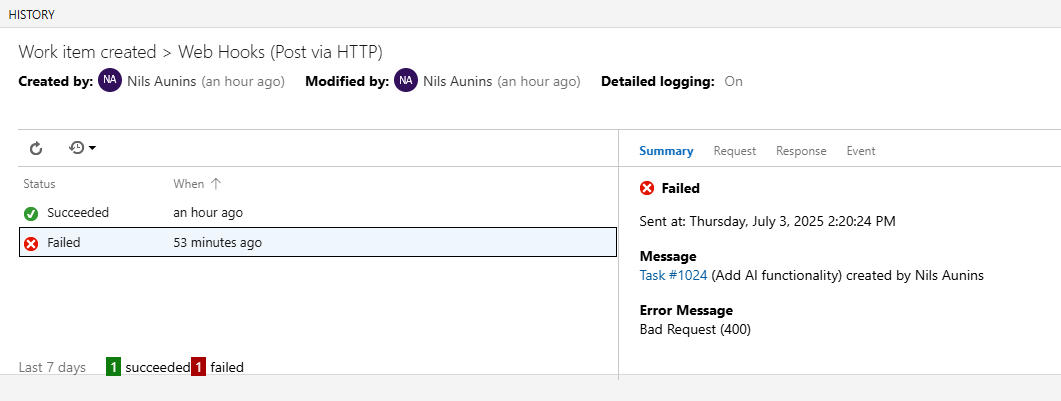
For each subscription, you can access a detailed history that includes the complete request and response data for each event. This information can help you debug a problematic service or subscription.
To view the activity and status of your subscriptions, go to the Service Hooks page.
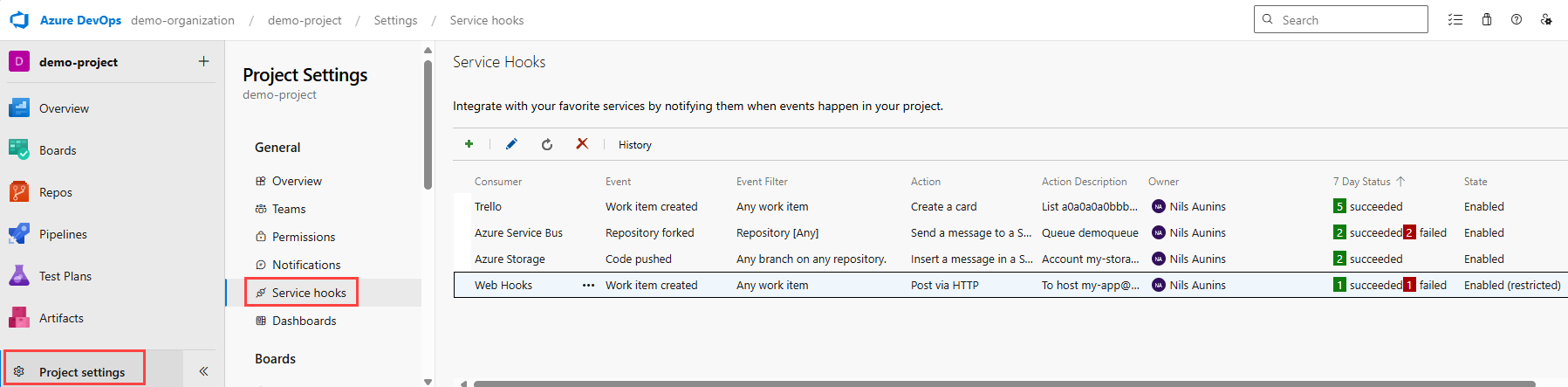
To view detailed activity for a subscription, including full request, response, and event payload data, select a subscription in the table, and then select History.
Subscription failures and probation (restricted)
If the HTTP response to a notification request indicates an error, the severity of the failure determines how Azure DevOps responds. Certain types of failures can disable subscriptions or put them on probation.
Failure types
Failures from service hook notifications are grouped into the following categories:
- Terminal failures
- Transient failures
- Enduring failures
The error code from the HTTP response determines how Azure DevOps categorizes the failure.
Terminal failures
The only HTTP status code that's categorized as a terminal failure is 410 (Gone).
When a terminal failure occurs in a subscription, the subscription is automatically disabled no matter its prior state.
Transient failures
HTTP responses with the following status codes are categorized as transient failures:
- 408 (Request Timeout)
- 502 (Bad Gateway)
- 503 (Service Unavailable)
- 504 (Gateway Timeout)
When a transient failure occurs in a subscription, Azure DevOps attempts to resend the notification up to eight times, with an increasing delay between each attempt.
The following table lists information about retries that are attempted after a transient failure occurs. Included is the approximate backoff time, or the time to wait before attempting to resend a notification. The maximum backoff time is 60 seconds. The table also shows the total delay for each retry.
| Retry number | Backoff time in seconds | Total delay in seconds |
|---|---|---|
| 1 | 1 | 1 |
| 2 | 2 | 3 |
| 3 | 4 | 7 |
| 4 | 8 | 15 |
| 5 | 16 | 31 |
| 6 | 32 | 63 |
| 7 | 60 | 123 |
| 8 | 60 | 183 |
If all retries for a notification are exhausted and each attempt results in a transient failure, the notification is no longer sent. Instead, it's categorized as an enduring failure.
Enduring failures
All other HTTP failure codes, for example, 404 (Not Found) and 500 (Internal Server Error), result in enduring failures.
When an enduring failure occurs in a subscription, the subscription is placed on probation.
Probation
When a subscription is on probation, it loses any new events. The system makes a limited number of attempts to resend the failed notification.
The following table lists approximate backoff times and total probation times for retries that the system attempts during probation. The system attempts at most seven retries, and the maximum backoff time for a probation retry is 15 hours.
| Retry number | Backoff time | Total probation time in hours |
|---|---|---|
| 1 | 20 minutes | 0.33 |
| 2 | 40 minutes | 1 |
| 3 | 1 hour 20 minutes | 2.33 |
| 4 | 2 hours 40 minutes | 5 |
| 5 | 5 hours 20 minutes | 10.33 |
| 6 | 10 hours 40 minutes | 21 |
| 7 | 15 hours | 36 |
If the subscription receives a successful response while on probation, the system restores it to a fully enabled state, and it publishes events again. If all seven retries fail, the system sets the subscription state to DisabledBySystem.
Subscriptions disabled due to inactivity
Azure DevOps automatically disables a subscription when its most recent successful notification delivery was more than six months ago. The subscription stops receiving events until a user re-enables it.
This inactivity check considers only the last successful delivery. It doesn't consider when the subscription was created or last edited, or how many events matched the subscription. A subscription that continues to deliver notifications successfully isn't disabled because of inactivity, regardless of its age. A subscription with no recorded successful deliveries isn't affected by the inactivity check.
Use AI to troubleshoot a service hook
The following example prompt for Copilot Chat helps Copilot troubleshoot your error code and message. Copy and paste this prompt into Copilot Chat, replacing the placeholder with your specific error message.
I'm getting this Azure DevOps service hook error: [PASTE YOUR ERROR MESSAGE HERE]

Can you help me troubleshoot this issue? Please provide step-by-step instructions to:
1. Identify the root cause
2. Fix the issue
3. Verify the solution works

Context: This is for a service hook in Azure DevOps.
FAQs
Q: What is the payload limit of a service hook?
A: The payload limit is 2 MB. Larger payloads cause degradation in performance and reliability. As a best practice, service hooks should limit the payload to 2 MB.
Q: What does the state Enabled (restricted) mean?
A: A subscription becomes restricted if too many failures occur. Being in the Enabled (restricted) state is the same as being on probation.
Q: Why can a subscription become disabled?
A: A subscription is automatically disabled in the following cases:
- A terminal failure is encountered.
- A series of consecutive failures occurs over a prolonged period.
- Its most recent successful notification delivery was more than six months ago.
- The user who created the subscription is no longer a member of the team.
Q: What does the state Disabled (due to failures) mean?
A: Notifications that result in transient failures are retried several times before being declared enduring failures. Enduring failure notifications are retried a limited number of times during probation. If all probation retries fail, the subscription gets disabled.
The following status codes provide examples of each type of failure:
- Transient: 408 (Request Timeout), 502 (Bad Gateway), 503 (Service Unavailable), 504 (Gateway Timeout)
- Terminal: 410 (Gone)
- Enduring: All failures that aren't transient or terminal
Q: What does the state Disabled (due to inactivity) mean?
A: The subscription's most recent successful notification delivery was more than six months ago, so Azure DevOps disabled it. This state differs from Disabled (due to failures), which means Azure DevOps attempted delivery and the delivery failed repeatedly. Re-enable the subscription if the integration is still needed.
Q: Why are inactive subscriptions disabled?
A: Azure DevOps evaluates every subscription when a matching event is published, even when the receiving integration is no longer active. Over time, organizations can accumulate inactive subscriptions as pipelines are retired and integrations are abandoned. Some organizations have tens of thousands of subscriptions that didn't deliver notifications in years. Disabling inactive subscriptions helps keep service hooks fast and reliable for subscriptions that are still in use.
Q: What does the state Disabled (user left project) mean?
A: The user who created the subscription is no longer a member of the team.
Q: What should I try if a service hook isn't working?
A: Check the following items:
- Confirm the subscription is enabled.
- Confirm the subscription settings are correct. Check event filters and actions.
- Look at the history, especially if there are failures.
Q: Can I grant a regular project user the ability to view and manage service hook subscriptions for a project?
A: By default, only project administrators have these permissions. To grant them to other users directly, use the command-line tool or the Security REST API.
Q: Can I programmatically create subscriptions?
A: Yes, use REST APIs.