Note
Access to this page requires authorization. You can try signing in or changing directories.
Access to this page requires authorization. You can try changing directories.
AI pipelines in Azure HorizonDB let you describe an AI workflow (chunking, embedding, extraction, generation, ranking, human approval) declaratively in SQL, and run it as a fault-tolerant pipeline that lives inside the database. The pipeline definition is just a row in a system catalog. The execution is durable: it survives crashes, retries failed steps, checkpoints incremental work, and resumes long-running jobs from the last completed step.
AI pipelines are part of the azure_ai extension. The ai.* functions and views used throughout this article are provided by azure_ai and built on top of pg_durable. Where pg_durable gives you a general durable-execution engine, the ai.* pipeline API gives you a higher-level, AI-shaped surface - sources, steps, sinks, and triggers - that compiles down to a durable graph automatically.
AI pipelines are currently in preview.
Why pipelines belong in the database
The most common pattern for getting data into a vector store today is a service in the application tier that reads source rows, calls an embedding API, and writes chunks back to Postgres. That pattern works, but it has predictable failure modes:
- The embedding service hits a transient API failure mid-batch, and there's no shared checkpoint between the application and the database that says which rows are done.
- A worker crashes after writing some chunks but before committing the parent row's "processed" flag, leaving the index in an inconsistent state.
- The embedding model changes, and now there's no clean way to re-embed exactly the rows that need it.
AI pipelines move that logic into HorizonDB itself. The source, the steps, the sink, and the run history are all SQL. The database is already where your data lives, where your transactions commit, and where backups and PITR already protect you - so it's the natural place for the embedding pipeline to live too.
Pipeline anatomy
A pipeline has four parts:
- Source - where rows come from. Today, a
table_source(...)over a HorizonDB table, optionally with anincremental_column(so the pipeline can skip rows it's already processed). - Steps - the AI operations that transform each row, in order. Each step appends columns to the in-flight batch.
- Sink (optional) - where the resulting rows are written.
- Trigger -
'on_change'(run automatically when source rows change) or'manual'(run only when you callai.run()).
Step types
Each step reads one or more input columns and writes its result to a fixed output column on the in-flight batch. During preview, these output column names are implicit. If the sink table doesn't exist, ai.create_pipeline() creates it with the inferred output columns. If you use an existing sink table, its columns must use these exact names. For more information, see Configure the sink table.
| Step | Purpose | Reads | Writes to |
|---|---|---|---|
ai.chunk() |
Split a long text column into overlapping chunks. | The input text column. | doc_id, chunk_index, chunk_text |
ai.embed() |
Generate vector embeddings for a column. | chunk_text or another text column. |
embedding |
ai.extract() |
Extract structured fields from text using an LLM. | A text column. | Merges its JSON result into metadata. |
ai.generate() |
Generate text from a prompt template using an LLM. | A text column. | generated_text |
ai.rank() |
Score documents against a required query. |
A text column. | rank_score (double precision, roughly 0–1) |
Prerequisites
Enable the required extensions:
CREATE EXTENSION IF NOT EXISTS pg_durable;
CREATE EXTENSION IF NOT EXISTS azure_ai;
CREATE EXTENSION IF NOT EXISTS vector;
CREATE EXTENSION IF NOT EXISTS pg_diskann;
You must preload pg_durable through shared_preload_libraries before you can create the extension. If CREATE EXTENSION pg_durable fails with pg_durable must be loaded via shared_preload_libraries, add it to that parameter and restart the instance. pg_durable is required to execute the durable graph submitted by ai.run(). Querying df.instances directly is optional and is only needed for lower-level execution inspection.
You also need an embedding (and optionally a generation) model that azure_ai can call. You have two options:
Option 1: AI Model Management
If AI Model Management (limited preview) is enabled on your HorizonDB instance, models are provisioned and registered in the model registry automatically. There's no endpoint or key to manage. AI functions use the Managed Models by default.
-- No endpoint configuration needed; AI Model Management handles it.
-- Uses the default-embedding Managed Model when no model alias is specified.
SELECT azure_openai.create_embeddings(input => 'hello world');
Option 2: Manually register a model in the model registry
If you don't use AI Model Management, deploy your own model through Microsoft Foundry and register it in the model registry:
SELECT model_registry.model_add(
    'my-embedding',                          -- a unique alias for your model
    'https://YOUR_RESOURCE.openai.azure.com/', -- your Azure OpenAI endpoint
    'text-embedding-3-small',                -- deployment name
    'text-embedding-3-small',                -- model name
    NULL,                                    -- API version (NULL for latest)
    'subscription-key',                      -- auth type
    'YOUR_API_KEY'                           -- endpoint key
);
For complete details on model registration, see Manual setup with model registry.
The examples in this article use the Managed Model aliases default-embedding, default-chat, and default-reranker. These aliases aren't guaranteed to exist on every instance. Confirm which aliases are registered, and substitute aliases from your instance (or register the example aliases yourself) before you run the pipeline examples:
-- List the model aliases registered on this instance.
SELECT * FROM model_registry.model_list_all();
Model registration doesn't validate the endpoint or key during preview. A wrong endpoint, deployment name, or key surfaces only when the pipeline runs, and can appear as empty output rather than as an error. After you register a model, confirm it responds with a one-shot call before you build a pipeline around it:
-- Confirm a registered model alias responds before building a pipeline.
SELECT azure_openai.create_embeddings('my-embedding', 'connectivity test');
The pipeline examples in this article work the same way under either option.
Define a pipeline
The smallest useful AI pipeline takes a source table of documents, chunks the body, generates embeddings, and writes the result to a sink table.
Configure the sink table
When the table named by ai.table_sink() doesn't exist, ai.create_pipeline() creates it immediately with columns inferred from the source and steps. The generated table doesn't include keys, constraints, conflict handling, or indexes.
Pre-create the sink only when you need to customize its schema, add a primary or unique key for on_conflict, or define other constraints. If an existing sink is missing a column that a step writes to, the pipeline still reports success but that step's result is silently dropped. For more information, see Verify pipeline output.
The auto-created columns depend on which steps your pipeline chains together:
| Steps in your pipeline | Auto-created sink columns |
|---|---|
chunk → embed |
doc_id, chunk_index, chunk_text, embedding |
chunk → generate |
doc_id, chunk_index, chunk_text, generated_text |
chunk → extract |
doc_id, chunk_index, chunk_text, metadata (extracted fields merge into metadata) |
chunk → rank |
doc_id, chunk_index, chunk_text, rank_score |
embed without chunk |
All source columns plus embedding |
generatewithout chunk |
All source columns plus generated_text |
extract without chunk |
All source columns plus metadata |
rank without chunk |
All source columns plus rank_score |
Keep these behaviors in mind when you design the sink during preview:
ai.generate()writes togenerated_text. Read its output fromgenerated_text.ai.extract()merges intometadata. Extracted fields don't get their own columns. Read them from themetadataJSONB, for examplemetadata->'style'. Two extract steps in the same pipeline share this single blob.ai.rank()writes torank_scoreand requires aquery. The score is adouble precisionvalue (roughly 0–1). Thequeryargument is required and has no default. Pass the optionaltop_nargument to keep only the highest-scoring rows.ai.rank()can read a source text column directly and doesn't emit arankorrelevancecolumn matching the synchronousazure_ai.rank()table shape.ai.chunk()materializesdoc_id,chunk_index, andchunk_text. Add a chunk step when later steps readchunk_textor when you want chunk-level output. During preview,doc_idis a batch-local row number, not the source table's primary key, and it can repeat across incremental runs. The chunk step also doesn't retain other source columns or preexisting sourcemetadatain the sink. Don't usedoc_idas a durable source identifier.- Chunking can multiply rows. One source row can produce several chunk rows, and therefore several output rows. If you need exactly one output row per source row, set
chunk_sizelarger than your source text so each row yields a single chunk.
Auto-created sink tables have no keys or constraints. Pre-create the table when you need on_conflict, because its conflict columns must have a matching primary key or unique constraint.
Create the pipeline
Important
Always configure an incremental_column when you use trigger => 'on_change'. Without one, each source change can reprocess the entire table, which can duplicate sink rows and repeat billable model calls.
If the source table doesn't already have a suitable timestamp or sequence column, add one before you create the pipeline. The concrete documents_ai_pipeline definition that follows demonstrates an updated_at TIMESTAMPTZ NOT NULL DEFAULT now() column. Pass that column as incremental_column => 'updated_at' to ai.table_source() so later inserts don't cause previously processed rows to run again.
The following example defines the sink explicitly so you can see the complete schema used by ai.table_sink('rag_pipeline_output'). You can omit the CREATE TABLE rag_pipeline_output statement when you want ai.create_pipeline() to infer and create the same basic sink automatically.
CREATE TABLE documents_ai_pipeline (
    id          SERIAL PRIMARY KEY,
    title       TEXT NOT NULL,
    content     TEXT NOT NULL,
    updated_at  TIMESTAMPTZ NOT NULL DEFAULT now()
);

INSERT INTO documents_ai_pipeline (title, content) VALUES
('PostgreSQL Basics', 'PostgreSQL is an open-source relational database designed for reliability, extensibility, and SQL compliance.'),
('Vector Search', 'Vector search compares embeddings to find semantically similar content across large collections of text.'),
('Durable Workflows', 'Durable execution helps pipelines recover from crashes, retry transient failures, and resume from checkpoints.');

-- Define the sink explicitly so its output schema is clear.
CREATE TABLE rag_pipeline_output (
    doc_id      INT,
    chunk_index INT,
    chunk_text  TEXT,
    embedding   vector(1536)
);

SELECT ai.create_pipeline(
    name   => 'rag_pipeline',
    source => ai.table_source(
        table_name         => 'documents_ai_pipeline',
        incremental_column => 'updated_at'
    ),
    steps  => ARRAY[
        ai.chunk(input => 'content',
                 chunk_size => 512, --Optional, default = 512
                 overlap    => 64   --Optional, default = 64
                 ),
        ai.embed(model => 'default-embedding',
                 input => 'chunk_text', -- This column comes from the chunk step output.
                 dimensions => 1536)
    ],
    trigger => 'on_change',
    sink   => ai.table_sink('rag_pipeline_output')
);
The ai.create_pipeline() function registers the definition. It doesn't process existing source rows, even when the trigger is on_change. Call ai.run() for the initial load; later source inserts launch change-triggered runs. To inspect the compiled execution plan, use ai.explain():
SELECT ai.explain('rag_pipeline');
Behind the scenes, ai.run() translates the definition into a pg_durable graph and submits it via Durable functions with pg_durable in Azure HorizonDB (Preview). Each AI step becomes a durable node, so a failure in ai.embed() doesn't rerun ai.chunk().
Use named arguments and required parameters
Always call the step builders and ai.create_pipeline() with named arguments.
The verified step and pipeline signatures during preview are:
- Create a pipeline
ai.create_pipeline(name text, source jsonb, steps jsonb[], sink jsonb,
                   trigger text DEFAULT 'manual', options jsonb DEFAULT NULL)
- Generate text
ai.generate(input text, system_prompt text DEFAULT 'You are a helpful assistant.',
           max_tokens integer DEFAULT 1024, model text DEFAULT NULL)
- Extract structured fields
ai.extract(input text, data text[] DEFAULT NULL, model text DEFAULT NULL)
- Embed text
ai.embed(input text, model text DEFAULT NULL, batch_size integer DEFAULT 100,
        dimensions integer DEFAULT NULL)
- Rank documents
ai.rank(input text, query text, top_n integer DEFAULT NULL,
        model text DEFAULT NULL)
- Chunk text
ai.chunk(input text, method text DEFAULT 'recursive', chunk_size integer DEFAULT 512,
        overlap integer DEFAULT 64)
- Define a table source
ai.table_source(table_name text, incremental_column text DEFAULT NULL,
               schema_name text DEFAULT 'public')
- Define a table sink
ai.table_sink(table_name text, schema_name text DEFAULT 'public',
             on_conflict text[] DEFAULT NULL, on_conflict_action text DEFAULT 'insert')
When you set on_conflict, pass a complete PostgreSQL conflict action in on_conflict_action: either DO NOTHING or DO UPDATE SET <expressions>.
Advanced pipeline steps
Beyond chunking and embedding, AI pipelines support extraction, generation, and ranking. These examples reuse the documents_ai_pipeline source table from the previous section, define a search_results source for ranking, and use the verified argument names from the signatures block. Use ai.chunk() when you want chunk-level processing. To process source text without chunking, pass a source text column directly to ai.extract(), ai.generate(), or ai.rank().
Extract structured fields with ai.extract()
ai.extract() takes a data array of field labels. Each entry must be either a bare field name or the exact detailed form name: type - description. A colon introduces the type, not the description, so style: product style category is parsed as an invalid type and fails. Use style: string - product style category instead. The step merges extracted values into the in-flight batch's metadata column, so read them as metadata->'<field>'.
The source table doesn't need a metadata column. If the sink doesn't exist, the pipeline creates it with the source columns plus metadata. The following example pre-creates the sink with a primary key and on_conflict action so changed-row reruns update the persisted sink row instead of inserting a duplicate:
CREATE TABLE extraction_pipeline_output (
    id         INT PRIMARY KEY,
    title      TEXT,
    content    TEXT,
    updated_at TIMESTAMPTZ,
    metadata   JSONB   -- ai.extract creates and populates this value
);

SELECT ai.create_pipeline(
    name   => 'extraction_pipeline',
    source => ai.table_source(
        table_name         => 'documents_ai_pipeline',
        incremental_column => 'updated_at'
    ),
    steps  => ARRAY[
        ai.extract(
            input => 'content',
            data  => ARRAY['topics: string - the main topics discussed',
                           'entities: string - named people, products, or places'],
            model => 'default-chat'
        )
    ],
    sink   => ai.table_sink(
        table_name         => 'extraction_pipeline_output',
        on_conflict        => ARRAY['id'],
        on_conflict_action => 'DO UPDATE SET title = EXCLUDED.title, content = EXCLUDED.content, updated_at = EXCLUDED.updated_at, metadata = EXCLUDED.metadata'
    )
);
This pipeline produces one persisted sink row per source row. On later runs, it skips unchanged source rows and updates the existing sink row when updated_at changes. This conflict handling protects the persisted sink shape, but it doesn't make the preceding ai.extract() model call exactly-once: retries and changed-row reruns can repeat the billable invocation. To extract from long documents at chunk granularity instead, add ai.chunk(input => 'content') before ai.extract(), change the extraction input to chunk_text, and use the doc_id, chunk_index, chunk_text, and metadata sink columns.
For example, product and sentiment: number - sentiment score from 1 to 5 are valid field labels. Don't omit the type between the colon and hyphen when you include a description. HorizonDB does the rest durably, in bulk, with the same retry-and-resume guarantees.
Generate new content with ai.generate()
ai.generate() takes the instruction in system_prompt (not prompt) and writes its result to generated_text. It can read a source column directly. The following example chunks long content first and lets the pipeline create the sink with doc_id, chunk_index, chunk_text, and generated_text. For direct row-level generation, omit ai.chunk() and set input => 'content'; the auto-created sink contains the source columns plus generated_text:
SELECT ai.create_pipeline(
    name   => 'generation_pipeline',
    source => ai.table_source(table_name => 'documents_ai_pipeline'),
    steps  => ARRAY[
        ai.chunk(input => 'content'),
        ai.generate(
            input => 'chunk_text',
            system_prompt => 'Create a concise summary in 50 words or fewer.',
            model => 'default-chat'
        )
    ],
    sink   => ai.table_sink('generation_pipeline_output')
);
Swap the system_prompt and the same shape becomes a classifier ("Label this ticket as billing, bug, or feature request"), a translator, or a headline generator. The instruction goes in system_prompt; the result lands in generated_text.
Rank documents with ai.rank()
ai.rank() requires a query argument and writes a relevance score to rank_score. It can rank a source text column directly. The following example chunks first, so the auto-created sink includes doc_id, chunk_index, chunk_text, and rank_score. For direct row-level ranking, omit ai.chunk() and set input => 'document_text'; the auto-created sink contains the source columns plus rank_score. Omit top_n if you want a score for every source row:
CREATE TABLE search_results (
    id            SERIAL PRIMARY KEY,
    document_text TEXT NOT NULL
);

INSERT INTO search_results (document_text) VALUES
('PostgreSQL supports vector search through the vector extension.'),
('Durable functions checkpoint progress so workflows survive restarts.');

SELECT ai.create_pipeline(
    name   => 'ranking_pipeline',
    source => ai.table_source(table_name => 'search_results'),
    steps  => ARRAY[
        ai.chunk(input => 'document_text'),
        ai.rank(
            input => 'chunk_text',
            query => 'How does PostgreSQL handle vector search?',
            top_n => 10,
            model => 'default-reranker'
        )
    ],
    sink   => ai.table_sink('ranking_pipeline_output')
);
Run, monitor, and retry
Submit a run:
SELECT ai.run('rag_pipeline');
ai.run() returns after it submits the durable instance; it doesn't wait for pipeline completion. Poll ai.status() until last_run_status is completed or failed before you inspect the output:
SELECT * FROM ai.status('rag_pipeline');

SELECT doc_id,
       chunk_index,
       left(chunk_text, 80) AS preview,
       vector_dims(embedding) AS embedding_dimensions
FROM rag_pipeline_output
ORDER BY doc_id, chunk_index;
After the initial run is completed and the sink contains embeddings, create the spherical-quantized DiskANN index:
CREATE INDEX diskann_sq_embedding_idx
ON rag_pipeline_output
USING diskann (embedding vector_cosine_ops)
WITH (spherical_quantized = true);
Spherical quantization trains its quantizer from the embeddings present when you create the index. The three rows in this walkthrough demonstrate the SQL shape but aren't a representative training corpus. For production, populate the sink with representative embeddings before you create the index, or rebuild the index after the corpus becomes representative. You can then use the index directly in hybrid-search queries.
If a pipeline fails or produces unexpected output, query ai.pipeline_runs first. Its status, rows_processed, error, and instance_id columns provide the run-level details needed to diagnose most failures.
SELECT * FROM ai.pipeline_runs
ORDER BY id DESC;
You can query status, history, and the underlying durable instance from SQL:
SELECT * FROM ai.status('rag_pipeline');
SELECT * FROM ai.result('rag_pipeline');
SELECT * FROM ai.list_pipelines();

SELECT id,
       instance_id,
       status,
       rows_processed,
       error,
       started_at,
       completed_at
FROM ai.pipeline_runs
WHERE pipeline_name = 'rag_pipeline'
ORDER BY id DESC;
During preview, ai.status().total_processed can remain zero for a completed run. Use ai.pipeline_runs.rows_processed for the per-run processed-row count.
For full execution history, query the durable function instance. This query requires pg_durable to be installed and preloaded through shared_preload_libraries. Without it, the df.instances relation doesn't exist and the query fails:
-- Optional: requires pg_durable. Check whether a run is pending, completed, or failed.
SELECT di.id AS instance_id, di.label, di.status AS df_status, di.created_at
FROM df.instances di
WHERE di.label = 'ai-pipeline:rag_pipeline'
ORDER BY di.created_at DESC
LIMIT 5;
The durable engine automatically retries failed steps. The azure_ai extension internally handles transient errors from the embedding endpoint. Persistent failures appear in ai.status() and in the pg_durable instance history.
To pause and resume change-triggered runs:
SELECT ai.pause('rag_pipeline');
SELECT ai.resume('rag_pipeline');
Caution
In azure_ai 2.3.2, pausing an on_change pipeline also causes inserts and updates on its source table to fail because the source trigger attempts to start the paused pipeline.
Verify pipeline output
A pipeline can report success and write rows even when the sink table is missing a column that a step produces. The missing result is silently dropped. The run can still be completed, and the authoritative processed-row count appears in ai.pipeline_runs.rows_processed.
Confirm the expected output column exists before you run the pipeline:
SELECT column_name, data_type
FROM information_schema.columns
WHERE table_schema = 'public'
  AND table_name = 'rag_pipeline_output'
ORDER BY ordinal_position;
After the run, confirm that the output column is populated, not just that the row count is nonzero:
-- Confirm the step output columns aren't all NULL.
SELECT
    count(*)         AS rows,
    count(embedding) AS embeddings_written
FROM rag_pipeline_output;
If embeddings_written is zero while rows is nonzero, the embedding step didn't populate the expected column. If the embedding column is absent entirely, the query fails with column "embedding" does not exist. A normal ai.run() isn't sufficient for recovery because the incremental checkpoint can skip source rows that were already processed.
Don't truncate the current sink before a backfill completes. ai.backfill() starts an asynchronous durable run, so a failed or incomplete run could otherwise leave the sink empty. During a maintenance window, preserve the current sink and rebuild into a staging table with a temporary pipeline:
-- Pausing this on_change pipeline also blocks source writes in azure_ai 2.3.2.
SELECT ai.pause('rag_pipeline');

ALTER TABLE rag_pipeline_output
ADD COLUMN IF NOT EXISTS embedding vector(1536);

CREATE TABLE rag_pipeline_output_rebuild (
    doc_id      INT,
    chunk_index INT,
    chunk_text  TEXT,
    embedding   vector(1536)
);

SELECT ai.create_pipeline(
    name   => 'rag_pipeline_rebuild',
    source => ai.table_source(
        table_name         => 'documents_ai_pipeline',
        incremental_column => 'updated_at'
    ),
    steps  => ARRAY[
        ai.chunk(input => 'content', chunk_size => 512, overlap => 64),
        ai.embed(
            model      => 'default-embedding',
            input      => 'chunk_text',
            dimensions => 1536
        )
    ],
    sink => ai.table_sink('rag_pipeline_output_rebuild')
);

SELECT ai.backfill('rag_pipeline_rebuild');
Poll the latest run until its status is completed. If it reaches failed or terminated, inspect error and leave the original sink unchanged:
SELECT status, rows_processed, error, instance_id
FROM ai.pipeline_runs
WHERE pipeline_name = 'rag_pipeline_rebuild'
ORDER BY id DESC
LIMIT 1;

SELECT count(*) AS rows,
       count(embedding) AS embeddings_written
FROM rag_pipeline_output_rebuild;
After the run completes and the staging output is valid, replace the stale rows atomically and remove the temporary objects:
BEGIN;
TRUNCATE rag_pipeline_output;
INSERT INTO rag_pipeline_output
    (doc_id, chunk_index, chunk_text, embedding)
SELECT doc_id, chunk_index, chunk_text, embedding
FROM rag_pipeline_output_rebuild;
COMMIT;

SELECT ai.drop_pipeline('rag_pipeline_rebuild');
DROP TABLE rag_pipeline_output_rebuild;
SELECT ai.resume('rag_pipeline');
For a pipeline that ends in ai.generate(), validate count(generated_text) in the staging sink the same way. Compare your sink columns against Configure the sink table.
Manage the pipeline lifecycle
A pipeline persists in the database until you drop it. The full lifecycle is ai.create_pipeline() → ai.run() (or an on_change trigger) → ai.status() → ai.drop_pipeline(). The on_change trigger persists across sessions: once set, the pipeline reruns whenever source rows change until you pause or drop it.
List the pipelines you defined, and remove one when you're done:
SELECT * FROM ai.list_pipelines();
SELECT ai.drop_pipeline('rag_pipeline');
Re-embed when the model changes
Embedding models change. Dimensions change. Chunk sizes change. Rebuild into a staging sink instead of truncating the active sink first. Create a temporary pipeline with the new definition, call ai.backfill(), poll ai.pipeline_runs until it reaches completed, and validate the staging output before replacement. If the schema is compatible, use the atomic TRUNCATE and INSERT transaction shown in Verify pipeline output. If dimensions or other column types change, swap the validated staging table into place and recreate the primary pipeline and indexes during the maintenance window.
The backfill runs as a single durable instance. If the database restarts mid-backfill, it resumes from the last checkpointed batch. Durable execution protects the staging rebuild; the existing sink remains available unless you explicitly replace it after completion.
Cost controls
Embedding and LLM call cost money. AI pipelines give you a few practical levers to keep that cost predictable:
incremental_columnlimits source selection to new or changed rows on subsequent runs. It doesn't make an append-only sink update-safe or make model calls exactly-once.ai.pause()blocks change-triggered runs while you're tuning. Inazure_ai2.3.2, it also blocks writes to the source table for anon_changepipeline; resume before accepting source writes.ai.backfill()is explicit. Re-embedding everything only happens when you ask for it.
Choose between ai.* pipelines and azure_ai.* calls
HorizonDB exposes two related namespaces, and mixing them up is the most common source of confusion:
azure_ai.*andazure_openai.*functions run immediately and synchronously.azure_openai.create_embeddings(...)returns a vector in the calling statement.ai.*functions are pipeline step builders.ai.embed(...)doesn't call a model. It returns a JSON descriptor thatai.create_pipeline()compiles into a durable graph, and the work runs later, durably, when the pipeline runs.
The two surfaces solve different problems:
| Concepts | One-shot azure_ai calls |
AI pipelines |
|---|---|---|
| Namespace | azure_ai.*, azure_openai.* |
ai.* |
| Shape | Single SQL function call (azure_openai.create_embeddings(...)) |
Declarative pipeline with source, steps, sink |
| Execution | Immediate and synchronous | Deferred and durable |
| Durability | None. Fails the calling statement | Durable: retries, resume after crash, checkpoints |
| Best for | Unplanned embedding of a few rows; using AI inside a query | Bulk ingestion, ongoing change-driven embedding, multi-step workflows |
| Backfill | Manual UPDATE ... SET embedding = ... |
ai.backfill() |
Use one-shot calls for interactive queries and small jobs. Use a pipeline whenever the work is large enough, long enough, or important enough that you'd otherwise build a service tier for it.
Map AI functions to AI pipeline steps
The pipeline step builders are the deferred analogues of the AI functions, but their argument names, sets, and order differ during preview. Don't assume the arguments you learned for AI functions carry over to its pipeline step. Use this mapping, and always pass named arguments:
| Operation | AI function call | Pipeline step | Watch out for |
|---|---|---|---|
| Generate | azure_ai.generate(prompt, model, json_schema, system_prompt) |
ai.generate(input, system_prompt, max_tokens, model) |
The first argument is prompt synchronously but input in the pipeline. The pipeline step has no json_schema and adds max_tokens. |
| Extract | azure_ai.extract(document, data, model) |
ai.extract(input, data, model) |
The first argument is document synchronously but input in the pipeline. |
| Embed | azure_openai.create_embeddings(model, input) |
ai.embed(input, model, batch_size, dimensions) |
Different namespace and argument order. The pipeline step adds batch_size and dimensions. |
| Rank | azure_ai.rank(query, documents, model) |
ai.rank(input, query, top_n, model) |
The pipeline step ranks one input column per row and writes rank_score, rather than returning a ranked table. Use top_n to keep only the highest-scoring rows. |
| Chunk | No synchronous equivalent | ai.chunk(input, method, chunk_size, overlap) |
Pipeline-only step. |
Monitor pipelines in Visual Studio Code
The PostgreSQL extension for Visual Studio Code includes a Pipelines & Workflows view where you can inspect AI pipeline runs and monitor execution state without leaving your editor.
Open the Pipelines pane
- In Visual Studio Code, open the PostgreSQL extension.
- In Object Explorer, right-click your database.
- Select Pipelines & Workflows.
- Select the AI Pipelines tab.
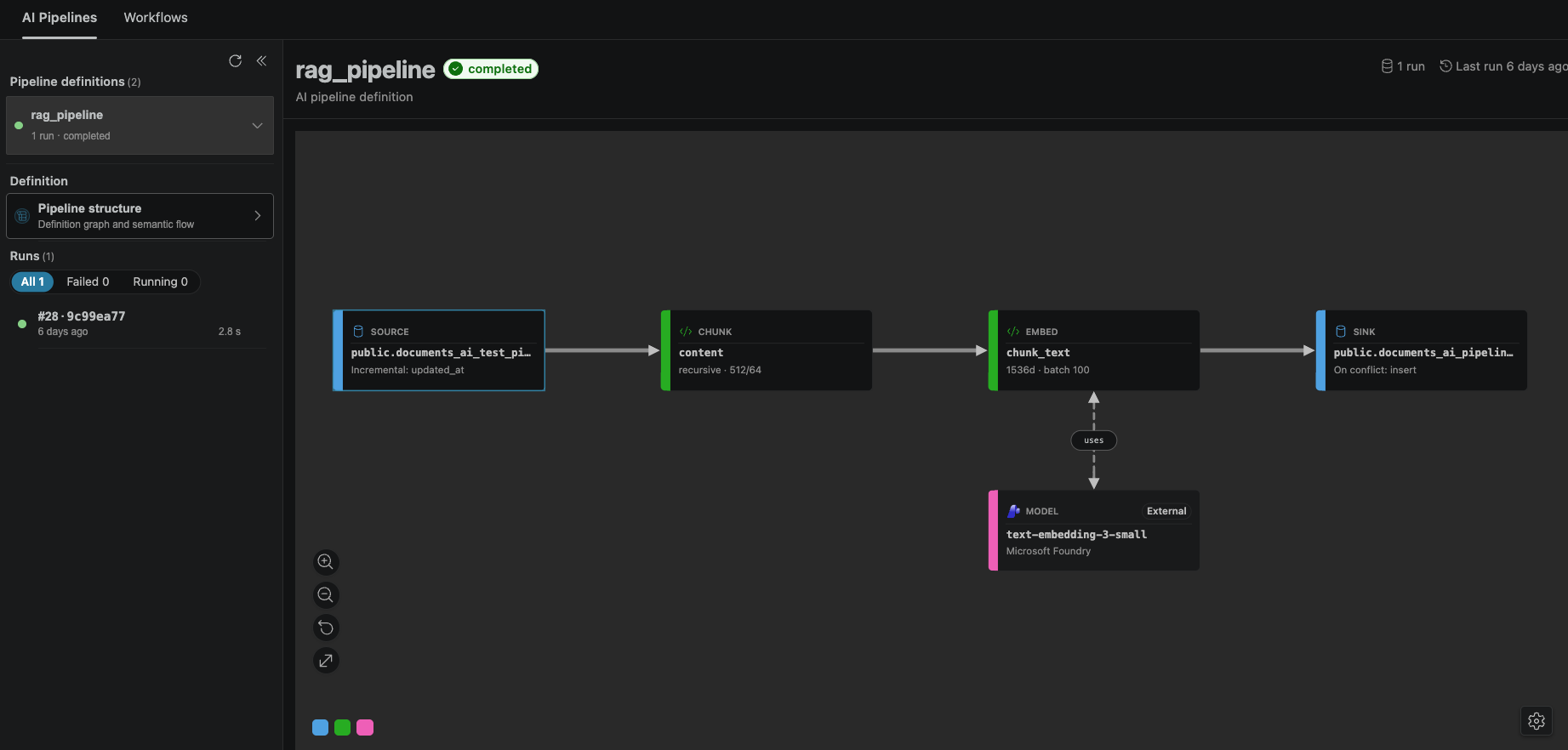
Understand the pipeline graph
When you select a pipeline run, the center pane displays the execution graph with color-coded step types:
- Blue: Source and sink steps (data entry and exit points).
- Green: Intermediate processing steps (chunk, embed, extract, generate, rank operations).
- Pink: External calls (model API calls and external services).
Use this color mapping to quickly validate that your pipeline is shaped correctly and executing as expected.
Inspect run details
For each pipeline run, you can verify:
- Status:
completed,running, orfailed. - Run ID: Unique identifier for traceability.
- Start time and duration: Performance insights.
- Pipeline definition link: Navigate from a run back to its definition to review recent changes.
If a run fails, open the graph view and inspect the step where execution stopped to identify the issue.
Limitations during preview
- Sources are HorizonDB tables. To ingest from blob storage or external systems, land the content in a staging table first; the pipeline handles chunking, embedding, checkpointing, and sink writes from there.
- Pipelines run on the primary. Read replicas can query
ai.*views but don't execute pipelines. - Pipeline state isn't portable across major versions of
pg_durableduring preview. Drain or pause running pipelines before upgrading.