Note
Access to this page requires authorization. You can try signing in or changing directories.
Access to this page requires authorization. You can try changing directories.
You can improve the security of your agent in Azure SRE Agent in a couple of ways: through appropriate role-based access control (RBAC) permissions, and through virtual network (VNet) integration.
If you grant the agent's managed identity the appropriate RBAC permissions, the agent can act on your infrastructure, query your databases, and run commands against your clusters. RBAC is the primary security boundary that controls what the agent can do.
Virtual network integration adds a complementary layer of protection by controlling where the agent can send traffic. Without this integration, outbound traffic from the agent flows over the public internet. With it, every outbound call routes through Azure Virtual Network and your existing network security infrastructure.
This article explains why network-level control matters for enterprise deployments, how virtual network integration works, and how to choose the right network control mode for your workload.
Why network control matters
By default, the agent can reach any endpoint on the internet. For development and test workloads, this behavior is acceptable. For production enterprise deployments, this level of access creates unnecessary risk.
Two risks drive the enterprise requirement for network controls:
Data exfiltration: An agent with access to sensitive internal data and unrestricted internet access can create a path for data to leave your organization.
Prompt injection: Malicious content on the public internet can be crafted to manipulate agent behavior. An unrestricted agent that fetches external content is exposed to injection attacks through those responses.
Place the agent inside a virtual network for better control over its behavior.
How virtual network integration works
Virtual network integration connects SRE Agent to your existing virtual network. When the agent makes an outbound call, traffic flows through your network infrastructure instead of the public internet.
After you configure virtual network integration, agent traffic:
- Appears in your network logs for auditing and monitoring.
- Passes through your layer 4 and layer 7 firewalls.
- Respects your custom Domain Name System (DNS) configuration.
- Follows your enterprise security policies and egress rules.
After SRE Agent joins the virtual network, it operates under the same rules as any other workload on that network, including firewall inspection, DNS resolution, and traffic logging.
Important
Virtual network integration controls outbound (egress) traffic only.
Network control modes
SRE Agent offers three network control modes. Select the mode that matches your security posture and operational context.
| Mode | Description | Best for |
|---|---|---|
| Unrestricted | No network restrictions. The agent can reach any internet endpoint. | Development, test, and non-sensitive workloads. |
| Limited | Wildcard-based URL allow list controls which endpoints the agent can call. | Host-level control without full VNet routing. |
| Azure VNet | All non-platform outbound traffic routes through your VNet with your DNS and firewall rules applied. | Production deployments requiring egress control and audit compliance. |
Choose a network control mode for your workload
Use the following criteria to select a mode:
Azure VNet: Choose this mode if the workload handles sensitive or regulated data, requires a full audit trail of outbound network activity, or must comply with enterprise security policies. This mode is recommended for production enterprise deployments.
Limited: Choose this mode if you want to restrict specific external destinations without routing all traffic through a virtual network. This mode works well when you need partial control without the overhead of full virtual network configuration.
Unrestricted: Choose this mode if the workload is a short-term development or test environment with no access to sensitive data. This mode is the default.
To select a mode, open your agent in the Azure portal and select Settings > Workspace configuration. Switch between modes on a running agent. Settings persist across mode changes.
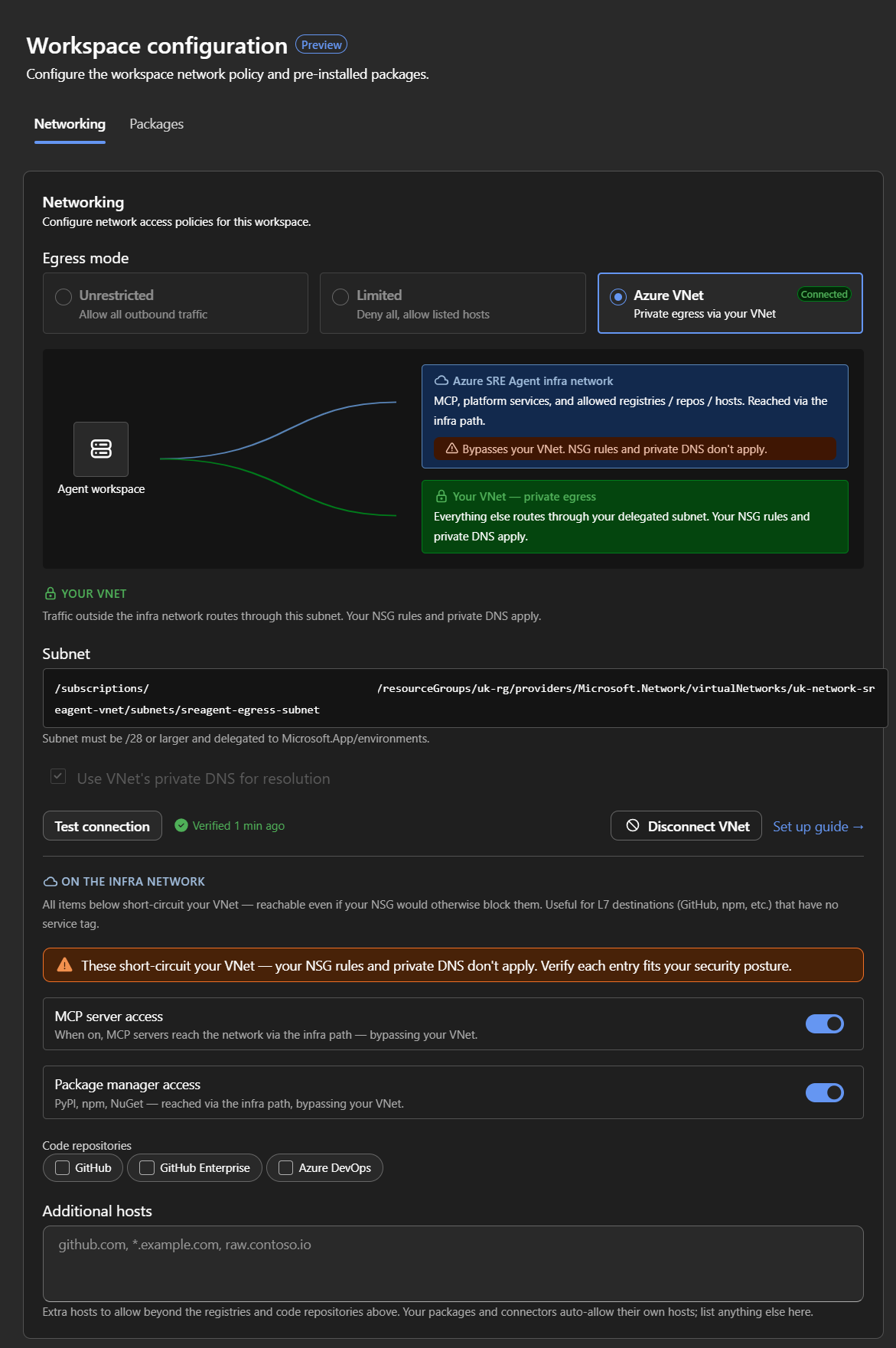
How Azure VNet mode works
In Azure VNet mode, outbound traffic takes one of two paths:
Your VNet. By default, all non-platform outbound traffic goes through a delegated subnet in your virtual network. Your NSG rules, firewall policies, custom DNS, and network logs all apply. The agent is subject to the same controls as any other workload on that subnet. It can reach what the subnet can reach, and nothing more.
The agent can reach resources behind private endpoints, internal services, and on-premises systems connected via ExpressRoute or VPN, as long as your network routes and rules allow it.
Azure SRE Agent infra network. Platform services the agent depends on (orchestration, model endpoints, telemetry) always route through Microsoft's managed infrastructure. These services aren't configurable. Some agent capabilities such as package installation, code repository access, and remote MCP servers require reaching public services. To use these capabilities in Azure VNet mode, enable the corresponding toggle. If a toggle is off, that capability is unavailable unless your VNet can route to those services directly (for example, through FQDN-based firewall rules). See Azure SRE Agent infra network for details.
Traffic routing summary
| Traffic type | Path | Configurable? |
|---|---|---|
| Your Azure infrastructure (Log Analytics, App Insights, AKS, databases, Key Vaults) | Your VNet | Yes. Routed through your VNet by default. |
| On-premises systems (ExpressRoute / VPN) | Your VNet | Yes. Accessible if your network routes allow it. |
| Platform services (orchestration, model endpoints, telemetry) | Azure SRE Agent infra network | No. Always routed through managed infrastructure. |
| Package registries (PyPI, npm, NuGet, apt) | SRE Agent infra network (toggle on) or your VNet (FQDN rule) | Yes. Per-registry toggle or preinstall packages |
| Code repositories (GitHub, GHE, Azure DevOps) | SRE Agent infra network (toggle on) or your VNet (FQDN rule) | Yes. Per-provider toggle |
| Remote MCP servers | SRE Agent infra network (toggle on) or your VNet (FQDN rule) | Yes. Single toggle |
| Additional hostnames | SRE Agent infra network (for hosts in the list) | Yes. Custom list |
| Connector traffic | Public internet | No. Not routed through VNet in this preview. |
| Inbound (private endpoint) | Not supported | No. Egress only in this preview. |
Configure Azure VNet mode
Subnet requirements
Azure VNet mode requires a dedicated subnet in your virtual network:
- Size: /28 or larger. A /28 supports a single agent's concurrent sessions. Size up to /26 for larger fleets or burst capacity.
- Delegation: The subnet must be delegated to
Microsoft.App/environments. - Region: The subnet must be in the same region as your SRE Agent resource.
- Dedicated: The subnet can't be shared with other services.
Set up Azure VNet mode
- Go to Settings > Workspace configuration > Network.
- Select Azure VNet as the egress mode.
- Select Browse subnets.
- Select your Subscription, Resource group, Virtual network, and Subnet that meets the subnet requirements.
- Select Save.
- Test the agent with a representative incident to confirm it can reach the resources it needs.
Azure SRE Agent infra network
Some agent capabilities depend on public services that are difficult to allow list by IP address. In Azure VNet mode, these capabilities require either an infra network toggle (which routes that category through the Azure SRE Agent infra network) or FQDN-based firewall rules in your VNet that allow the traffic directly. See the traffic routing summary for the full list of categories and paths.
If you turn off a toggle and your VNet can't reach the service, that capability is unavailable.
Note
You can apply an Azure Policy to restrict or disable infra network toggles, ensuring that no operator can route traffic outside the VNet.
Preinstalled packages
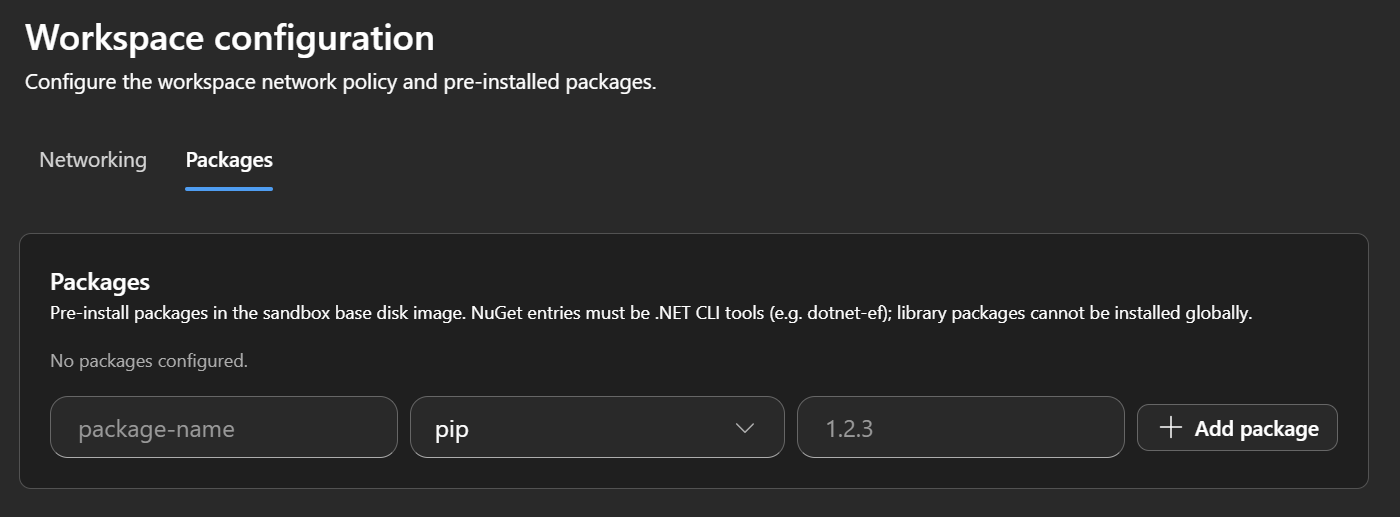
Preinstall packages in the sandbox base disk image so they're available every time the agent runs. This feature is useful when your tools or scripts depend on specific packages that aren't included in the default sandbox environment.
To configure preinstalled packages:
Open your agent in the Azure portal, and select Settings > Workspace configuration.
Select the Packages tab.
Enter the package name, select the package manager (pip or NuGet), and optionally specify a version.
Select + Add package.
Note
NuGet entries must be .NET CLI tools (for example, dotnet-ef). You can't install library packages globally.
Virtual network bypass controls
When you enable Azure VNet mode, the On the infra network section of the workspace configuration page lets you route categories of traffic outside your VNet over the public internet. If you don't enable any of these controls, all agent traffic routes through your VNet.
Not every external service provides an Azure service tag. GitHub, for example, isn't an Azure service and doesn't expose a service tag. If your agent needs to reach GitHub, your only option with a Layer 4, IP-based firewall is to maintain a list of the provider's IP addresses. Those lists change frequently, and a firewall that doesn't stay current breaks the agent.
The same is true for several major public services such as PyPI, npm, NuGet, and container registries. These services operate from large, frequently changing global IP ranges, and they aren't covered by Azure service tags.
The bypass toggles let the agent reach these hosts through the platform egress. Your network team updates firewall rules, or moves to a firewall that supports hostname filtering or fully qualified domain name (FQDN) filtering. Examples include Azure Firewall Premium with FQDN rules, or a network virtual appliance that supports Transport Layer Security inspection.
Treat the bypass controls as a transitional tool, not a permanent substitute for hostname-aware egress filtering.
The following controls are available:
| Control | Description |
|---|---|
| Model Context Protocol (MCP) server access | When enabled, MCP server traffic routes over the public internet instead of your virtual network. |
| Package manager access | When enabled, package manager traffic (PyPI, npm, NuGet) routes over the public internet instead of your virtual network. |
| Code repositories | Select which code repository providers (GitHub, GitHub Enterprise, Azure DevOps) route over the public internet instead of your virtual network. |
| Additional hosts | Enter extra hostnames or wildcard patterns (for example, github.com, *.example.com, raw.contoso.io) to route over the public internet instead of your virtual network. Your configured packages automatically allow their own hosts. |
Governance considerations
Access to these controls is scoped to users with the SRE Agent Administrator role. Creating an SRE agent in an enterprise environment is itself a significant governance act because organizations typically require substantial approval to deploy services into production. The bypass controls are one aspect of the broader enterprise governance story that includes managed identity, on-behalf-of (OBO) credentials, and RBAC permissions. The agent can only do what its permissions allow, and network configuration controls where that traffic goes.
What happens when the network blocks a call
If an outbound request is denied by an NSG rule or has no route, the agent sees the same network error any workload on that subnet would see. The agent reports the failure in its investigation output (for example, "Failed to reach Log Analytics workspace: connection timed out") and continues with the tools and data it can reach. If a critical data source is unreachable, the investigation is incomplete, and the agent reports this condition.
Limitations
The following limitations apply during preview.
Egress only: Virtual network integration controls outbound (egress) traffic only. Inbound connections to the agent from inside a private network aren't supported.
Connectors don't route through the virtual network: There's no support for routing connector traffic through the virtual network. Connectors are also in preview. During preview, connector traffic routes over the public internet. For more information, see SRE Agent connectors.
kubectl commands against private clusters require managed identity: When the agent reaches a private Azure Kubernetes Service (AKS) API server through virtual network integration, kubectl commands run through the AKS command invoke flow.
This flow supports the agent's managed identity but doesn't pass on-behalf-of (OBO) user credentials.
The command also has operational limits, including a 60-second Azure Resource Manager API timeout and a 512-KB output size limit. Long-running or high-output kubectl operations can truncate or fail.
If you need OBO support for kubectl, or you need to run operations that exceed those limits, keep the AKS API server publicly reachable, and use unrestricted or limited mode.
Note
MCP servers and Azure resources behind the VNet are accessible as expected, if your IP address and service tag configuration is correct.
Connectors are also in preview. During preview, connector traffic routes over the public internet rather than through the VNet. For more information, see SRE Agent connectors.