Note
Access to this page requires authorization. You can try signing in or changing directories.
Access to this page requires authorization. You can try changing directories.
You can refresh segments based on the scheduled system refresh, weekly, monthly, or refresh them manually on demand. The default is every scheduled system refresh. To help your most needed segments refresh faster, schedule last season's segments or segments that don't change often on a slower cadence such as monthly.
Prerequisites for automatic refresh of a segment
- A system refresh must be scheduled. Daily system refresh is recommended.
- The segment must have the type Dynamic or Expansion. Static segments aren't refreshed automatically.
- The custom schedule for a segment must align with the system refresh schedule.
Caution
If someone changes the system refresh date after you set custom schedules for your segments so that the dates no longer align, your segments don't refresh as scheduled until their custom schedules align with the new system refresh schedule. Change your segments custom schedules to align with the new system refresh schedule or refresh the segments manually.
Create custom refresh schedules for segments
Define refresh schedules for one or more segments. The currently defined schedule appears in the Schedule column of the segment list.
Go to Insights > Segments.
Select the segments you want to schedule.
Select Schedule.
In the Schedule pane, set the Schedule run to On to run the segment automatically. Set it to Off to refresh it manually.
For automatically refreshed segments, select Recurrence and enter the details.
When defining the schedule for several segments, make a selection under Keep or override schedules:
- Keep individual schedules: Keep the previously defined schedule for the selected segments.
- Define new schedule for all selected segments: Override the existing schedules of the selected segments.
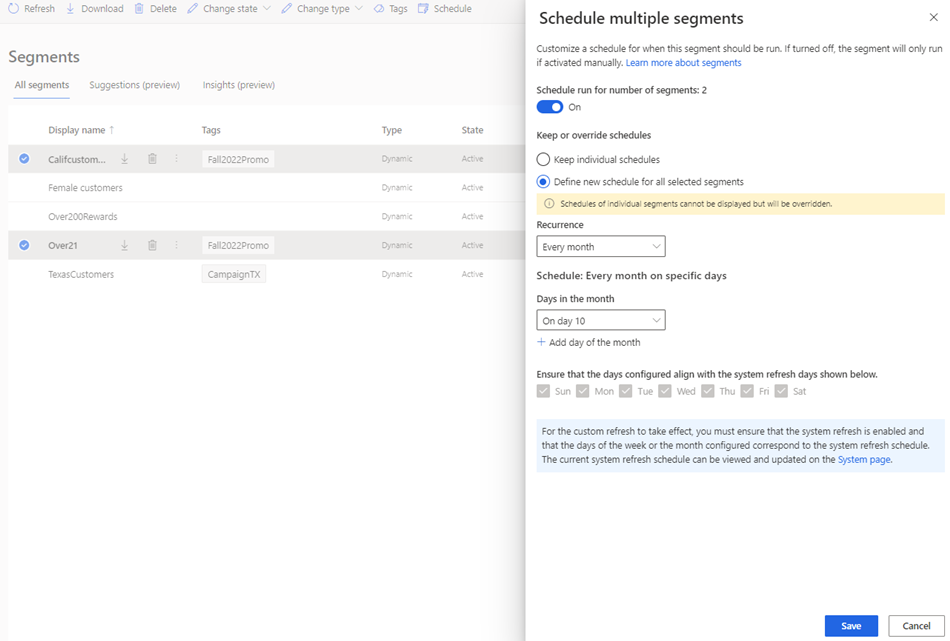
Select Save and then confirm the change. The system refreshes the segments on the scheduled date during the system refresh.
