Note
Access to this page requires authorization. You can try signing in or changing directories.
Access to this page requires authorization. You can try changing directories.
Note
Community interest groups have now moved from Yammer to Microsoft Viva Engage. To join a Viva Engage community and take part in the latest discussions, fill out the Request access to Finance and Operations Viva Engage Community form and choose the community you want to join.
Preparing for the Enable advanced awareness options parameter after year-end close
You can find the Awareness between ledger settlement feature, along with its associated features Automate ledger settlement process and Post foreign currency realized gains/losses for ledger settlements, on the General Ledger parameters page, specifically under the Ledger settlements tab. Manage these features through the Enable advanced awareness options, Enable process automation for ledger settlement, and Enable post currency realized gains/losses for ledger settlements parameters.
A major change to the Enable advanced awareness options parameter is that you can't settle the ledger across fiscal years. This cross-year limitation is relevant only to ledger settlement, not to Accounts receivable or Accounts payable settlements.
Before the Enable advanced awareness options parameter is enabled, the fiscal year that undergoes the year-end close must not have any ledger transactions that are settled across fiscal years. Specifically, any transactions that were posted into the fiscal year that you're running the year-end close for must be unsettled from transactions that were posted into a different fiscal year. The transactions can then be resettled against transactions in the same fiscal year.
This article describes the steps that are required to identify, unsettle, and resettle the ledger transactions that are settled across fiscal years. In the example that's provided, fiscal year 2022 is closed. The focus is on preparing the ledger settlement transactions well before the 2023 year-end close is run.
Example setup
The following illustration shows the transactions that you posted for main account 110190. The ledger transactions in green are settled in the same fiscal year and don't have to change. The transactions in red are ledger-settled, but they have transaction dates in different fiscal years. You must identify those transactions, and you might have to reverse the ledger settlement.
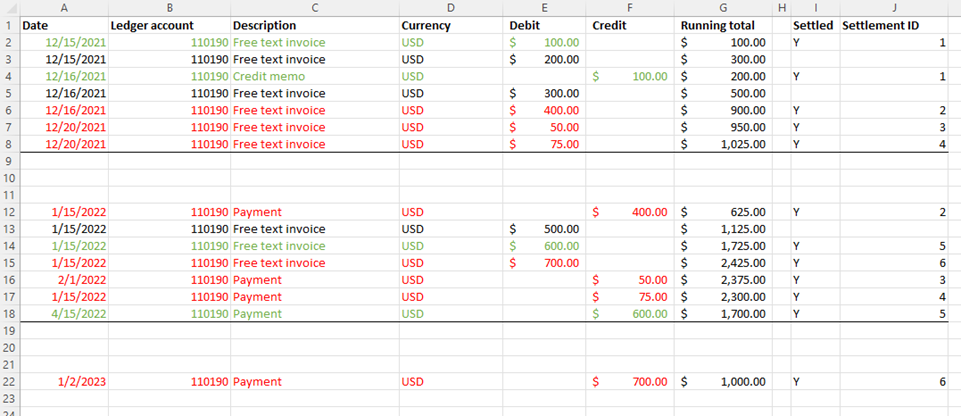
Example
Follow these steps if your organization wants to use the Enable advanced awareness options parameter after the year-end close for fiscal year 2022 is run.
Note
Rerun the year-end close for 2022 and earlier fiscal years only if new transactions are posted into fiscal year 2022 or earlier. When you complete the following procedure, don't post new transactions into 2022. Therefore, you don't have to rerun the year-end close.
Ledger transactions that are settled across fiscal years can remain ledger-settled if they aren't settled against a transaction that you posted into 2023 or later. For example, if you settled transactions across 2019 and 2020, they can remain settled.
Complete the year-end close for 2022 without enabling the Enable advanced awareness options parameter.
Optional: After you complete the year-end close for 2022, enable the Enable advanced awareness options parameter. A year-end close is considered completed when all adjustments are posted and the year-end close process won't be run again.
Important
Don't enable the Enable advanced awareness options parameter if you plan to run the year-end close for 2022 again. By enabling the Enable advanced awareness options parameter now, you prevent users from settling ledger transactions that were posted into different fiscal years.
If the year-end close isn't completed, you can still complete the next steps without enabling the Enable advanced awareness options parameter. You'll enable the Enable advanced awareness options parameter in a later step, as noted.
On the Ledger settlement page, identify the total of all the transactions that are settled across fiscal years 2022 and 2023. 2021 transactions that are settled against 2022 transactions aren't relevant because 2022 is already closed. Those transactions can remain settled.
Specify a date range for all of fiscal year 2022. For example, specify January 1, 2022 through December 31, 2022, if you're using a calendar year as the fiscal year.
In the Status field, select Settled.
Filter on one ledger account at a time.
- Repeat these steps for each ledger account that ledger settlement occurs for.
- If other ledger accounts are no longer set up for ledger settlement, you might have to temporarily add them back to the ledger settlement setup. Then complete these steps if those ledger accounts have transactions in 2023 that are settled against transactions in 2022 or earlier.
Select and hold (or right-click) in the Status column, and then select to group by this column.
Select and hold (or right-click) in the Amount in transaction currency column, and then select to total this column.
- If you settled transactions only in 2022, the total is 0 (zero).
- If you have transactions that were settled across fiscal years, the total isn't 0 (zero).
Identify which transactions were settled between 2022 and 2023 by filtering on the Settlement date value. If you filter on a settlement date of January 1, 2023, through December 31, 2023, you get a total of $700, which is the total of transactions that were ledger settled across 2022 and 2023.

Repeat step 3 for fiscal year 2023. The total should match the $700 from 2022 because no 2023 transactions were settled against 2024 transactions.

If you enabled the Enable advanced awareness options parameter in step 2, disable it before you move on to step 6. In the next steps, you'll reverse the ledger settlement that crossed fiscal years. If the Enable advanced awareness options parameter is enabled, ledger settlement can't be reversed for fiscal year 2022. Therefore, you must disable the Enable advanced awareness options parameter before you continue.
After you disable the Enable advanced awareness options parameter, use the same filters on the Ledger settlement page to reverse the ledger settlement of the detailed transactions.
- Return to the Ledger settlement page, and filter on transaction dates for 2023. Then find the detailed transactions that make up the $700 total. Filtering for this information might not be easy. You might have to send the data to Microsoft Excel to evaluate it.
- After you have the list of transactions, select the ledger transactions on the Ledger settlement page, and select Mark selected. You don't have to see both sides of the ledger transactions that were settled. If you mark either the debit or the credit, everything that has the same Settlement ID value is reversed, even if the Marked amount value isn't 0 (zero).
- Select Reverse marked transactions to unsettle the transactions.

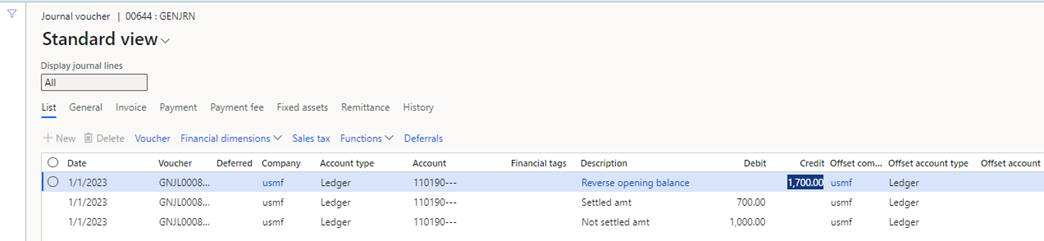
Post an adjusting general journal to split the opening balance for 2023 into two amounts: the portion that's settled against the fiscal year 2022 transaction and the portion that isn't yet settled in 2023.
- Portion of the opening balance that's settled against the previous year: The first amount is $700, based on the totals that you found that are settled across 2022 and 2023.
- Portion of the opening balance that isn't settled against the previous year: The second amount is the difference between the opening balance and the first amount of $525. The remaining amount is $1700 – $700 = $1000.
In this way, you can settle the 2023 transactions against the $700 that was originally settled against the 2022 transaction. This step is required because ledger settlement doesn't allow for partial settlement.
- Go to the general journal, and post the adjustment. Your organization must decide what transaction date to use, based on the periods that are open in 2023.
- You might have to temporarily turn off the Do not allow manual entry parameter on the Main account page. This adjustment isn't posted if the main account doesn't allow for manual entry.
Settle the unsettled transactions. Return to the Ledger settlement page, and limit the date range to January 1, 2022, through December 31, 2022. The following illustration shows the unsettled transactions that now exist.
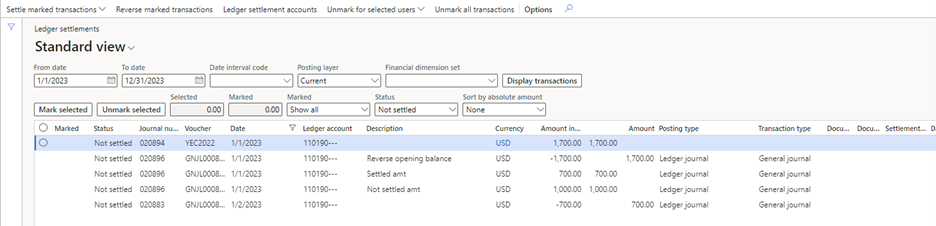
- Settle the opening balance of $1,700 against the adjustment for -$1,700.
- Settle the detailed transactions that were unsettled for -$700 against the adjustment for $700.00.
Re-enable the Enable advanced awareness options parameter.
After you enable the Enable advanced awareness options parameter, you can't perform ledger settlement across fiscal years. You might have to further divide the remaining balance of $1,000 into smaller amounts before you can settle against new transactions in 2023. Some customers choose to post that detail during step 8, where the $1,000 is further divided to represent the unsettled transactions from 2022. This approach essentially mimics what the Enable advanced awareness options parameter does for only the current year. Next year, the process automatically happens by using the Keep details setting in the ledger settlement setup.