Note
Access to this page requires authorization. You can try signing in or changing directories.
Access to this page requires authorization. You can try changing directories.
Important
This content is archived and is not being updated. For the latest documentation, go to Welcome to Dynamics 365 Customer Service. For the latest release plans, go to Release plans for Dynamics 365, Power Platform, and Copilot.
| Enabled for | Public preview | General availability |
|---|---|---|
| Users by admins, makers, or analysts |  Oct 30, 2024
 |
- |
Business value
Customer Service agents use connector plugins to get information from external data sources. This process needs either administrator-level authentication or agent-level authentication. Currently, the system supports only administrator-level authentication for connector plugins. When you add support for agent-level authentication, organizations get more flexibility to manage authentication at the agent level or administrator level. With agent-level authentication, only agents who have access to external data sources can access data through connector plugins. This permission level removes the risk that an administrator's credentials become stale and make connector plugins inaccessible to agents.
Feature details
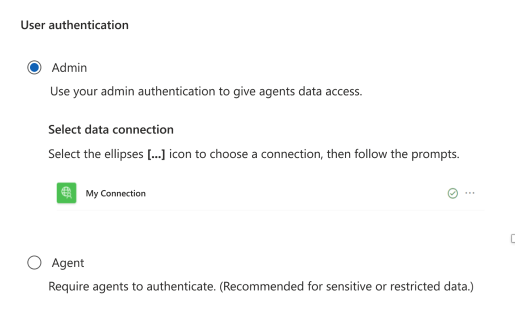
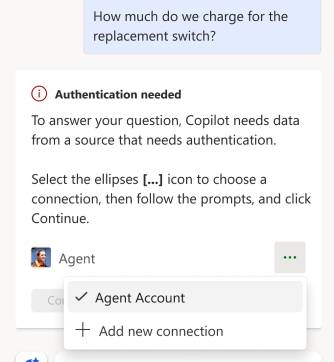
In the Customer Service admin center, administrators can turn connector plugins on or off. Copilot in Dynamics 365 Customer Service uses these plugins. With a plugin wizard, administrators can set up authentication for administrators only or for agents.
When you set up agent authentication, your organization gets more flexibility. You can manage authentication for both administrators and agents.
Geographic areas
Visit the Explore Feature Geography report for Microsoft Azure areas where this feature is planned or available.
Language availability
Visit the Explore Feature Language report for information on this feature's availability.