Note
Access to this page requires authorization. You can try signing in or changing directories.
Access to this page requires authorization. You can try changing directories.
APPLIES TO:  2016 2019 Subscription Edition
Introduction
Basic authentication is a method of client authentication that requires a username and a password to access a resource. However, Basic authentication can pose a security risk. As many of our customers make business decisions to eliminate Basic authentication in their environments, we're providing this documentation to help with these efforts as it relates to Exchange Server.
Important
We don't support disabling NTLM or Negotiate (Windows Integrated Authentication, which includes NTLM and Kerberos) on the Exchange virtual directories.
To prevent clients from using NTLM or Kerberos when connecting to Exchange servers, we support and recommend using Authentication Policies as described in the following blog post: Disabling Legacy Authentication in Exchange Server 2019.
This article describes how to disable Basic authentication on each virtual directory where it's enabled by default on an Exchange Server. If you previously enabled Basic authentication on other virtual directories, do one of the following steps:
- Use your documented steps to reverse the changes made.
- Use the instructions in Default settings for Exchange Server virtual directories to set the authentication method back to default settings.
Prerequisites
You should configure the virtual directories for Outlook on the web (formerly known as Outlook Web App or OWA) and the Exchange admin center (EAC) with the same authentication method.
By default, Outlook on the web and the EAC use Forms Based Authentication (FBA), which relies on Basic authentication. If you disable Basic authentication on these virtual directories, you can't use FBA. You need to configure another authentication method.
Disable Basic authentication on the Outlook on the web virtual directory
The Outlook on the web virtual directory is used by web clients to connect to mailboxes on the Exchange server. As previously described, the authentication methods on the Outlook on the web and EAC virtual directories should be the same.
You can use the EAC or the Exchange Management Shell to disable Basic authentication on the Outlook on the web virtual directory.
Important
Before you disable Basic authentication on the Outlook on the web virtual directory, you need to configure another authentication method. If the virtual directories are already configured with another authentication method (for example, NTLM, Kerberos, ADFS, or Certificate Based Authentication), Basic authentication is likely disabled. Otherwise, the following guidance helps you disable Basic authentication if you no longer require FBA and are already using another method.
Use the EAC to disable Basic authentication on the Outlook on the web virtual directory
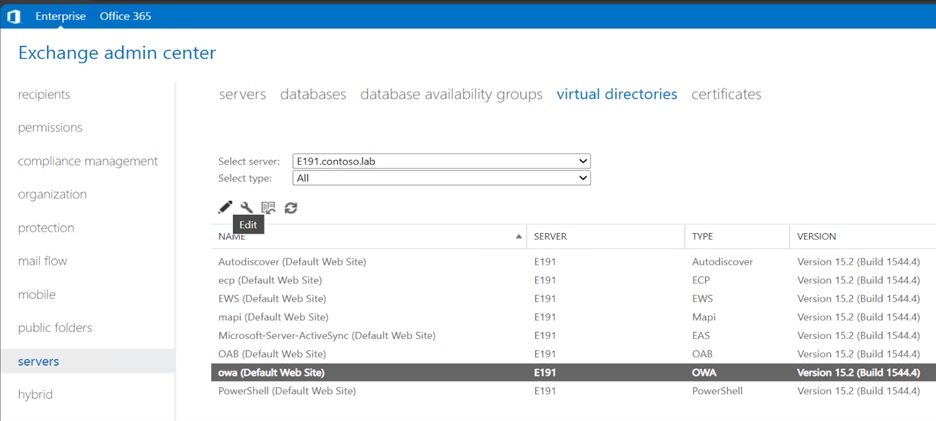
Open the EAC and go to Servers > Virtual Directories.
Select the server using the dropdown menu.
Select the OWA (Default Web Site) virtual directory and then select Edit.
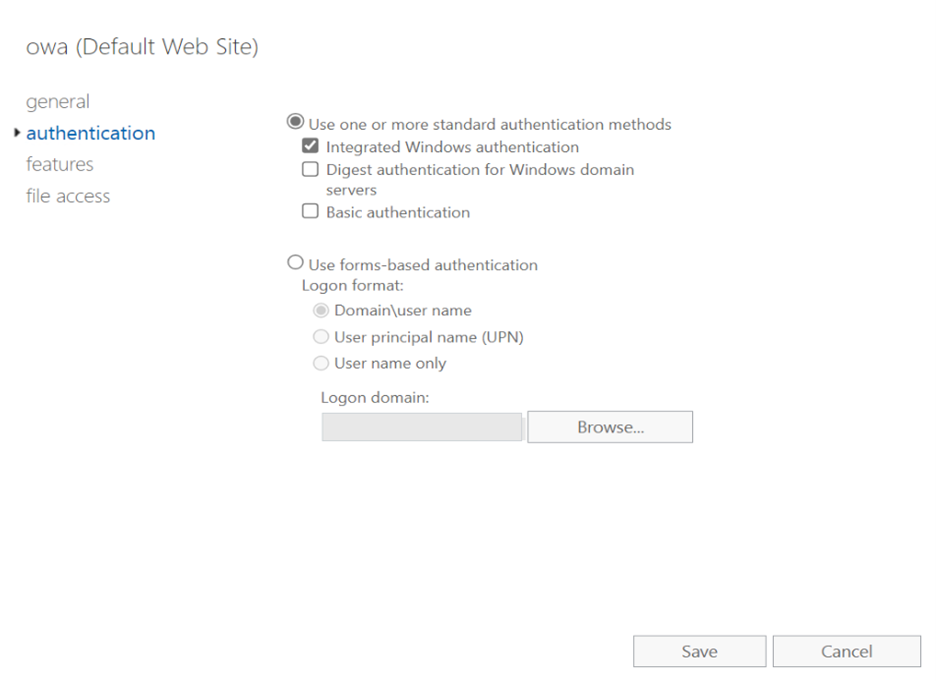
Select Authentication, clear the Basic authentication check box, and the select Save.
Use the Exchange Management Shell to disable Basic authentication on the Outlook on the web virtual directory
In the Exchange Management Shell, the following example disables Basic authentication on the OWA virtual directory on the server named EX01:
Set-OwaVirtualDirectory -Identity "EX01\owa (Default Web Site)" -BasicAuthentication $false
For detailed syntax and parameter information, see Set-OwaVirtualDirectory.
Disable Basic authentication on the ECP virtual directory
The EAC virtual directory is the ECP virtual directory (the old name for the EAC was the Exchange Control Panel or ECP). As previously described, the authentication methods on the Outlook on the web and EAC virtual directories should be the same.
You can use the EAC or the Exchange Management Shell to disable Basic authentication on the ECP virtual directory.
Important
Before you disable Basic authentication on the ECP virtual directory, you need to configure another authentication method. If the virtual directories are already configured with another authentication method (for example, NTLM, Kerberos, ADFS, or Certificate Based Authentication), Basic authentication is likely disabled. Otherwise, the following guidance helps you disable Basic authentication if you no longer require FBA and are already using another method.
Use the EAC to disable Basic authentication on the ECP virtual directory
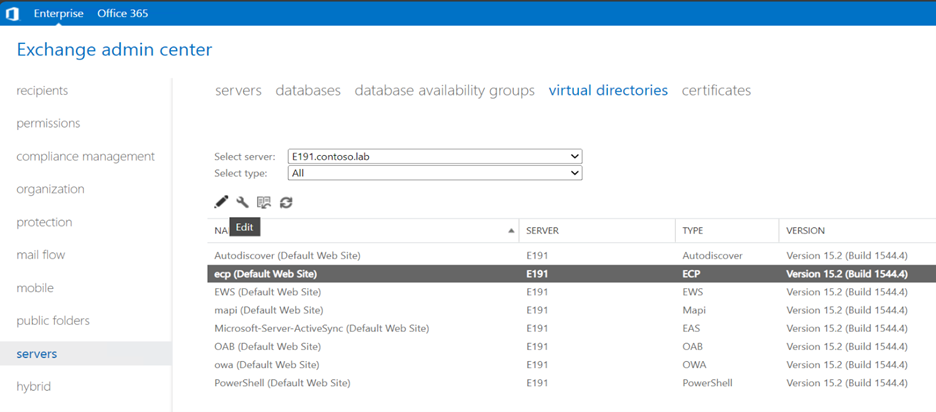
Open the EAC and go to Servers > Virtual Directories.
Select the server using the dropdown menu.
Select the ECP (Default Web Site) virtual directory, and then select Edit.
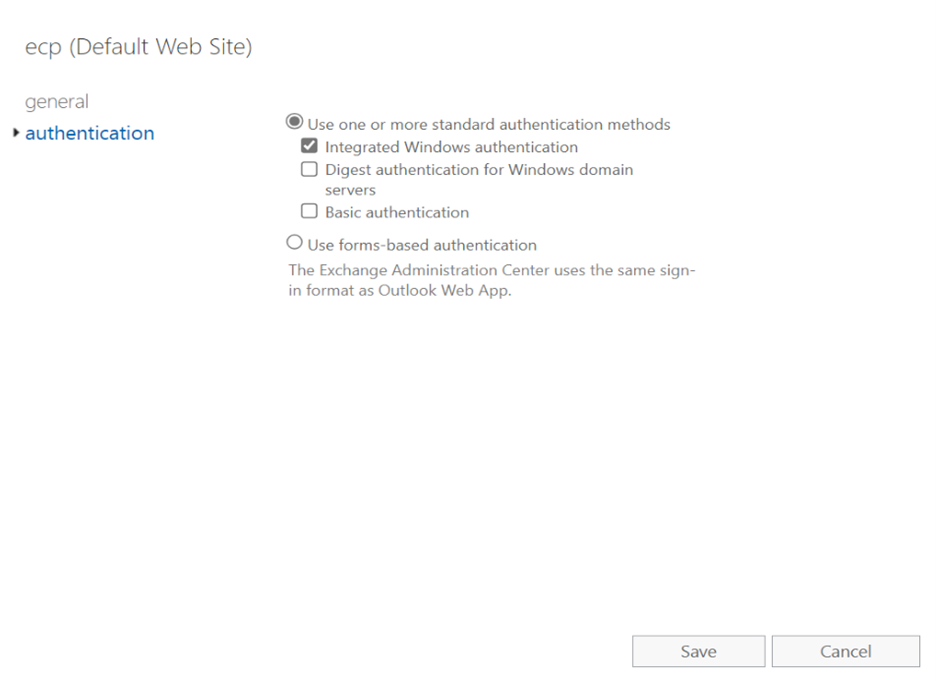
Select Authentication, clear the Basic authentication check box, and then select Save.
Use the Exchange Management Shell to disable Basic authentication on the ECP virtual directory
In the Exchange Management Shell, the following example disables Basic authentication on the ECP virtual directory on the server named EX01:
Set-EcpVirtualDirectory -Identity "EX01\ecp (Default Web Site)" -BasicAuthentication $false
For detailed syntax and parameter information, see Set-EcpVirtualDirectory.
Disable Basic authentication on the Autodiscover virtual directory
The Autodiscover virtual directory is used by Outlook and mobile devices to automatically configure the connection settings to the Exchange server.
You can use the EAC or the Exchange Management Shell to disable Basic authentication on the Autodiscover virtual directory.
Use the EAC to disable Basic authentication on the Autodiscover virtual directory
Open the EAC and go to Servers > Virtual Directories.
Select the server using the dropdown menu.
Select the Autodiscover (Default Web Site) virtual directory, and then select Edit.
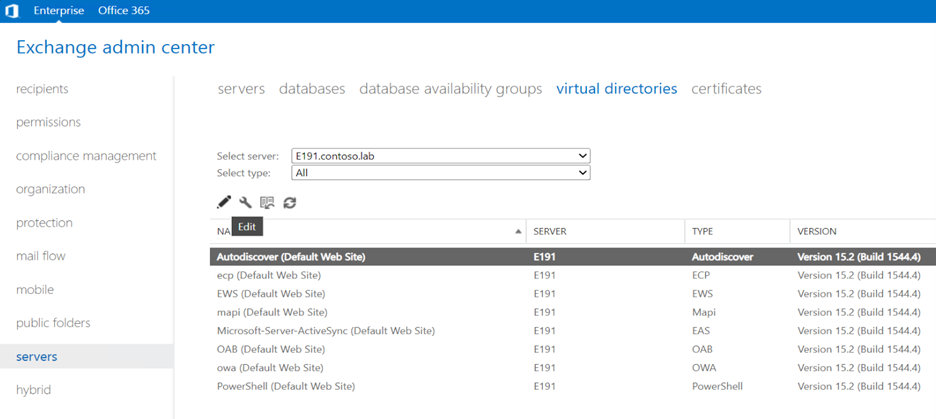
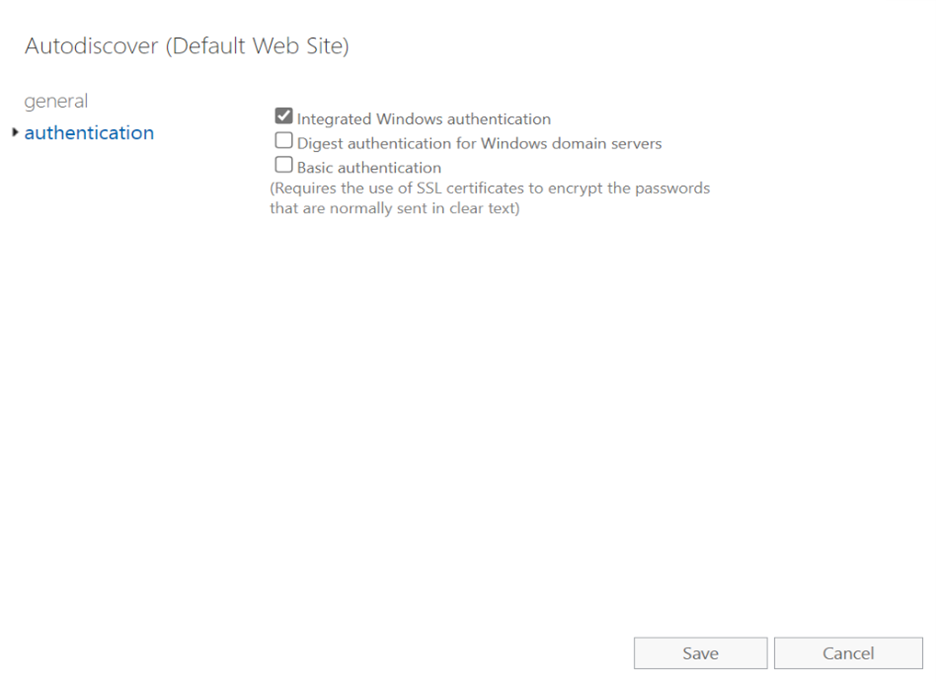
Select Authentication, clear the Basic authentication check box, and then select Save.
Use the Exchange Management Shell to disable Basic authentication on the Autodiscover virtual directory
In the Exchange Management Shell, the following command disables Basic authentication on the Autodiscover virtual directory on the server named EX01:
Set-AutodiscoverVirtualDirectory -Identity "EX01\Autodiscover (Default Web Site)" -BasicAuthentication $false
For detailed syntax and parameter information, see Set-AutodiscoverVirtualDirectory.
Disable Basic authentication on the ActiveSync virtual directory
The Exchange ActiveSync (EAS) virtual directory is used by ActiveSync mobile clients to connect to their mailboxes on the Exchange server.
You can use the EAC or the Exchange Management Shell to disable Basic authentication on the ActiveSync virtual directory.
Important
Before you disable Basic authentication on the ActiveSync virtual directory, you need to configure another authentication method (for example, Hybrid Modern Authentication (HMA) or Certificate Based Authentication (CBA)). Otherwise, ActiveSync clients can't connect to their mailboxes.
Use the EAC to disable Basic authentication on the ActiveSync virtual directory
Open the EAC and go to Servers > Virtual Directories.
Select the server using the dropdown menu.
Select the Microsoft-Server-ActiveSync (Default Web Site) virtual directory, and then select Edit.
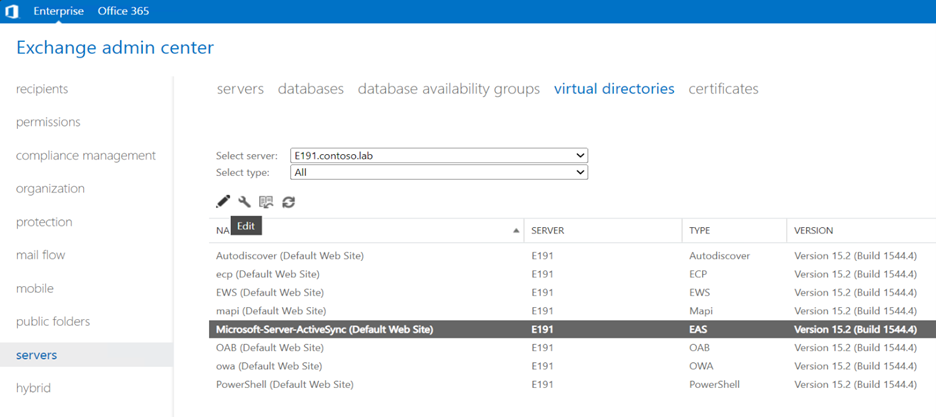
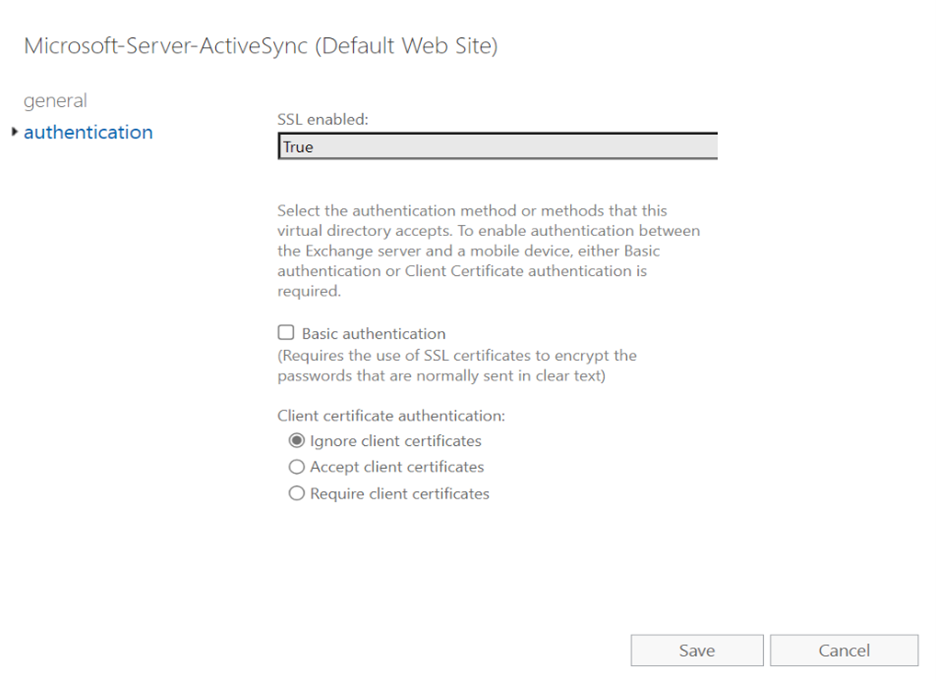
Select Authentication, clear the Basic authentication check box, and then select Save.
Use the Exchange Management Shell to disable Basic authentication on the ActiveSync virtual directory
In the Exchange Management Shell, the following example disables Basic authentication on the Microsoft-Server-ActiveSync virtual directory on the server named EX01:
Set-ActiveSyncVirtualDirectory -Identity "EX01\ Microsoft-Server-ActiveSync (Default Web Site)" -BasicAuthentication $False
For detailed syntax and parameter information, see Set-ActiveSyncVirtualDirectory.
Disable Basic authentication on the Outlook Anywhere virtual directory
The Outlook Anywhere virtual directory is used by older Outlook clients that use the legacy RPC over HTTP protocol to connect to their mailboxes on an Exchange server.
In the EAC, you can only set the external authentication method, not the internal authentication method.
In contrast, the Set-OutlookAnywhere cmdlet in the Exchange Management Shell configures both internal and external authentication methods. Because Kerberos authentication is typically unavailable for external connections, we recommend using the DefaultAuthenticationMethod parameter with the value NTLM. This method simultaneously updates the ExternalClientAuthenticationMethod, InternalClientAuthenticationMethod, and IISAuthenticationMethods settings.
Important
Most organizations no longer use the legacy RPC over HTTP protocol. MAPI over HTTP is now the default protocol in modern versions of Outlook.
If you still use RPC over HTTP for internal connections only, we recommend using Kerberos if possible.
OAuth isn't available for RPC over HTTP.
In the Exchange Management Shell, the following example disables Basic authentication for internal and external connections on the Outlook Anywhere virtual directory on the server named EX01. The command also sets the authentication method to NTLM for internal and external connections:
Set-OutlookAnywhere -Identity "EX01\Rpc (Default Web Site)" -DefaultAuthenticationMethod NTLM
For detailed syntax and parameter information, see [Set-OutlookAnywhere](/powershell/module/exchangepowershell/set-outlook anywhere).
Related articles
Disabling Legacy Authentication in Exchange Server 2019
How to configure Exchange Server on-premises to use Hybrid Modern Authentication
Using hybrid Modern Authentication with Outlook for iOS and Android
Configure certificate based authentication in Exchange 2016
Use AD FS claims-based authentication with Outlook on the web