Note
Access to this page requires authorization. You can try signing in or changing directories.
Access to this page requires authorization. You can try changing directories.
Applies to: ✅ Warehouse in Microsoft Fabric
This article details the strategy, considerations, and methods for migrating data warehouses in SQL Server to Microsoft Fabric Data Warehouse.
Tip
An automated experience for migration from SQL Server is available by using the Fabric Migration Assistant for Data Warehouse. This article contains important strategic and planning information.
Migration introduction
Microsoft Fabric is an all-in-one SaaS analytics solution for enterprises that offers a comprehensive suite of services, including Data Factory, Data Engineering, Data Warehousing, Data Science, Real-Time Intelligence, and Power BI.
This article describes options for schema (DDL), database code (DML), and data migration and helps you choose an option for your scenario. It uses the TPC-DS industry benchmark for illustration and performance testing. Your results might vary depending on factors such as data types, table width, and source latency.
Prepare for migration
Carefully plan your migration project before you get started, and ensure that your schema, code, and data are compatible with Fabric Data Warehouse. Consider the limitations. Quantify the refactoring work of the incompatible items, as well as any other resources needed before the migration delivery.
Another key goal of planning is to adjust your design to ensure that your solution takes full advantage of the high query performance that Fabric Data Warehouse is designed to provide. Designing data warehouses for scale introduces unique design patterns, so traditional approaches aren't always the best. Review the performance guidelines. Although some design adjustments can be made after migration, making changes earlier in the process will save you time and effort. Migration from one technology or environment to another is always a major effort.
The following diagram depicts the migration lifecycle. It lists the major pillars consisting of Assess and Evaluate, Plan and Design, Migrate, Monitor and Govern, and Optimize and Modernize, with the associated tasks in each pillar to plan and prepare for a smooth migration.
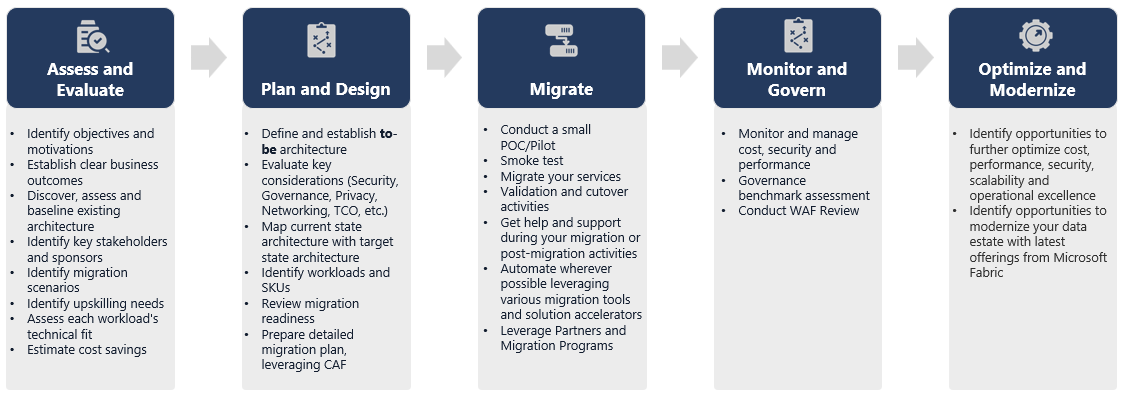
Runbook for migration
Consider the following activities as a planning runbook for your migration from SQL Server to Fabric Data Warehouse.
- Assess and Evaluate
- Identify objectives and motivations. Establish clear desired outcomes.
- Discover, assess, and baseline the existing architecture.
- Identify key stakeholders and sponsors.
- Define the scope of what to migrate.
- Start small and simple, and prepare for multiple small migrations.
- Begin to monitor and document all stages of the process.
- Build an inventory of data and processes for migration.
- Define data model changes, if any.
- Set up the Fabric workspace.
- Assess your team's skill set and preferences.
- Automate wherever possible.
- Use built-in tools and features to reduce migration effort.
- Train staff early on the new platform.
- Identify upskilling needs and training assets, including Microsoft Learn.
- Plan and Design
- Define the desired architecture.
- Select the methods and tools for the migration to accomplish the following tasks:
- Extract data from the source.
- Convert the schema (DDL), including metadata for tables and views.
- Ingest data, including historical data.
- If necessary, re-engineer the data model by using the new platform's performance and scalability.
- Migrate database code (DML).
- Migrate or refactor stored procedures and business processes.
- Inventory and extract the security features and object permissions from the source.
- Design and plan to replace or modify existing ETL or ELT processes for incremental load.
- Create parallel ETL or ELT processes in the new environment.
- Prepare a detailed migration plan.
- Map the current state to the new desired state.
- Migrate
- Migrate the schema, data, and code.
- Extract data from the source.
- Convert the schema (DDL).
- Ingest data.
- Migrate database code (DML).
- If necessary, scale SQL Server resources temporarily to increase migration speed.
- Apply security and permissions.
- Migrate existing ETL or ELT processes for incremental load.
- Migrate or refactor ETL or ELT incremental load processes.
- Test and compare parallel incremental load processes.
- Adapt the detailed migration plan as necessary.
- Migrate the schema, data, and code.
- Monitor and Govern
- Run in parallel, and compare against your source environment.
- Test applications, business intelligence platforms, and query tools.
- Benchmark and optimize query performance.
- Monitor and manage cost, security, and performance.
- Perform a governance benchmark and assessment.
- Run in parallel, and compare against your source environment.
- Optimize and Modernize
- When the business is comfortable, transition applications and primary reporting platforms to Fabric.
- Scale resources as the workload shifts from SQL Server to Microsoft Fabric.
- Build a repeatable template from the experience gained for future migrations. Iterate.
- Identify opportunities for cost optimization, security, scalability, and operational excellence.
- Identify opportunities to modernize your data estate with the latest Fabric features.
- When the business is comfortable, transition applications and primary reporting platforms to Fabric.
Lift and shift or modernize?
In general, there are two types of migration scenarios, regardless of the purpose and scope of the planned migration: lift and shift as-is, or a phased approach that incorporates architectural and code changes.
Lift and shift
In a lift and shift migration, you migrate an existing data model with minor changes to the new Fabric Data Warehouse. This approach minimizes risk and migration time by reducing the new work needed to realize the benefits of migration.
Lift and shift migration is a good fit for these scenarios:
- You have an existing environment with a small number of data marts to migrate.
- You have an existing environment with data that's already in a well-designed star or snowflake schema.
- You're under time and cost pressure to move to Fabric Data Warehouse.
In summary, this approach works well for workloads that are optimized for your current SQL Server environment and therefore don't require major changes in Fabric.
Modernize in a phased approach with architectural changes
If a legacy data warehouse evolved over a long period of time, you might need to re-engineer it to maintain the required performance levels.
You might also want to redesign the architecture to take advantage of the new engines and features available in the Fabric workspace.
Design differences between SQL Server and Fabric Data Warehouse
Consider the following differences between SQL Server and Fabric Data Warehouse.
Table considerations
When you migrate tables between different environments, typically only the raw data and the metadata physically migrate. You usually don't migrate other database elements from the source system, such as indexes, because they might be unnecessary or implemented differently in the new environment.
Performance optimizations in the source environment, such as indexes, indicate where you might add performance optimization in a new environment, but Fabric takes care of that automatically for you.
T-SQL considerations
Be aware of several Data Manipulation Language (DML) syntax differences. Refer to T-SQL surface area in Fabric Data Warehouse. Also, consider a code assessment when choosing migration methods for the database code (DML).
Depending on the parity differences at the time of the migration, you might need to rewrite parts of your T-SQL DML code.
Data type mapping differences
Fabric Data Warehouse has several data type differences from other Microsoft SQL platforms. For more information, see Data types in Microsoft Fabric.
The following table shows the mapping of supported data types from the SQL Database Engine to Fabric Data Warehouse.
| SQL Server | Fabric Data Warehouse |
|---|---|
money |
decimal(19,4) |
smallmoney |
decimal(10,4) |
smalldatetime |
datetime2 |
datetime |
datetime2 |
nchar |
char |
nvarchar |
varchar |
tinyint |
smallint |
binary |
varbinary |
datetimeoffset* |
datetime2 |
* datetime2 doesn't store the time zone offset information that datetimeoffset stores. Because the datetimeoffset data type isn't currently supported in Fabric Data Warehouse, extract the time zone offset data into a separate column.
Tip
Ready to migrate?
To get started with an automated migration experience, see Fabric Migration Assistant for Data Warehouse.
For more manual migration steps and details, see Migration methods for SQL Server to Fabric Data Warehouse.