Note
Access to this page requires authorization. You can try signing in or changing directories.
Access to this page requires authorization. You can try changing directories.
To start a new recording for an encounter, your app must provide UI (for example, a Record button) for the user to control recording. After retrieving a DAXSession object from DAXKit, your app can then start a recording using the DAXSession.startRecording() function.
If DAXKit successfully starts recording, a recorder object that can be used for stopping the recording is returned. If DAXKit fails to start recording, the delegate's recordingInterrupted(reason:) is called and the function returns the reason why the recording was interrupted.
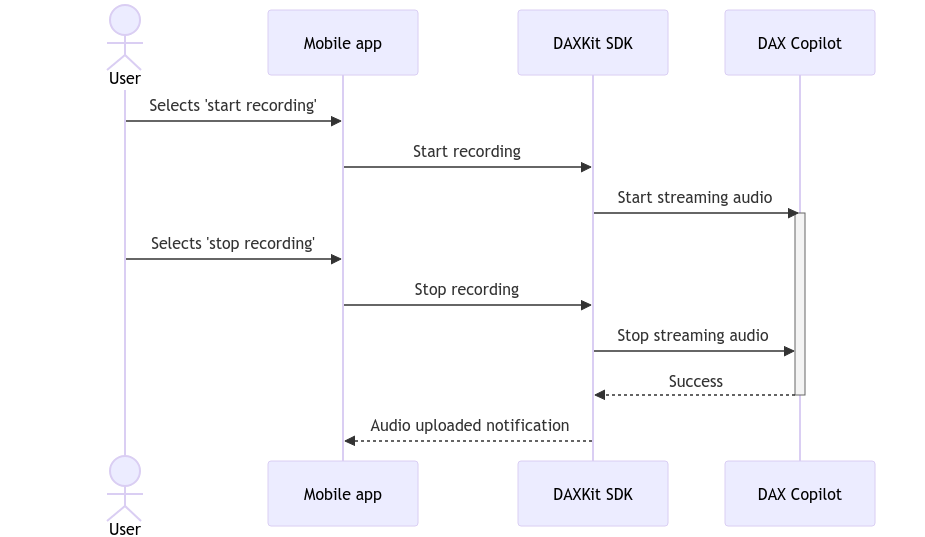
The following diagram shows the interaction between the mobile app, DAXKit and Dragon Copilot when a user starts recording in the app.
public func startRecording(delegate: RecordingDelegate, locales: [Locale] = [], autoNoteGeneration: Bool = true, outputFormIds: [String]? = nil) throws -> Recorder

public func stop()
Parameters
delegateThe delegate that receives recording events.
localesOptional: One or more locales defining the languages spoken in the recording. If not set, this defaults to "en-us". Currently, if there are multiple locales in the list, DAX Copilot only uses the first one.
autoNoteGenerationOptional: Define if the note is auto-generated for this recording. If not set, this defaults to true; Dragon Copilot automatically generates a note for each recording by default. You can set this to false to prevent note generation for specific recordings.
outputFormIdsPreview feature. Specify output form IDs to control which clinical output formats are generated. Output form IDs specified for the session apply to all recordings in the session. You can override this for individual recordings by passing output form IDs to the
startRecording()call.
Throws
This function throws a DAXKitError. if the user wasn't properly configured before attempting to start a recording, the error code is set to .invalidConfiguration. If the recording failed to start, the error code is set to .internalError.
Returns
A Recorder instance that can be used to stop this recording.
Example
// Configure the encounter.
let session = try DAXKit.shared.session(withIdentifier: UUID().uuidString)

// Start recording, specifying en-US language.
let recorder = session.startRecording(delegate: delegate, locales: [Locale(identifier: "en-US")])

// Stop recording.
recorder.stop()