Multi-Geo Capabilities in OneDrive and SharePoint
Multi-Geo capabilities in OneDrive and SharePoint enable control of shared resources like SharePoint team sites and Microsoft 365 Group mailboxes stored at rest in a specified geo location.
Each user, Group mailbox, and SharePoint site have a Preferred Data Location (PDL) which denotes the geo location where related data is to be stored. Users' personal data (Exchange mailbox and OneDrive) along with any Microsoft 365 Groups or SharePoint sites that they create can be stored in the specified geo location to meet data residency requirements. You can specify different administrators for each geo location.
Users get a seamless experience when using Microsoft 365 services, including Office applications, OneDrive, and Search. See User experience in a multi-geo environment for details.
OneDrive
Each user's OneDrive can be provisioned in or moved by an administrator to a satellite location in accordance with the user's PDL. Personal files are then kept in that geo location, though they can be shared with users in other geo locations. Administrative options found under the OneDrive tab of an active user within the Microsoft 365 admin center are currently not supported for multi-geo tenants.
SharePoint Sites and Groups
Management of the Multi-Geo feature is available through the SharePoint admin center. Detailed information can be found in the corresponding blog post.
When a user creates a SharePoint group-connected site in a multi-geo environment, their PDL is used to determine the geo location where the site and its associated Group mailbox are created. (If the user's PDL value hasn't been set, or has been set to geo location that hasn't been configured as a satellite location, then the site and mailbox are created in the central location.)
Microsoft 365 services other than Exchange, OneDrive, SharePoint, and Teams aren't Multi-Geo. However, Microsoft 365 Groups that are created by these services will be configured with the PDL of the creator and their Exchange Group mailbox, SharePoint site are provisioned in the corresponding geo.
Managing the multi-geo environment
Setting up and managing your multi-geo environment is done through the SharePoint admin center.
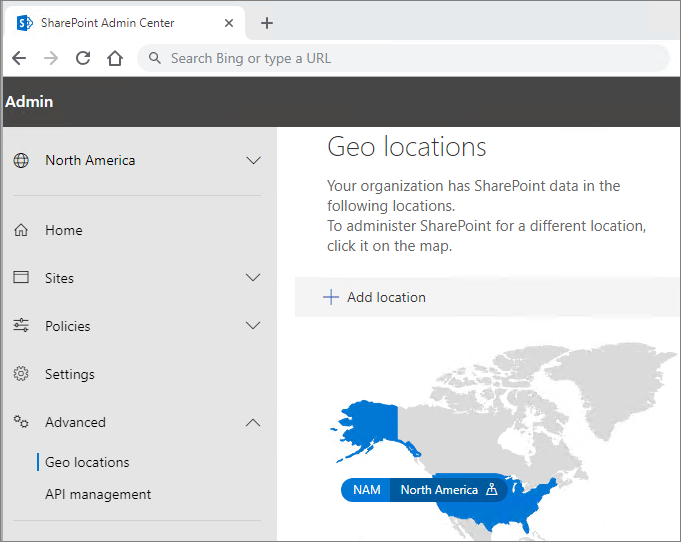
(Some actions, such as moving a SharePoint site or a OneDrive site require Microsoft PowerShell.)
See also
Multi-Geo in SharePoint and Microsoft 365 Groups
Administering a multi-geo environment
SharePoint storage quotas in multi-geo environments
Administering Exchange Online mailboxes in a multi-geo environment
Feedback
Coming soon: Throughout 2024 we will be phasing out GitHub Issues as the feedback mechanism for content and replacing it with a new feedback system. For more information see: https://aka.ms/ContentUserFeedback.
Submit and view feedback for