Note
Access to this page requires authorization. You can try signing in or changing directories.
Access to this page requires authorization. You can try changing directories.
You can add a settings page that allows users to configure settings for your app.
The user can access the settings by right-clicking the app item in the compose box.
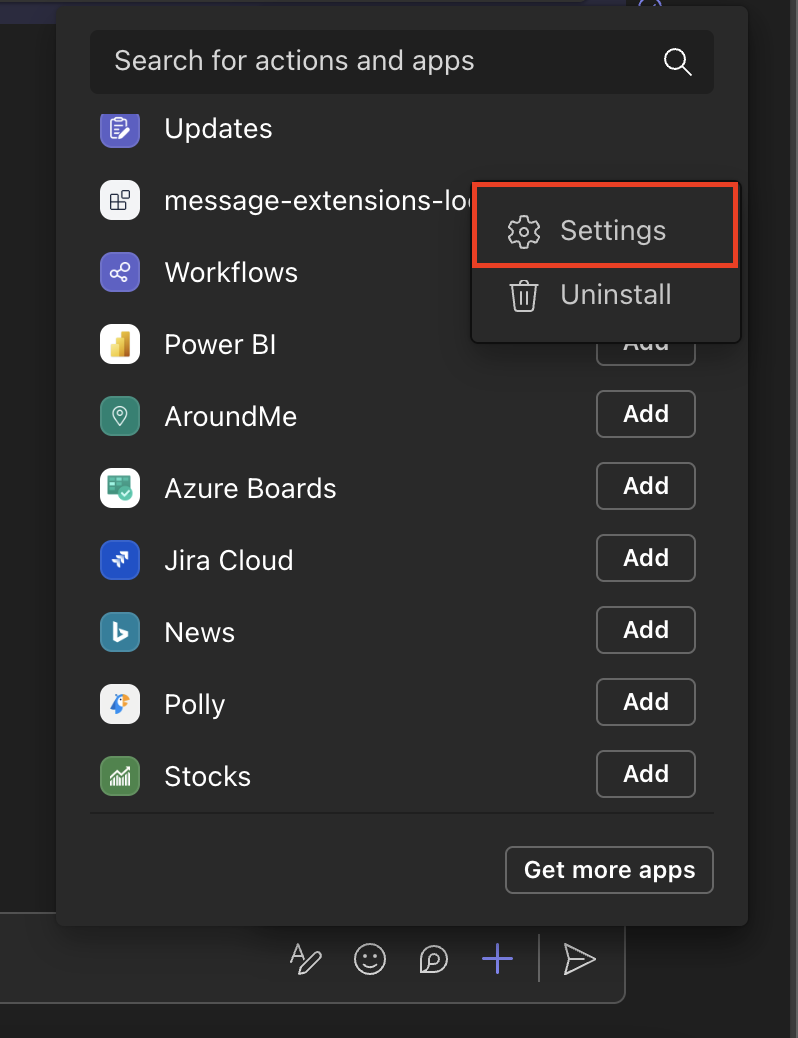
This guide will show how to enable user access to settings, as well as setting up a page that looks like this:
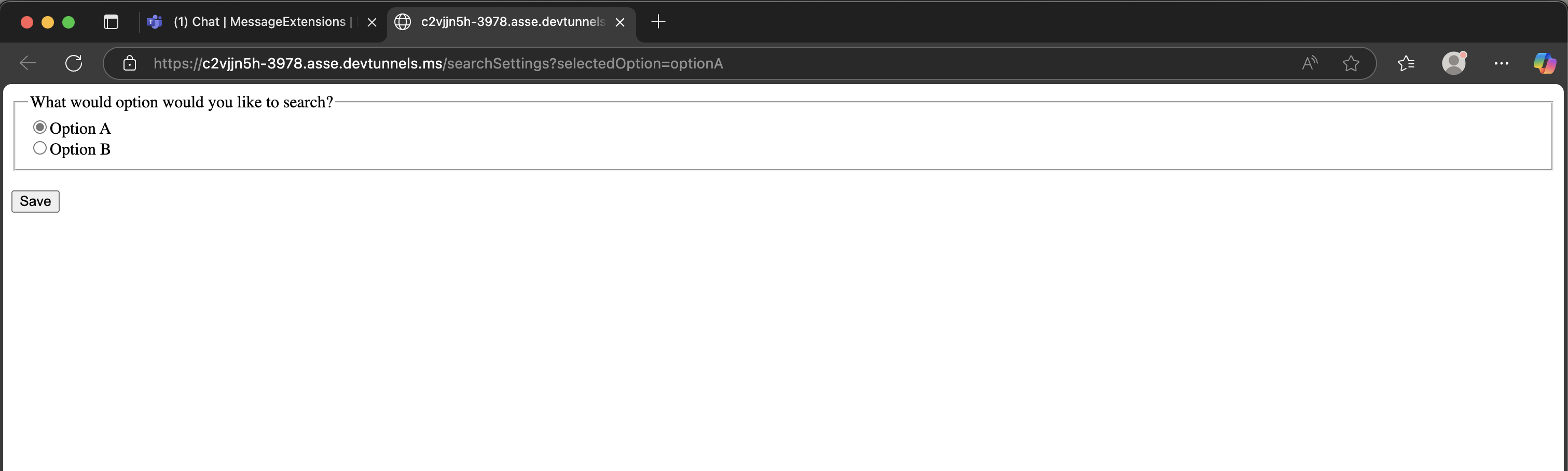
1. Update the Teams Manifest
Set the canUpdateConfiguration field to true in the desired message extension under composeExtensions.
"composeExtensions": [
    {
        "botId": "${{BOT_ID}}",
        "canUpdateConfiguration": true,
        ...
    }
]
2. Serve the settings html page
This is the code snippet for the settings html page:
<!DOCTYPE html>
<html>
  <head>
    <title>Message Extension Settings</title>
    <link
      rel="stylesheet"
      href="https://stackpath.bootstrapcdn.com/bootstrap/4.5.0/css/bootstrap.min.css"
    />
    <script src="https://statics.teams.cdn.office.net/sdk/v1.11.0/js/MicrosoftTeams.min.js"></script>
    <style>
      body {
        margin: 0;
        padding: 10px;
      }
      .form-group {
        margin-bottom: 10px;
      }
    </style>
  </head>
  <body>
    <div class="container">
      <h3>Message Extension Settings</h3>
      <form id="settingsForm">
        <div class="form-group">
          <label>Selected Option:</label>
          <select class="form-control" id="selectedOption" name="selectedOption">
            <option value="">Please select an option</option>
            <option value="option1">Option 1</option>
            <option value="option2">Option 2</option>
            <option value="option3">Option 3</option>
          </select>
        </div>
        <button type="submit" class="btn btn-primary">Save Settings</button>
      </form>
    </div>

    <script>
      microsoftTeams.initialize();

      // Get the selectedOption from URL parameters
      const urlParams = new URLSearchParams(window.location.search);
      const selectedOption = urlParams.get('selectedOption');
      if (selectedOption) {
        document.getElementById('selectedOption').value = selectedOption;
      }

      document.getElementById('settingsForm').addEventListener('submit', function (event) {
        event.preventDefault();
        let selectedValue = document.getElementById('selectedOption').value;
        microsoftTeams.tasks.submitTask(selectedValue);
      });
    </script>
  </body>
</html>
<html>
  <body>
    <form>
      <fieldset>
        <legend>What programming language do you prefer?</legend>
        <input type="radio" name="selectedOption" value="typescript" />Typescript<br />
        <input type="radio" name="selectedOption" value="csharp" />C#<br />
      </fieldset>

      <br />
      <input type="button" onclick="onSubmit()" value="Save" /> <br />
    </form>

    <script
      src="https://res.cdn.office.net/teams-js/2.34.0/js/MicrosoftTeams.min.js"
      integrity="sha384-brW9AazbKR2dYw2DucGgWCCcmrm2oBFV4HQidyuyZRI/TnAkmOOnTARSTdps3Hwt"
      crossorigin="anonymous"
    ></script>

    <script type="text/javascript">
      document.addEventListener('DOMContentLoaded', function () {
        // Get the selected option from the URL
        var urlParams = new URLSearchParams(window.location.search);
        var selectedOption = urlParams.get('selectedOption');
        if (selectedOption) {
          var checkboxes = document.getElementsByName('selectedOption');
          for (var i = 0; i < checkboxes.length; i++) {
            var thisCheckbox = checkboxes[i];
            if (selectedOption.includes(thisCheckbox.value)) {
              checkboxes[i].checked = true;
            }
          }
        }
      });
    </script>

    <script type="text/javascript">
      // initialize the Teams JS SDK
      microsoftTeams.app.initialize();

      // Run when the user clicks the submit button
      function onSubmit() {
        var newSettings = '';

        var checkboxes = document.getElementsByName('selectedOption');

        for (var i = 0; i < checkboxes.length; i++) {
          if (checkboxes[i].checked) {
            newSettings = checkboxes[i].value;
          }
        }

        // Closes the settings page and returns the selected option to the bot
        microsoftTeams.authentication.notifySuccess(newSettings);
      }
    </script>
  </body>
</html>
Save it in the index.html file in the same folder as where your app is initialized.
You can serve it by adding the following code to your app:
// In your startup configuration (Program.cs or Startup.cs)
app.UseStaticFiles();
app.MapGet("/tabs/settings", async context =>
{
    var html = await File.ReadAllTextAsync("wwwroot/settings.html");
    context.Response.ContentType = "text/html";
    await context.Response.WriteAsync(html);
});
app.page("settings", str(Path(__file__).parent), "/tabs/settings")
import path from 'path';
import { App } from '@microsoft/teams.apps';
// ...

app.tab('settings', path.resolve(__dirname));
Note
This will serve the HTML page to the ${BOT_ENDPOINT}/tabs/settings endpoint as a tab. See Tabs Guide to learn more.
Note
This will serve the HTML page to the ${BOT_ENDPOINT}/tabs/settings endpoint as a tab.
3. Specify the URL to the settings page
To enable the settings page, your app needs to handle the message.ext.query-settings-url activity that Teams sends when a user right-clicks the app in the compose box. Your app must respond with the URL to your settings page. Here's how to implement this:
using Microsoft.Teams.Api.Cards;
using Microsoft.Teams.Cards;

[MessageExtension.QuerySettingsUrl]
public Microsoft.Teams.Api.MessageExtensions.Response OnMessageExtensionQuerySettingsUrl(
    [Context] Microsoft.Teams.Api.Activities.Invokes.MessageExtensions.QuerySettingsUrlActivity activity,
    [Context] IContext.Client client,
    [Context] Microsoft.Teams.Common.Logging.ILogger log)
{
    log.Info("[MESSAGE_EXT_QUERY_SETTINGS_URL] Settings URL query received");

    // Get user settings (this could come from a database or user store)
    var selectedOption = ""; // Default or retrieve from user preferences

    var botEndpoint = Environment.GetEnvironmentVariable("BOT_ENDPOINT") ?? "https://your-bot-endpoint.com";
    var settingsUrl = $"{botEndpoint}/tabs/settings?selectedOption={Uri.EscapeDataString(selectedOption)}";

    var settingsAction = new CardAction
    {
        Type = CardActionType.OpenUrl,
        Title = "Settings",
        Value = settingsUrl
    };

    var suggestedActions = new Microsoft.Teams.Api.MessageExtensions.SuggestedActions
    {
        Actions = new List<CardAction> { settingsAction }
    };

    var result = new Microsoft.Teams.Api.MessageExtensions.Result
    {
        Type = Microsoft.Teams.Api.MessageExtensions.ResultType.Config,
        SuggestedActions = suggestedActions
    };

    return new Microsoft.Teams.Api.MessageExtensions.Response
    {
        ComposeExtension = result
    };
}
@app.on_message_ext_query_settings_url
async def handle_message_ext_query_settings_url(ctx: ActivityContext[MessageExtensionQuerySettingUrlInvokeActivity]):
    user_settings = {"selectedOption": ""}
    escaped_selected_option = user_settings["selectedOption"]

    bot_endpoint = os.environ.get("BOT_ENDPOINT", "")

    settings_action = CardAction(
        type=CardActionType.OPEN_URL,
        title="Settings",
        value=f"{bot_endpoint}/tabs/settings?selectedOption={escaped_selected_option}",
    )

    suggested_actions = MessagingExtensionSuggestedAction(actions=[settings_action])

    result = MessagingExtensionResult(type=MessagingExtensionResultType.CONFIG, suggested_actions=suggested_actions)

    return MessagingExtensionInvokeResponse(compose_extension=result)
import { App } from '@microsoft/teams.apps';
// ...

app.on('message.ext.query-settings-url', async ({ activity }) => {
  // Get user settings from storage if available
  const userSettings = (await app.storage.get(activity.from.id)) || { selectedOption: '' };
  const escapedSelectedOption = encodeURIComponent(userSettings.selectedOption);

  return {
    composeExtension: {
      type: 'config',
      suggestedActions: {
        actions: [
          {
            type: 'openUrl',
            title: 'Settings',
            // ensure BOT_ENDPOINT is set in your .env (Teams Developer CLI does not populate it by default).
            value: `${process.env.BOT_ENDPOINT}/tabs/settings?selectedOption=${escapedSelectedOption}`,
          },
        ],
      },
    },
  };
});
4. Handle Form Submission
When a user submits the settings form, Teams sends a message.ext.setting activity with the selected option in the activity.value.state property. Handle it to save the user's selection:
[MessageExtension.Setting]
public Microsoft.Teams.Api.MessageExtensions.Response OnMessageExtensionSetting(
    [Context] Microsoft.Teams.Api.Activities.Invokes.MessageExtensions.SettingActivity activity,
    [Context] IContext.Client client,
    [Context] Microsoft.Teams.Common.Logging.ILogger log)
{
    log.Info("[MESSAGE_EXT_SETTING] Settings submission received");

    var state = activity.Value?.State;
    log.Info($"[MESSAGE_EXT_SETTING] State: {state}");

    if (state == "CancelledByUser")
    {
        log.Info("[MESSAGE_EXT_SETTING] User cancelled settings");
        return CreateEmptyResult();
    }

    var selectedOption = state;
    log.Info($"[MESSAGE_EXT_SETTING] Selected option: {selectedOption}");

    // Here you would typically save the user's settings to a database or user store
    // SaveUserSettings(activity.From.Id, selectedOption);

    // Return empty result to close the settings dialog
    return CreateEmptyResult();
}

// Helper method to create empty result
private static Microsoft.Teams.Api.MessageExtensions.Response CreateEmptyResult()
{
    return new Microsoft.Teams.Api.MessageExtensions.Response
    {
        ComposeExtension = new Microsoft.Teams.Api.MessageExtensions.Result
        {
            Type = Microsoft.Teams.Api.MessageExtensions.ResultType.Result,
            AttachmentLayout = Microsoft.Teams.Api.Attachment.Layout.List,
            Attachments = new List<Microsoft.Teams.Api.MessageExtensions.Attachment>()
        }
    };
}
@app.on_message_ext_setting
async def handle_message_ext_setting(ctx: ActivityContext[MessageExtensionSettingInvokeActivity]):
    state = getattr(ctx.activity.value, "state", None)

    if state == "CancelledByUser":
        result = MessagingExtensionResult(
            type=MessagingExtensionResultType.RESULT, attachment_layout=AttachmentLayout.LIST, attachments=[]
        )
        return MessagingExtensionInvokeResponse(compose_extension=result)

    selected_option = state
    await ctx.send(f"Selected option: {selected_option}")

    result = MessagingExtensionResult(
        type=MessagingExtensionResultType.RESULT, attachment_layout=AttachmentLayout.LIST, attachments=[]
    )

    return MessagingExtensionInvokeResponse(compose_extension=result)
import { App } from '@microsoft/teams.apps';
// ...

app.on('message.ext.setting', async ({ activity, send }) => {
  const { state } = activity.value;
  if (state == 'CancelledByUser') {
    return {
      status: 400,
    };
  }
  const selectedOption = state;

  // Save the selected option to storage
  await app.storage.set(activity.from.id, { selectedOption });

  await send(`Selected option: ${selectedOption}`);

  return {
    status: 200,
  };
});