Note
Access to this page requires authorization. You can try signing in or changing directories.
Access to this page requires authorization. You can try changing directories.
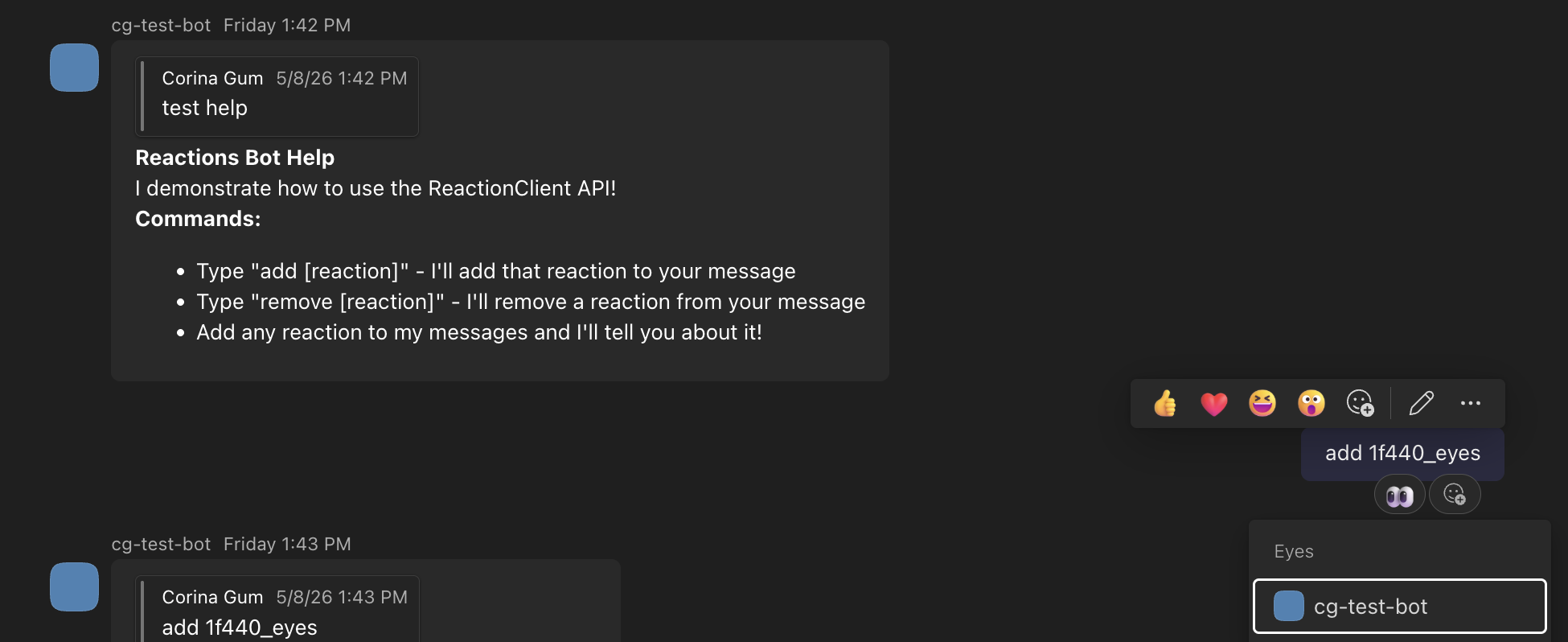
Message reactions allow your agent to add or remove emoji reactions on messages in a Teams conversation, and to react to reactions added by users. This gives your agent a quick, low-friction way to acknowledge messages or signal status without sending a full text reply.
Adding a Reaction
To add a reaction to a message, use the reactions client through the API client:
app.OnMessage(async (context, cancellationToken) =>
{
    await context.Send("Hello! I'll react to your message.", cancellationToken);

    // Add a reaction to the incoming message
    await context.Api.Conversations.Reactions.AddAsync(
        context.Activity.Conversation.Id,
        context.Activity.Id,
        ReactionType.Like,
        cancellationToken: cancellationToken
    );
});
@app.on_message
async def handle_message(ctx: ActivityContext[MessageActivity]):
    await ctx.send("Hello! I'll react to your message.")

    # Add a reaction to the incoming message
    await ctx.api.reactions.add(
        ctx.activity.conversation.id,
        ctx.activity.id,
        'like'
    )
app.on('message', async ({ activity, api, send }) => {
  await send("Hello! I'll react to your message.");

  // Add a reaction to the incoming message
  await api.reactions.add(activity.conversation.id, activity.id, 'like');
});
Removing a Reaction
You can also remove reactions that your agent has previously added:
app.OnMessage(async (context, cancellationToken) =>
{
    // First, add a reaction
    await context.Api.Conversations.Reactions.AddAsync(
        context.Activity.Conversation.Id,
        context.Activity.Id,
        ReactionType.Heart,
        cancellationToken: cancellationToken
    );

    // Wait a bit, then remove it
    await Task.Delay(2000, cancellationToken);
    await context.Api.Conversations.Reactions.DeleteAsync(
        context.Activity.Conversation.Id,
        context.Activity.Id,
        ReactionType.Heart,
        cancellationToken: cancellationToken
    );
});
import asyncio

@app.on_message
async def handle_message(ctx: ActivityContext[MessageActivity]):
    # First, add a reaction
    await ctx.api.reactions.add(
        ctx.activity.conversation.id,
        ctx.activity.id,
        'heart'
    )

    # Wait a bit, then remove it
    await asyncio.sleep(2)
    await ctx.api.reactions.delete(
        ctx.activity.conversation.id,
        ctx.activity.id,
        'heart'
    )
app.on('message', async ({ activity, api }) => {
  // First, add a reaction
  await api.reactions.add(activity.conversation.id, activity.id, 'heart');

  // Wait a bit, then remove it
  await new Promise((resolve) => setTimeout(resolve, 2000));
  await api.reactions.delete(activity.conversation.id, activity.id, 'heart');
});
Receiving Reactions
Your agent can also listen for reactions that users add or remove on messages in conversations it participates in. The activity carries ReactionsAdded and ReactionsRemoved collections.
Your agent can also listen for reactions that users add or remove on messages in conversations it participates in. The activity carries reactions_added and reactions_removed lists.
Your agent can also listen for reactions that users add or remove on messages in conversations it participates in. The activity carries reactionsAdded and reactionsRemoved arrays.
.NET exposes a single OnMessageReaction handler plus dedicated OnMessageReactionAdded / OnMessageReactionRemoved sub-handlers.
app.OnMessageReactionAdded(async (context, cancellationToken) =>
{
    foreach (var reaction in context.Activity.ReactionsAdded ?? [])
    {
        Console.WriteLine($"User added reaction: {reaction.Type}");
    }
});

app.OnMessageReactionRemoved(async (context, cancellationToken) =>
{
    foreach (var reaction in context.Activity.ReactionsRemoved ?? [])
    {
        Console.WriteLine($"User removed reaction: {reaction.Type}");
    }
});
If you only need a single handler that runs for both adds and removes, use app.OnMessageReaction instead.
@app.on_message_reaction
async def handle_reaction(ctx: ActivityContext[MessageReactionActivity]):
    for reaction in ctx.activity.reactions_added or []:
        print(f"User added reaction: {reaction.type}")

    for reaction in ctx.activity.reactions_removed or []:
        print(f"User removed reaction: {reaction.type}")
app.on('messageReaction', async ({ activity }) => {
  for (const reaction of activity.reactionsAdded ?? []) {
    console.log(`User added reaction: ${reaction.type}`);
  }

  for (const reaction of activity.reactionsRemoved ?? []) {
    console.log(`User removed reaction: ${reaction.type}`);
  }
});
Available Reaction Types
The SDK ships a small set of named reaction constants for the most common reactions, exposed via the ReactionType class.
The SDK ships a small set of named reaction constants for the most common reactions.
ReactionType.Like—ReactionType.Heart—ReactionType.Eyes—ReactionType.CheckMark—ReactionType.Launch—ReactionType.Pushpin—
'like'—'heart'—'1f440_eyes'—'2705_whiteheavycheckmark'—'launch'—'1f4cc_pushpin'—
Skin Tones
Reactions tagged Diverse in the Teams reactions reference support five skin-tone variants. Append -tone1 through -tone5 to the reaction ID to select a variant:
1f44b_wavinghand-tone4
Rate Limits
Agents are limited to two reactions per second. Calls that exceed this limit are throttled and return a 429 response. Implement exponential backoff and honor the Retry-After header.
Best Practices
- Use reactions sparingly. Reactions work best when they signal something specific (acknowledgement, completion, an error). Reacting to every message creates noise.
- Match the reaction to the context. Different reactions carry different meanings. Choose one that aligns with your agent's purpose.
- Replace, don't stack. If your agent has already added a reaction and needs to update it, remove the existing reaction first, then add the new one. Adding a reaction that's already present is a no-op.
- Handle errors. Reaction operations can fail if the message no longer exists or the agent isn't a member of the conversation. Handle exceptions appropriately.
Differences from Feedback
Message reactions are different from the feedback feature:
- Reactions are quick emoji responses your agent adds to or removes from messages programmatically, and reactions users add to messages your agent can listen for.
- Feedback are interactive UI components (like/dislike buttons) that users can click to provide structured feedback on agent responses.
Use reactions when your agent wants to acknowledge or respond to a message with emoji. Use feedback when you want to collect user opinions about your agent's responses.