Note
Access to this page requires authorization. You can try signing in or changing directories.
Access to this page requires authorization. You can try changing directories.
Everything on-screen in Minecraft is built from voxels, pixels in 3-D space rather than 2-D. Individual voxels make up blocks, and more complicated shapes like structures are made from blocks. A voxel shape defines those more complicated shapes by defining one or more axis-aligned bounding boxes around them.
Okay, so what's an axis-aligned bounding box (AABB)? It's a box whose edges align to a grid—specifically, the 3-D grid the Minecraft world is built on. Because the boxes are aligned to these axes, it makes it very easy for the rendering engine to determine when blocks connect, overlap, or collide with one another.
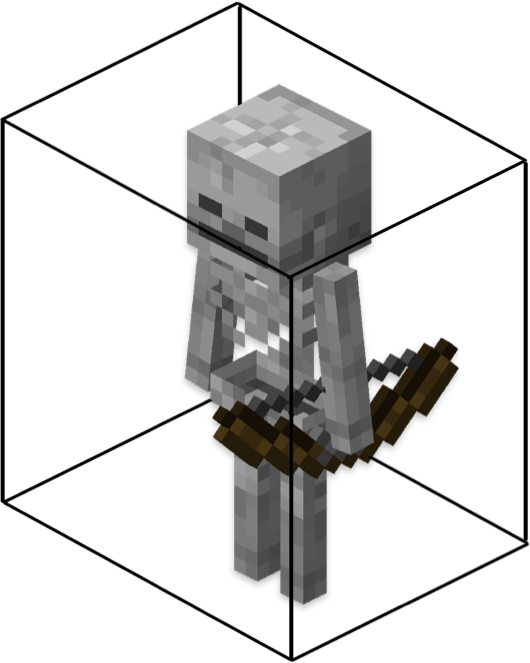
If the skeleton rotates, the AABB doesn't rotate with it: the box stays aligned to the X, Y, and Z axes of the world.
Voxel shapes combine one or more AABBs to define the boundaries of more complex forms. A voxel shape overlaps with, and may completely contain, blocks, but they don't necessarily conform completely to the blocks they're associated with. For example:
- A full block, like a stone, is a single 16×16×16 box.
- A slab is a single 16×8×16 box, covering half of a block.
- Stairs use two boxes, one for the bottom half and one for the back step.
In Minecraft: Bedrock Edition, voxel shapes are used for face culling, determining which faces of adjacent blocks need to be rendered. When blocks are next to one another, the renderer uses voxel shapes to compute which faces (or parts of faces) are hidden by their neighbors. Hidden faces don't have to be rendered, improving performance.
Important
Currently, voxel shapes only participate in culling when a block defines culling rules.
Creating a voxel shape
Definition files
Voxel shape definitions are JSON files, stored in the shapes/ folder of a behavior pack. Here's an example:
{
  "format_version": "1.21.110",
  "minecraft:voxel_shape": {
    "description": {
      "identifier": "mypack:slab_bottom"
    },
    "shape": {
      "boxes": [
        { "min": [0,0,0], "max": [16,8,16] }
      ]
    }
  }
}
As with most Minecraft JSON files, we start with the format_version, then a key which defines the file type: minecraft:voxel_shape.
format_versionmust be1.21.110or later.identifieris a string in thenamespace:nameformat. The namespace cannot beminecraft.boxesis an array of up to 32 axis-aligned bounding box definitions.minandmaxare coordinates in 3-D space that define opposite corners of the bounding box;minmust be smaller thanmax.
Rules and limitations
Voxel shapes have constraints similar to custom block geometries:
- Units are in pixels (1/16th of a block)
- A standard block spans
0to16on each axis - Boxes can extend from
-30to30pixels - Boxes must have positive volume, and overlap the base 16×16×16 block region by at least 1 pixel
Voxel shape coordinates vs. geometry coordinates
Keep in mind some differences between how voxel shapes and geometry shapes are defined in Bedrock Edition:
| Aspect | Voxel Shape | Geometry |
|---|---|---|
| Origin (0,0,0) | Block corner | Block center |
| Range | 0 to 16 | -8 to 8 |
| Y direction | Bottom → Top | Center → Up |
Here's the voxel shape and the geometry for the previous example's bottom slab:
- Voxel:
{ min: [0,0,0], max: [16,8,16] } - Geometry:
{ origin: [-8,0,-8], size: [16,8,16] }
Examples
Stairs
{
  "format_version": "1.21.110",
  "minecraft:voxel_shape": {
    "description": { "identifier": "mypack:stairs" },
    "shape": {
      "boxes": [
        { "min": [0,0,0], "max": [16,8,16] },
        { "min": [0,8,8], "max": [16,16,16] }
      ]
    }
  }
}
Fence post
{
  "format_version": "1.21.110",
  "minecraft:voxel_shape": {
    "description": { "identifier": "mypack:fence_post" },
    "shape": {
      "boxes": [ { "min": [6,0,6], "max": [10,16,10] } ]
    }
  }
}
Using voxel shapes
Built-in shapes
Minecraft provides two built-in voxel shapes for reference:
minecraft:empty: an empty, non-occluding shape, used as the defaultminecraft:unit_cube: a single 16×16×16 block
Referencing shapes in block JSON
The minecraft:geometry component contains a culling_shape property, which applies a voxel shape to the block.
"minecraft:geometry": {
  "identifier": "geometry.custom_slab",
  "culling": "mypack:culling.custom",
  "culling_shape": "mypack:slab_bottom"
}
If culling_shape is omitted, the default minecraft:empty will be used.
Important
If you specify a full block with minecraft:geometry.full_block, then minecraft:unit_cube will automatically be selected as the culling_shape, and custom shapes will be ignored.
Like blocks, voxel shapes can be rotated, scaled, and translated by the transformation component.
Custom voxel shapes are optimized, then de-duplicated if they match an existing Vanilla or custom shape.
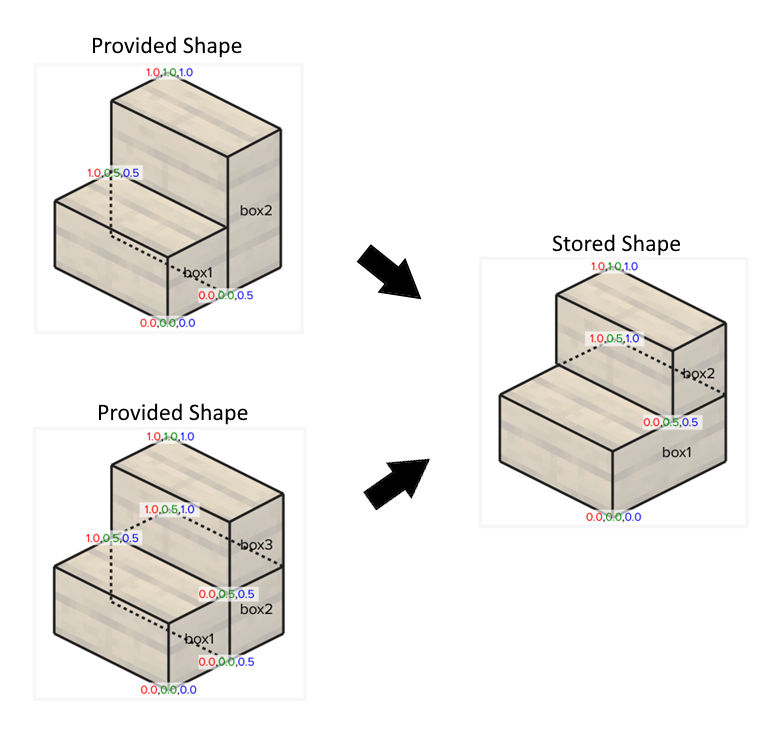
The shape registry can store up to 4,500 unique custom shapes.
Warning
If the 4,500 unique shape limit is reached, successive shapes will not be loaded, and their culling_shape property will be set to minecraft:empty.
Culling rules
For the renderer to optimize blocks within voxel shapes by calculating occlusion between shared faces, both of the blocks have to enable culling for the shared faces and be assigned voxel shapes. The basic culling logic works like this:
- A "face slice" is computed from the voxel shape at the face boundary.
- The neighboring block's opposite face slice is computed.
- If the neighbor fully covers this face slice, the face is culled.
The six faces of a block have face slice boundaries based on one of their three axes:
| Face | Axis | Boundary |
|---|---|---|
| North | Z | 0 |
| South | Z | 16 |
| West | X | 0 |
| East | X | 16 |
| Down | Y | 0 |
| Up | Y | 16 |
Note
If voxel shape comparison indicates a face should remain visible, the renderer will still check the culling rules condition. A shared layer may still cull the face.
A block can skip out of voxel shape comparisons in one of two ways:
- set
culling_shapetominecraft:empty(which is the default) - provide a
conditionother than the default
This is useful with block types such as foliage and glass, where adjacent blocks of the same type should cull one another, but blocks of different types should not. In this example, the condition and culling_shape are left at their defaults, so the foliage blocks will not be culled by the voxel shape comparison algorithm, and the culling_layer of culling_layer:leaves will be used.
"minecraft:block": {
  "description": { "identifier": "mypack:foliage" },
  "components": {
    "minecraft:geometry": {
      "identifier": "geometry.foliage",
      "culling_layer": "minecraft:culling_layer.leaves"
    }
  }
}
Best practices
- Match voxel shapes to block geometry where possible.
- Use simpler shapes and fewer boxes.
- When possible, use the buit-in
minecraft:unit_cubeandminecraft:emptyshapes. - Test your shapes in rotated orientations.
- Reuse voxel shapes when blocks have the same shape.
Troubleshooting
Shape not culling
- Ensure the shape file is in
behavior_pack/shapes/ - Check identifier spelling
- Ensure both blocks define shapes or compatible layers
- Confirm culling rules exist and are correct
Incorrect culling
- Shape mismatch with geometry
- Transformation issues
- Face slice not fully covered
- Culling condition is incorrect or not met