Note
Access to this page requires authorization. You can try signing in or changing directories.
Access to this page requires authorization. You can try changing directories.
Appropriate roles: Indirect provider
CSP indirect providers can create a CSP Reseller Sandbox account by way of their own Tier 2 Sandbox account in Partner Center.
Prerequisites
- Partner Center indirect provider (Tier 2) or Direct Billing (Tier 1) production tenant and global admin credentials. The sandbox scenario supports authentication with both the standalone App and App + User credentials.
- Microsoft Entra tenant. For information on how to set up a Microsoft Entra tenant, see the Quickstart: Set up a tenant.
- Role prerequisite for create tenant: you must have the Tenant Creator role on the tenant.
- The Microsoft Entra tenant must have a configured Billing Account and Azure subscription.
- If you don't have a Billing account, you can sign up for one. A Partner isn't charged for creating a Billing account.
- For more information, see Billing accounts and scopes in Azure portal and Create Azure subscriptions programmatically.
- The sandbox scenario supports authentication with both the standalone App and App + User credentials.
Note
CSP Integration and Reseller Sandboxes aren't available for Control Panel Vendor (CPV) partners.
Create a CSP integration sandbox account
- Sign in to Partner Center by way of your Tier 2 Sandbox account or Direct Billing (Tier 1) Production account.
- Select the Settings (gear) icon in upper right corner, then choose Account settings.
- On Account settings, under the Integration sandbox menu, select Integration Sandbox.
- Follow the enrollment steps:
- Provide the required information on the Integration Sandbox page. A Microsoft Customer Agreement (MCA) Billing account is now mandatory during the creation process.
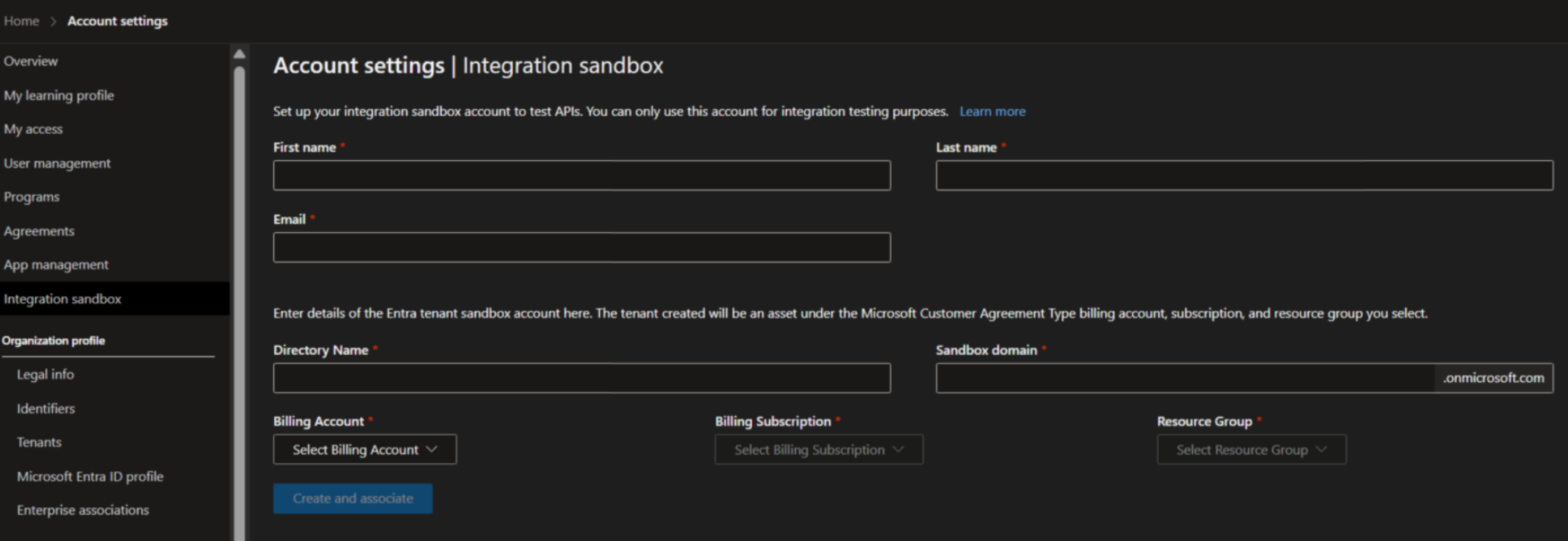
- Then, in the left navigation pane, select Create and associate button to create the Reseller Sandbox Account. This account doesn't undergo vetting. It activates as soon as you finish the account enrollment. Make a note of the sandbox domain for your reference.
- In Partner Center, sign out and then sign in again using the Global Administrator credentials for the new tenant.
- Provide the required information on the Integration Sandbox page. A Microsoft Customer Agreement (MCA) Billing account is now mandatory during the creation process.
Account set up after Sandbox creation
- After creating the Sandbox tenant, navigate to Azure portal Settings, and the tenant should now appear in the Azure portal Directories List. The Global Administrator who created the tenant is added as a guest account in the Sandbox tenant. Create a new Global Administrator account. This new Global Administrator account is used to set up the Sandbox Account.
- Sign-in with the new Global Administrator account, you are promoted to set up MFA.
- Once MFA is set up, navigate to Partner Center > Accounts Settings and selecting Integration Sandbox. select Set up account and allow time for this process to complete. Select Set up account again if there are any process issues.
- Refresh the page. You'll be prompted to sign back into Partner Center with the Sandbox credentials. Once sign in is done, the setup process is complete.
Here are some examples of what you can manage by using the Reseller Sandbox:
- Profiles
- Users and roles
- Indirect Providers
- CSP Sandbox customers
- Relationships
Sandbox indirect provider: delete a Reseller Sandbox account using the Partner Center user interface
This option is a Sandbox only feature that helps Sandbox indirect providers delete an existing Reseller Sandbox account by way of Partner Center.
Prerequisites to delete a Reseller Sandbox account
An existing CSP Reseller Sandbox account associated with your own CSP Indirect Provider Tier-2 Sandbox account.
Delete a CSP Reseller Sandbox account
- Sign into Partner Center using your Tier 2 Sandbox account.
- Navigate to Resellers from the left menu.
- Select the Delete Reseller Sandbox link next to the Reseller Sandbox account you want to delete. The Reseller Sandbox account is permanently deleted and can't be recovered.