Note
Access to this page requires authorization. You can try signing in or changing directories.
Access to this page requires authorization. You can try changing directories.
The SAP OData connector helps you connect your SAP systems to Microsoft Power Platform. The SAP OData connector works with the latest version of the OData specification, V4, and is backwards compatible with V3 and V2. This connector can link up with SAP systems like ECC, S/4HANA, SuccessFactors, Concur, and other OData APIs on top of SAP systems. By using this connector, you can bring the powerful features of SAP into Power Platform—all while keeping your SAP core clean.
What's OData?
OData stands for Open Data Protocol. It's a standard way to create and use data APIs, which are like doors for different software to communicate. OData makes it easy to perform basic tasks like creating, reading, updating, and deleting data. The SAP OData connector uses these rules to connect to and communicate with SAP systems.
SAP OData connection options
The SAP OData connector for Power Platform offers the following user connection options:
- Basic authentication: Use your account credentials to connect.
- Anonymous token: No authentication is needed. This option is a good choice for public data.
- Microsoft Entra ID using Azure API Management: Single sign-on managed by Azure API management enables easy and secure access to your SAP systems.
- Microsoft Entra ID using SuccessFactors (preview): Single sign-on managed by SAP SuccessFactors.
Proxy through a corporate firewall
If the SAP system you're integrating with isn't accessible from the internet because it's behind a company firewall, you need to proxy or route through the corporate firewall. By setting up an on-premises data gateway, you can access the system. To get started:
- download
- Install the on-premises data gateway on your Windows VM. Be sure to install and configure it in the same region as your Power Automate environment.
- Select Gateways to see the gateway installed in your Power Automate environment.
Set up and test the OData connector
- Go to Power Automate.
- Create a new flow with a trigger of your choice, such as the SAP OData query action.
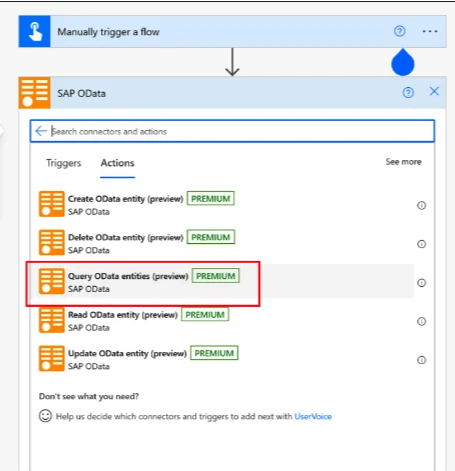
- Set up a connection to your SAP system. To connect to a system that is only available from within the company firewall (where the on-premises data gateway is installed), select Data Gateway and then select your gateway from the list.
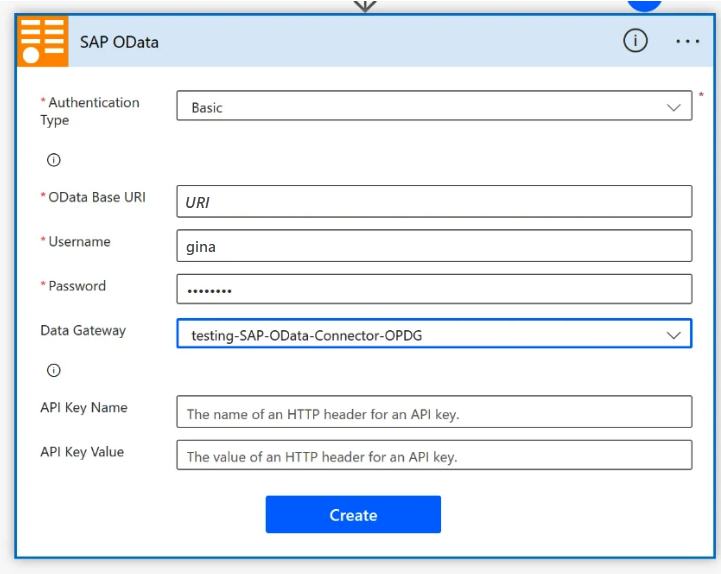
- Provide the required information by using the OData Base URI L from your local SAP system. It looks similar to this URI:
https://mylocal.sap.system:50000/sap/opu/odata/iwbep/GWSAMPLE_BASIC - Test the URL internally to verify that it's not accessible from outside the intranet. Once you know it's working properly, you can start creating flows and testing how they work with your SAP system.
Note
Using the OData connector with SAP ECC or earlier versions requires configuration of OData endpoints that aren't included in the ECC out-of-box setup.
To learn more about working with the OData connector and Power Platform, see Hurray! SAP OData connector now supports OAuth2 and SAP Principal Propagation.