Note
Access to this page requires authorization. You can try signing in or changing directories.
Access to this page requires authorization. You can try changing directories.
Azure DevOps Services | Azure DevOps Server | Azure DevOps Server 2022 | Azure DevOps Server 2020
Once you complete your sprint plan, sharing it with your team and organization is simple. Stakeholders with project access can view the sprint plan by accessing the URL of your sprint backlog page. Additionally, you can distribute the plan via email or by printing a copy to ensure everyone stays informed and aligned.
Open a sprint backlog for a team
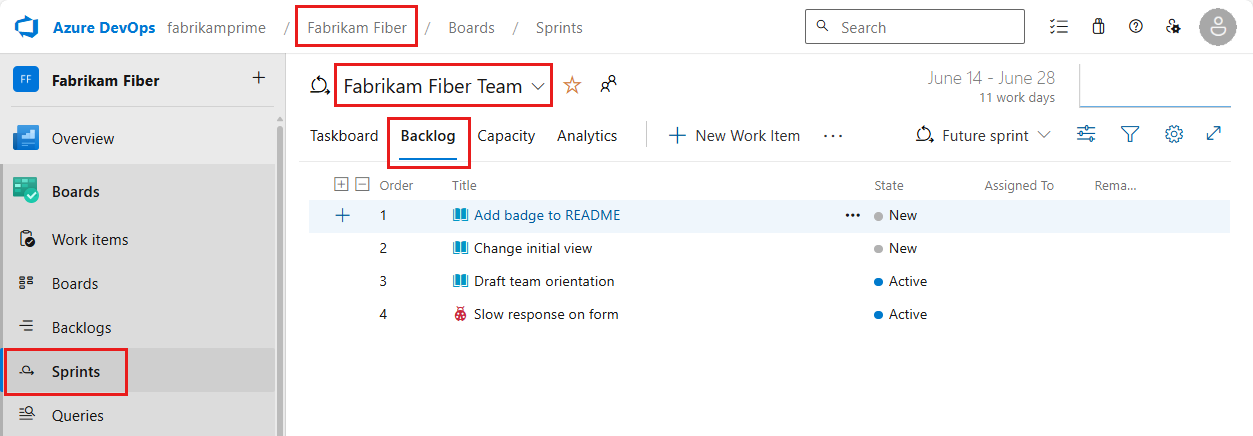
From your web browser, open your product backlog. (1) Check that you've selected the right project, (2) choose Boards>Sprints, (3) select the correct team from the team selector menu, and lastly (4), choose Backlog.
To choose another team, open the selector and select a different team or choose the
 Browse all sprints option. Or, you can enter a keyword in the search box to filter the list of team backlogs for the project.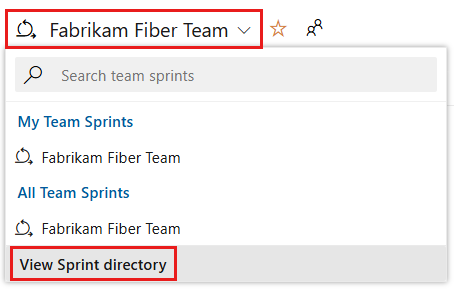
To choose a different sprint than the one shown, open the sprint selector and choose the sprint you want.
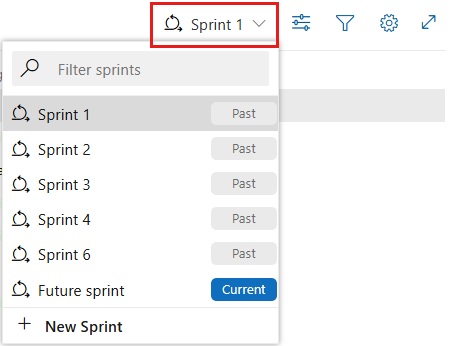
The system lists only those sprints that have been selected for the current team focus. If you don't see the sprints you want listed, then choose New Sprint from the menu, and then choose Select existing iteration. For more information, see Define iteration (sprint) paths.
Create query for your sprint plan
Or, you can select all the items in the list, choose Copy as HTML, and paste the formatted list into an email form or Word document. See Copy a list of work items.