Note
Access to this page requires authorization. You can try signing in or changing directories.
Access to this page requires authorization. You can try changing directories.
This article helps resolve an issue in which Windows client machines don't send dynamic Domain Name System (DNS) updates when the Dynamic Host Configuration Protocol (DHCP) server stops sending Option 81 (also known as the client fully qualified domain name (FQDN) option) in the DHCPREQUEST (REQ) and DHCPACK (ACK) packets of a DHCP response.
You have a DHCP server that is leasing IP addresses to client machines, and you have enabled the Option 81 configuration from the DHCP server side. Option 81 is configured to perform dynamic DNS (DDNS) updates for incoming DHCP client requests. With this configuration, the DHCP server performs DDNS updates for the clients and always sends Option 81 back to the clients.
Note
The configuration settings on the DHCP server are:
- Always dynamically update DNS records
- Discard A and PTR records when lease is deleted
- Dynamically update DNS records for DHCP clients that do not request updates (for example, clients running Windows NT 4.0)
A client machine continuously runs and keeps performing the REQ-ACK process (without completing the DORA process) for the IP address lease extension according to the DHCP lease time. The DHCP renewal ideally occurs at 50% and 87.5% of the lease duration.
Note
DORA stands for Discover, Offer, Request, and Acknowledge.
When the DHCP server stops sending Option 81, the client machine assumes the DHCP server is still handling DDNS updates and doesn't trigger updates itself as expected. Even if you restart the client machine (considering the lease hasn't expired), the client machine doesn't perform DDNS updates on REQ-ACK packets.
Therefore, the DNS record won't be populated because neither the DHCP server nor the client machine updates the record. If DNS scavenging is enabled, the record for the impacted machine might be deleted.
The client machine doesn't receive Option 81 and relies on cache
The client machine updates and caches the DHCP Option 81 configuration received from the DHCP server within the ACK frame. This update happens every time an ACK is returned from the DHCP server with Option 81 attached. This cache is stored in the following registry value:
Computer\HKEY_LOCAL_MACHINE\SYSTEM\CurrentControlSet\Services\Tcpip\Parameters\Interfaces\{Interface GUID}\DCHPInterfaceOptions
Important
Don't make any change to this registry, as the registry contains information that shouldn't be changed manually.
The client machine doesn't receive Option 81, so it has nothing to update and relies entirely on the cache.
The client machine needs to perform a complete DORA process
To fix this issue, the client machine needs to perform a complete DORA process to update the cache. The DORA process can be initiated by one of the following methods:
- Make the client machine's IP address expire. For example, turn off the operating system for the lease duration.
- Run the
ipconfig /releaseandipconfig /renewcommands on the machine. - Run a script to set a device to manually register the DNS using the
ipconfig /registerdnscommand.
Diagnostics and log collection
To identify that you're experiencing the issue, follow these steps:
On the problematic client machine, enable the following event logs in the Event Viewer:
Applications and Services Logs > Microsoft > Windows > Dhcp-Client > Microsoft-Windows-DHCP Client Events/Operational
Once enabled, open an elevated command prompt window and run the following command:
ipconfig /renewThen, some events will be generated under Dhcp-Client > Microsoft-Windows-DHCP Client Events/Operational.
Search for Event ID 50042, whose task category is DNS State Event. This event gives the DNS Flag value.
If the DNS Flag value is set to 64, it indicates that the client machine doesn't send a dynamic update itself but relies on the DHCP server.
The value 64 can be caused by the registry cache when the DHCP server doesn't send back Option 81.
In some cases, the value 64 might also indicate that the DHCP server responds with Option 81, which overrides the client options:
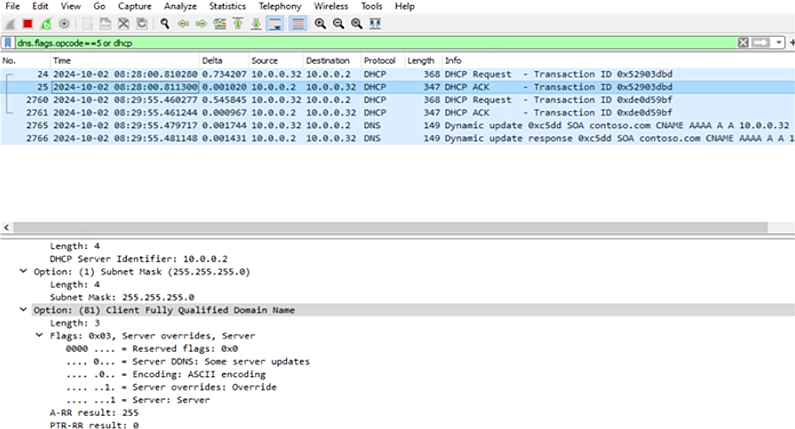
This article fixes an issue in which the value 64 is caused by the cache rather than the DHCP server response.
Collect trace logs
To diagnose the issue, collect a network trace using netsh:
Open an elevated Windows command prompt.
Start a network trace by running the following command:
Netsh trace start overwrite=yes persistent=yes traceFile=C:\DDNSTrace.etl capture=yes report=disabled maxSize=16000 provider={1C95126E-7EEA-49A9-A3FE-A378B03DDB4D} keywords=0xffffffffffffffff level=0xff provider= {1540FF4C-3FD7-4BBA-9938-1D1BF31573A7} keywords=0xffffffffffffffff level=0xff provider= {9CA335ED-C0A6-4B4D-B084-9C9B5143AFF0} keywords=0xffffffffffffffff level=0xff provider= {609151DD-04F5-4DA7-974C-FC6947EAA323} keywords=0xffffffffffffffff level=0xff provider= {76325CAB-83BD-449E-AD45-A6D35F26BFAE} keywords=0xffffffffffffffff level=0xff provider={A7B8B859-D00E-45CC-85B8-89EA5D015C62} keywords=0xffffffffffffffff level=0xff provider={CFAA5446-C6C4-4F5C-866F-31C9B55B962D} keywords=0xffffffffffffffff level=0xff provider={CA030134-54CD-4130-9177-DAE76A3C5791} keywords=0xffffffffffffffff level=0xff provider="Microsoft-Windows-DNS-Client" keywords=0xffffffffffffffff level=0xff provider="Microsoft-Windows-Dhcp-Client" keywords=0xffffffffffffffff level=0xff provider={CC3DF8E3-4111-48d0-9B21-7631021F7CA6} keywords=0xffffffffffffffff level=0xffRun the following command:
ipconfig /renewStop the network trace by running the following command:
netsh trace stop