Note
Access to this page requires authorization. You can try signing in or changing directories.
Access to this page requires authorization. You can try changing directories.
By default, IoT Hub hostnames map to a public endpoint with a publicly routable IP address over the internet. Different customers share this IoT Hub public endpoint, and IoT devices in wide-area networks and on-premises networks can all access it.
Note
IoT Hub introduces additional endpoints to support TLS 1.3 (Preview). These endpoints are additive and don't replace the existing endpoint used by Private Link (<hub>.azure-devices.net). Existing Private Endpoint configurations continue to function without any changes.
For more information about these endpoints, see TLS 1.3-enabled endpoints.
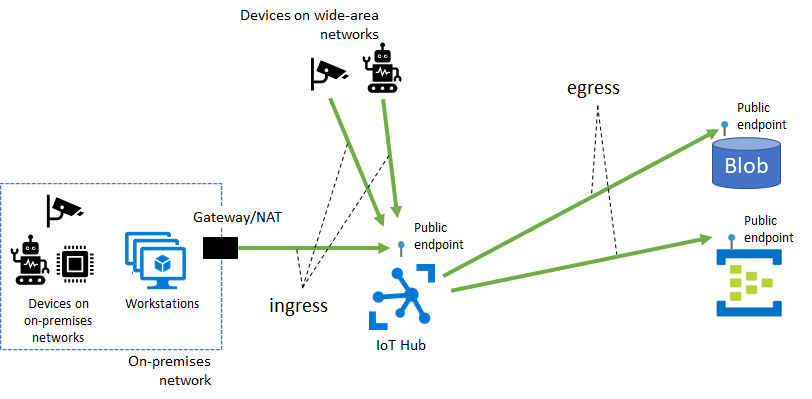
Some IoT Hub features, including message routing, file upload, and bulk device import/export, also require connectivity from IoT Hub to a customer-owned Azure resource over its public endpoint. These connectivity paths make up the egress traffic from IoT Hub to customer resources.
You might want to restrict connectivity to your Azure resources (including IoT Hub) through a virtual network that you own and operate for several reasons, including:
Introducing network isolation for your IoT hub by preventing connectivity exposure to the public internet.
Enabling a private connectivity experience from your on-premises network assets, which ensures that your data and traffic is transmitted directly to Azure backbone network.
Preventing exfiltration attacks from sensitive on-premises networks.
Following established Azure-wide connectivity patterns using private endpoints.
This article describes how to achieve these goals by using Azure Private Link for ingress connectivity to IoT Hub and by using trusted Microsoft services exception for egress connectivity from IoT Hub to other Azure resources.
Ingress connectivity to IoT Hub using Azure Private Link
A private endpoint is a private IP address allocated inside a customer-owned virtual network through which an Azure resource is reachable. By using Azure Private Link, you can set up a private endpoint for your IoT hub so that services inside your virtual network can reach IoT Hub without sending traffic to IoT Hub's public endpoint. Similarly, your on-premises devices can use Azure VPN Gateway or Azure ExpressRoute peering to gain connectivity to your virtual network and your IoT hub (via its private endpoint). As a result, you can restrict or completely block connectivity to your IoT hub's public endpoints by using IoT Hub IP filter or the public network access toggle. This approach keeps connectivity to your hub using the private endpoint for devices. The main focus of this setup is for devices inside an on-premises network. This setup isn't advised for devices deployed in a wide-area network.
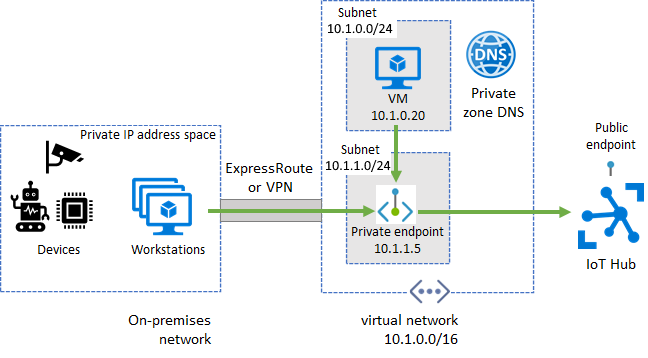
Before proceeding, ensure that the following prerequisites are met:
You created an Azure virtual network with a subnet in which to create the private endpoint.
For devices that operate in on-premises networks, set up Azure VPN Gateway or Azure ExpressRoute private peering into your Azure virtual network.
Set up a private endpoint for IoT Hub ingress
Private endpoints work for IoT Hub device APIs (like device-to-cloud messages) and service APIs (like creating and updating devices).
In the Azure portal, go to your IoT hub.
In the left-side pane, under Security settings, select Networking > Private access, and then select Create a private endpoint.
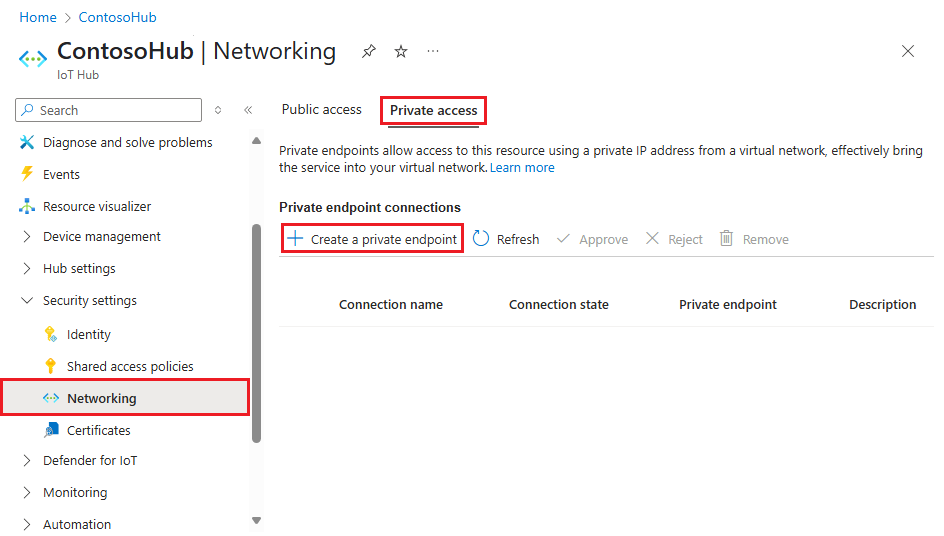
Enter the subscription, resource group, name, network interface name, and region to create the new private endpoint. Create the private endpoint in the same region as your hub.
Select Next: Resource, and enter the subscription for your IoT Hub resource. Then, select Microsoft.Devices/IotHubs for the resource type, your IoT hub name as the resource, and iotHub as the target subresource.
Select Next: Virtual Network, and enter your virtual network and subnet to create the private endpoint in.
Select Next: DNS, and select the option to integrate with private DNS zone, if desired.
Select Next: Tags, and optionally enter any tags for your resource.
Select Next: Review + create to review the details for your private link resource, and then select Create to create the resource.
Built-in Event Hubs compatible endpoint
You can also access the built-in Event Hubs compatible endpoint over a private endpoint. When you configure private link, you see another private endpoint connection and configuration for the built-in endpoint. It's the one with servicebus.windows.net in the FQDN.
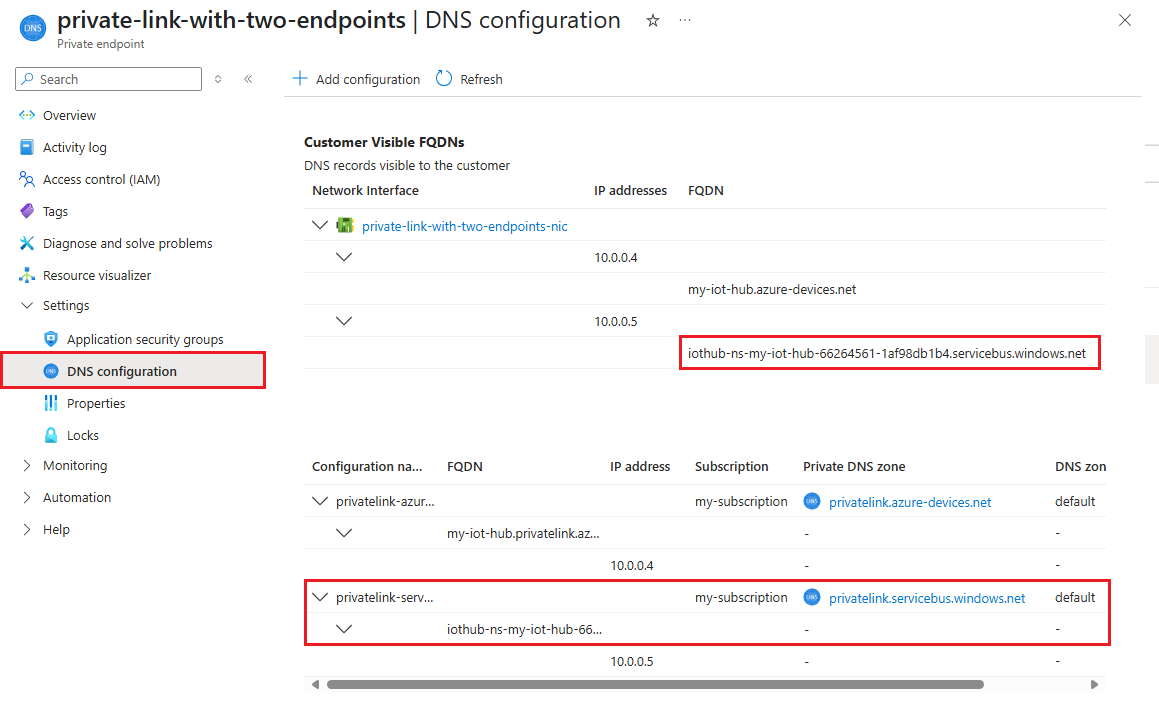
You can optionally use IoT Hub's IP filter to control public access to the built-in endpoint.
To completely block public network access to your IoT hub, turn off public network access or use IP filter to block all IP and select the option to apply rules to the built-in endpoint.
Pricing for Private Link
For pricing details, see Azure Private Link pricing.
Egress connectivity from IoT Hub to other Azure resources
IoT Hub can connect to your Azure blob storage, event hubs, and Service Bus resources for message routing, file upload, and bulk device import/export over the resources' public endpoint. Binding your resource to a virtual network blocks connectivity to the resource by default. As a result, this configuration prevents IoT hubs from sending data to your resources. To fix this issue, enable connectivity from your IoT Hub resource to your storage account, event hub, or Service Bus resources via the trusted Microsoft service option.
To allow other services to find your IoT hub as a trusted Microsoft service, your hub must use a managed identity. Once a managed identity is provisioned, grant permission to your hub's managed identity to access your custom endpoint. Follow the procedures provided in IoT Hub support for managed identities to provision a managed identity with Azure role-based access control (RBAC) permission, and add the custom endpoint to your IoT hub. To allow your IoT hubs access to the custom endpoint, make sure you turn on the trusted Microsoft first party exception if you have the firewall configurations in place.
Pricing for trusted Microsoft service option
Trusted Microsoft first party services exception feature is free of charge. Charges for the provisioned storage accounts, event hubs, or service bus resources apply separately.
Next steps
To learn more about IoT Hub features, see the following resources: